How to recover deleted data from SQL Server

Standard

In all my years of working SQL server, one of the most commonly asked questions has always been “How can we recover deleted record?”

Now, it is very easy to recover deleted data from your SQL server 2005 or above.

How to generate Insert statements from table data using SQL Server »

How to recover deleted data from SQL Server

October 22, 2011 by Muhammad Imran

In all my years of working SQL server, one of the most commonly asked questions has always been “How can we recover deleted record?”

Now, it is very easy to recover deleted data from your SQL server 2005 or above.(Note: This script can recover following data types & compatible with CS collation).

  • image
  • text
  • uniqueidentifier
  • tinyint
  • smallint
  • int
  • smalldatetime
  • real
  • money
  • datetime
  • float
  • sql_variant
  • ntext
  • bit
  • decimal
  • numeric
  • smallmoney
  • bigint
  • varbinary
  • varchar
  • binary
  • char
  • timestamp
  • nvarchar
  • nchar
  • xml
  • sysname

Let me explain this issue demonstrating simple example.

–Create Table

Create Table [Test_Table]

(

[Col_image] image,

[Col_text] text,

[Col_uniqueidentifier] uniqueidentifier,

[Col_tinyint] tinyint,

[Col_smallint] smallint,

[Col_int] int,

[Col_smalldatetime] smalldatetime,

[Col_real] real,

[Col_money] money,

[Col_datetime] datetime,

[Col_float] float,

[Col_Int_sql_variant] sql_variant,

[Col_numeric_sql_variant] sql_variant,

[Col_varchar_sql_variant] sql_variant,

[Col_uniqueidentifier_sql_variant] sql_variant,

[Col_Date_sql_variant] sql_variant,

[Col_varbinary_sql_variant] sql_variant,

[Col_ntext] ntext,

[Col_bit] bit,

[Col_decimal] decimal(18,4),

[Col_numeric] numeric(18,4),

[Col_smallmoney] smallmoney,

[Col_bigint] bigint,

[Col_varbinary] varbinary(Max),

[Col_varchar] varchar(Max),

[Col_binary] binary(8),

[Col_char] char,

[Col_timestamp] timestamp,

[Col_nvarchar] nvarchar(Max),

[Col_nchar] nchar,

[Col_xml] xml,

[Col_sysname] sysname

)


GO

–Insert data into it

INSERT INTO [Test_Table]

([Col_image]

,[Col_text]

,[Col_uniqueidentifier]

,[Col_tinyint]

,[Col_smallint]

,[Col_int]

,[Col_smalldatetime]

,[Col_real]

,[Col_money]

,[Col_datetime]

,[Col_float]

,[Col_Int_sql_variant]

,[Col_numeric_sql_variant]

,[Col_varchar_sql_variant]

,[Col_uniqueidentifier_sql_variant]

,[Col_Date_sql_variant]

,[Col_varbinary_sql_variant]

,[Col_ntext]

,[Col_bit]

,[Col_decimal]

,[Col_numeric]

,[Col_smallmoney]

,[Col_bigint]

,[Col_varbinary]

,[Col_varchar]

,[Col_binary]

,[Col_char]

,[Col_nvarchar]

,[Col_nchar]

,[Col_xml]

,[Col_sysname])

VALUES

(CONVERT(IMAGE,REPLICATE(‘A’,4000))

,REPLICATE(‘B’,8000)

,NEWID()

,10

,20

,3000

,GETDATE()

,4000

,5000

,getdate()+15

,66666.6666

,777777

,88888.8888

,REPLICATE(‘C’,8000)

,newid()

,getdate()+30

,CONVERT(VARBINARY(8000),REPLICATE(‘D’,8000))

,REPLICATE(‘E’,4000)

,1

,99999.9999

,10101.1111

,1100

,123456

,CONVERT(VARBINARY(MAX),REPLICATE(‘F’,8000))

,REPLICATE(‘G’,8000)

,0x4646464

,’H’

,REPLICATE(‘I’,4000)

,’J’

,CONVERT(XML,REPLICATE(‘K’,4000))

,REPLICATE(‘L’,100)

)


GO

–Delete the data

Delete from Test_Table

Go

–Verify the data

Select * from Test_Table

Go

–Recover the deleted data without date range

EXEC Recover_Deleted_Data_Proc ‘test’,’dbo.Test_Table’

GO

–Recover the deleted data it with date range

EXEC Recover_Deleted_Data_Proc ‘test’,’dbo.Test_Table’,’2012-06-01′,’2012-06-30′

Download Stored Procedure :

Now, you need to create the procedure to recover your deleted data

Explanation:

How does it work? Let’s go through it step by step. The process requires seven easy steps:

Step-1:

We need to get the deleted records from sql server. By using the standard SQL Server function fn_blog, we can easily get all transaction log (Including deleted data. But, we need only the selected deleted records from the transaction log. So we included three filters (Context, Operation & AllocUnitName).

  • Context (‘LCX_MARK_AS_GHOST’and ‘LCX_HEAP’)
  • Operation (‘LOP_DELETE_ROWS’)
  • AllocUnitName(‘dbo.Student’) –- Schema + table Name

Here is the code snippet:

Select [RowLog Contents 0] FROM sys.fn_dblog(NULL,NULL)WHEREAllocUnitName =‘dbo.Student’ AND Context IN (‘LCX_MARK_AS_GHOST’,‘LCX_HEAP’) AND Operation in (‘LOP_DELETE_ROWS’)

This query will return number of columns providing different information, but we only need to select the column “RowLog content o, to get the deleted data.

The Column “RowLog content 0″ will look like this:

“0x300018000100000000000000006B0000564920205900000

00500E001002800426F62206A65727279″

Step-2: 

Now,we have deleted data but in Hex values but SQL keeps this data in a specific sequence so we can easily recover it.But before recovering the data we need to understand the format. This format is defined in detail in Kalen Delaney’s SQL Internal’s book.

  • 1 Byte : Status Bit A
  • 1 Byte : Status Bit B
  • 2 Bytes : Fixed length size
  • n Bytes : Fixed length data
  • 2 Bytes : Total Number of Columns
  • n Bytes : NULL Bitmap (1 bit for each column as 1 indicates that the column is null and 0 indicate that the column is not null)
  • 2 Bytes : Number of variable-length columns
  • n Bytes : Column offset array (2x variable length column)
  • n Bytes : Data for variable length columns

So, the Hex data“RowLog content 0″ is equal to:

“Status Bit A + Status Bit B + Fixed length size + Fixed length data + Total Number of Columns + NULL Bitmap + Number of variable-length columns + NULL Bitmap+ Number of variable-length columns + Column offset array + Data for variable length columns.”

Step-3: 

Now, we need to break the RowLog Content o (Hex value of our deleted data) into the above defined structure.[Color codes are used for reference only]

  • [Fixed Length Data] = Substring (RowLog content 0, Status Bit A+ Status Bit B + 1,2 bytes)
  • [Total No of Columns]= Substring (RowLog content 0, [Fixed Length Data] + 1,2 bytes)
  • [Null Bitmap length] = Ceiling ([Total No of Columns]/8.0)
  • [Null Bytes]= Substring (RowLog content 0, Status Bit A+ Status Bit B +[Fixed Length Data] +1, [Null Bitmap length] )
  • Total no of variable columns = Substring (RowLog content 0, Status Bit A+ Status Bit B + [Fixed Length Data] +1, [Null Bitmap length] + 2 )
  • Column Offset Array= Substring (RowLog content 0, Status Bit A+ Status Bit B + [Fixed Length Data] +1, [Null Bitmap length] + 2 , Total no of variable columns*2 )
  • Variable Column Start = Status Bit A+ Status Bit B + [Fixed Length Data] + [Null Bitmap length] + 2+( Total no of variable columns*2)

Step-4: 

Now, we have the split of data as well,so we can find that which one column value is null or not by using Null Bytes. To achieve this convert Null Bytes (Hex value) into Binary format (As discussed, 1 indicates null for the column and 0 means there is some data).Here in this data, the Null Bitmap values are 00000111.We have only five column in student table (used as sample) and first five value of null bitmap is 00000.It means there is no null values.

Step-5:

Now, we have the primary data split (Step-3) and null values (Step-4) as well. After that we need to use this code snippet to get the column data like column name, column size, precision, scale and most importantly the leaf null bit (to ensure that the column is fixed data (<=-1) or variable data sizes (>=1)) of the table.

Select * from sys.allocation_units allocunits INNER JOINsys.partitions partitions ON (allocunits.type IN (1, 3) ANDpartitions.hobt_id = allocunits.container_id) OR (allocunits.type= 2 AND partitions.partition_id = allocunits.container_id) INNERJOIN sys.system_internals_partition_columns cols ONcols.partition_id = partitions.partition_id LEFT OUTER JOINsyscolumns ON syscolumns.id = partitions.object_id ANDsyscolumns.colid = cols.partition_column_id

And join it with our collected data table (Step-1,2,3,4) on the basis of allocunits.[Allocation_Unit_Id].Till now we know the information about the table and data,so we need to utilize this data to break [RowLog Contents 0] into table column data but in hex value. Here we need to take care as the data is either in fixed column size or in variable column size. .

Step-6: 

We collected data in hex value (Step-5) with respect to each column. Now we need to convert the data with respect to its data type defined as [System_type_id]. Each type is having different mechanism
for data conversion.

1

2

3

4

5

6

7

8

9

10

11

12

13

14

15

16

17

18

19

20

21

22

23

24

25

26

27

28

29

30

31

32

33

34

35

36

37

38

39

40

41

42

43

44

45

46

47

–NVARCHAR ,NCHAR

WHEN system_type_id IN (231, 239) THEN  LTRIM(RTRIM(CONVERT(NVARCHAR(max),hex_Value)))


–VARCHAR,CHAR

WHEN system_type_id IN (167,175) THEN  LTRIM(RTRIM(CONVERT(VARCHAR(max),REPLACE(hex_Value, 0x00, 0x20))))


–TINY INTEGER

WHEN system_type_id = 48 THEN CONVERT(VARCHAR(MAX), CONVERT(TINYINT, CONVERT(BINARY(1), REVERSE (hex_Value))))


–SMALL INTEGER

WHEN system_type_id = 52 THEN CONVERT(VARCHAR(MAX), CONVERT(SMALLINT, CONVERT(BINARY(2), REVERSE (hex_Value))))


— INTEGER

WHEN system_type_id = 56 THEN CONVERT(VARCHAR(MAX), CONVERT(INT, CONVERT(BINARY(4), REVERSE(hex_Value))))


— BIG INTEGER

WHEN system_type_id = 127 THEN CONVERT(VARCHAR(MAX), CONVERT(BIGINT, CONVERT(BINARY(8), REVERSE(hex_Value))))


–DATETIME

WHEN system_type_id = 61 Then CONVERT(VARCHAR(Max),CONVERT(DATETIME,Convert(VARBINARY(max),REVERSE (hex_Value))),100)


–SMALL DATETIME

WHEN system_type_id =58 Then CONVERT(VARCHAR(Max),CONVERT(SMALLDATETIME,CONVERT(VARBINARY(MAX),REVERSE(hex_Value))),100) –SMALL DATETIME


— NUMERIC

WHEN system_type_id = 108 THEN CONVERT(VARCHAR(MAX), CAST(CONVERT(NUMERIC(18,14), CONVERT(VARBINARY,CONVERT(VARBINARY,xprec)+CONVERT(VARBINARY,xscale))+CONVERT(VARBINARY(1),0) + hex_Value) as FLOAT))


–MONEY,SMALLMONEY

WHEN system_type_id In(60,122) THEN CONVERT(VARCHAR(MAX),Convert(MONEY,Convert(VARBINARY(MAX),Reverse(hex_Value))),2)


— DECIMAL

WHEN system_type_id = 106 THEN CONVERT(VARCHAR(MAX), CAST(CONVERT(Decimal(38,34), Convert(VARBINARY,Convert(VARBINARY,xprec)+CONVERT(VARBINARY,xscale))+CONVERT(VARBINARY(1),0) + hex_Value) as FLOAT))


— BIT

WHEN system_type_id = 104 THEN CONVERT(VARCHAR(MAX),CONVERT (BIT,CONVERT(BINARY(1), hex_Value)%2))


— FLOAT

WHEN system_type_id = 62 THEN  RTRIM(LTRIM(Str(Convert(FLOAT,SIGN(CAST(Convert(VARBINARY(max),Reverse(hex_Value)) AS BIGINT)) * (1.0 + (CAST(CONVERT(VARBINARY(max),Reverse(hex_Value)) AS BIGINT) & 0x000FFFFFFFFFFFFF) * POWER(CAST(2 AS FLOAT), -52)) * POWER(CAST(2 AS FLOAT),((CAST(CONVERT(VARBINARY(max),Reverse(hex_Value)) AS BIGINT) & 0x7ff0000000000000) / EXP(52 * LOG(2))-1023))),53,LEN(hex_Value))))


–REAL

When  system_type_id =59 THEN  Left(LTRIM(STR(Cast(SIGN(CAST(Convert(VARBINARY(max),Reverse(hex_Value)) AS BIGINT))* (1.0 + (CAST(CONVERT(VARBINARY(max),Reverse(hex_Value)) AS BIGINT) & 0x007FFFFF) * POWER(CAST(2 AS Real), -23)) * POWER(CAST(2 AS Real),(((CAST(CONVERT(VARBINARY(max),Reverse(hex_Value)) AS INT) )& 0x7f800000)/ EXP(23 * LOG(2))-127))AS REAL),23,23)),8)


–BINARY,VARBINARY

WHEN system_type_id In (165,173) THEN (CASE WHEN Charindex(0x,cast(” AS XML).value(‘xs:hexBinary(sql:column(“hex_value”))’, ‘varbinary(max)’)) = 0 THEN ‘0x’ ELSE ” END) +cast(” AS XML).value(‘xs:hexBinary(sql:column(“hex_value”))’, ‘varchar(max)’)


–UNIQUEIDENTIFIER

WHEN system_type_id =36 THEN CONVERT(VARCHAR(MAX),CONVERT(UNIQUEIDENTIFIER,hex_Value))

Step-7: 

Finally we do a pivot table over the data and you will see the result. THE DELETED DATA IS BACK.

Note: This data will only for display. It is not available in your selected table but you can insert this data in your table.

I’d really appreciate your comments on my posts, whether you agree or not, do comment.


Recover_Deleted_Data_Proc.sql

How to find user who ran DROP or DELETE statements on your SQL Server Objects

Standard
Problem

Someone has dropped a table from your database and you want to track who did it.  Or someone has deleted some data from a table, but no one will say who did.  In this tip, we will look at how you can use the transaction log to track down some of this information.

Solution

I have already discussed how to read the transaction log file in my last tip “How to read SQL Server Database Log file“. Before reading this tip, I recommend that you read the previous tip to understand how the transaction log file logs all database activity.

Here we will use the same undocumented function “fn_dblog” to find any unauthorized or unapproved deletes or table drops. This tip will help you track or find any unethical or an unwanted user who has dropped a table or deleted data from a table. I strongly suggest testing any undocumented functions in a lab environment first.

One way to find such users is with the help of the default trace, because the default trace captures and tracks database activity performed on your instance, but if you have a busy system the trace files may roll over far too fast and you may not be able to catch some of the changes in your database.  But these changes are also tracked in the transaction log file of the database and we will use this to find the users in question.

Finding a user who ran a DELETE statement

Step 1

Before moving ahead, we will create a database and a table on which I will delete some data. Run the below SQL code to create a database and table.

--Create DB.
USE [master];
GO
CREATE DATABASE ReadingDBLog;
GO
-- Create tables.
USE ReadingDBLog;
GO
CREATE TABLE [Location] (
    [Sr.No] INT IDENTITY,
    [Date] DATETIME DEFAULT GETDATE (),
    [City] CHAR (25) DEFAULT 'Bangalore');

Step 2

We have created a database named “ReadingDBLog” and a table ‘Location’ with three columns. Now we will insert a 100 rows into the table.

USE ReadingDBLog
GO
INSERT INTO Location DEFAULT VALUES ;
GO 100

Step 3

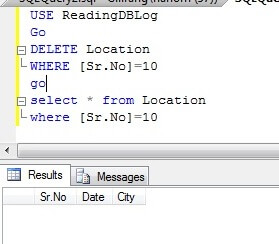
Now go ahead and delete some rows to check who has deleted your data.

USE ReadingDBLog
GO
DELETE Location WHERE [Sr.No]=10
GO
SELECT * FROM Location WHERE [Sr.No]=10
GO
Delete a row from the table'location'

You can see in the above screenshot that a row has been deleted from the table “Location”. I also ran a SELECT statement to verify the data has been deleted.

Step 4

Now we have to search the transaction log file to find the info about the deleted rows. Run the below command to get info about all deleted transactions.

USE ReadingDBLog
GO
SELECT 
    [Transaction ID],
    Operation,
    Context,
    AllocUnitName
    
FROM 
    fn_dblog(NULL, NULL) 
WHERE 
    Operation = 'LOP_DELETE_ROWS'


Find all the deleted rows info from t-log file

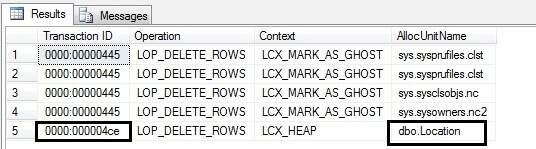
All transactions which have executed a DELETE statement will display by running the above command and we can see this in the above screenshot. As we are searching for deleted data in table Location, we can see this in the last row. We can find the table name in the “AllocUnitName” column. The last row says a DELETE statement has been performed on a HEAP table ‘dbo.Location’ under transaction ID 0000:000004ce. Now capture the transaction ID from here for our next command.

Step 5

We found the transaction ID from the above command which we will use in the below command to get the transaction SID of the user who has deleted the data.

USE ReadingDBLog
GO
SELECT
    Operation,
    [Transaction ID],
    [Begin Time],
    [Transaction Name],
    [Transaction SID]
FROM
    fn_dblog(NULL, NULL)
WHERE
    [Transaction ID] = '0000:000004ce'
AND
    [Operation] = 'LOP_BEGIN_XACT'


Find the transaction SID of the user

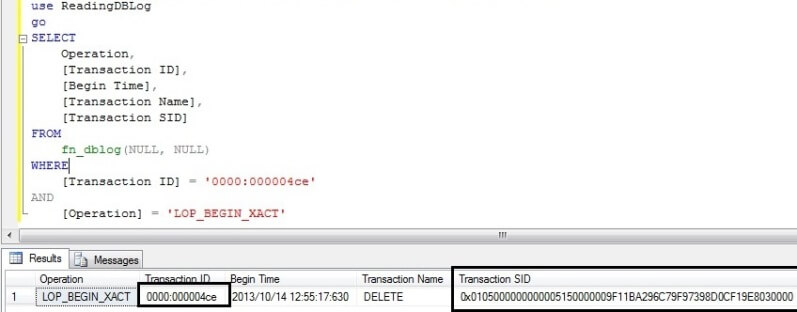
Here, we can see the [Begin Time] of this transaction which will also help filter out the possibilities in finding the exact info like when the data was deleted and then you can filter on the base of begin time when that command was executed.

We can read the above output as “A DELETE statement began at 2013/10/14 12:55:17:630 under transaction ID 0000:000004ce by user transaction SID 0x0105000000000005150000009F11BA296C79F97398D0CF19E8030000.

Now our next step is to convert the transaction SID hexadecimal value into text to find the real name of the user.

Step 6

Now we will figure out who ran the DELETE command. We will copy the hexadecimal value from the transaction SID column for the DELETE transaction and then pass that value into the SUSER_SNAME () function.

USE MASTER
GO   
SELECT SUSER_SNAME(0x0105000000000005150000009F11BA296C79F97398D0CF19E8030000)


Find the login name with the help of transaction SID

Now we have found the user that did the delete.

Finding a user who ran a DROP statement

Step 1

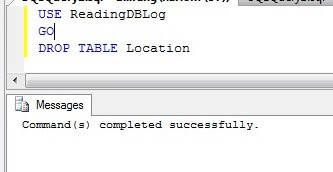
Here I am going to drop table Location.

USE ReadingDBLog
GO
DROP TABLE Location


Drop a table

Step 2

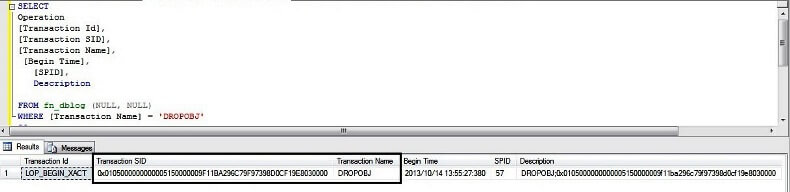
Similarly if you drop any object or you perform anything operation in your database it will get logged in the transaction log file which will be visible by using this function fn_dblog.

Run the below script to display all logs which have been logged under DROPOBJ statement.

USE ReadingDBLog
GO
SELECT 
Operation,
[Transaction Id],
[Transaction SID],
[Transaction Name],
 [Begin Time],
   [SPID],
   Description
FROM fn_dblog (NULL, NULL)
WHERE [Transaction Name] = 'DROPOBJ'
GO


Finding a user trasaction SID who ran DROP statement for table location

Here we can find the transaction SID and all required info which we need to find the user.

Step 3

Now we can pass the transaction SID into system function SUSER_SNAME () to get the exact user name.

SELECT SUSER_SNAME(0x0105000000000005150000009F11BA296C79F97398D0CF19E8030000) 


Finding a user who ran DROP statement for table location

Once again, we found the user in question.

Next Step

Use this function to do more research into your transaction log file. There is a lot of informative data in more than 100 columns when you use this command. You may also need to look into this and correlate with other data. Explore more knowledge on SQL Server Database Administration Tips.

Source

SQL Server – How to find Who Deleted What records at What Time

Standard

Let me explain it with simple example :

Create Table tbl_Sample 
([ID] int identity(1,1) ,
[Name] varchar(50))
GO
Insert into tbl_Sample values ('Letter A')
Insert into tbl_Sample values ('Letter B')
Insert into tbl_Sample values ('Letter C')

Select * from tbl_Sample

Now, you can change logins and delete records.

Given below is the code that can give you the recovered data with the user name who deleted it and the date and time as well.

-- Script Name: Recover_Deleted_Data_With_UID_Date_Time_Proc
-- Script Type : Recovery Procedure 
-- Develop By: Muhammad Imran
-- Date Created: 24 Oct 2012
-- Modify Date: 
-- Version    : 1.0
-- Notes      :

CREATE PROCEDURE Recover_Deleted_Data_With_UID_Date_Time_Proc
@Database_Name NVARCHAR(MAX),
@SchemaName_n_TableName NVARCHAR(Max),
@Date_From DATETIME='1900/01/01',
@Date_To DATETIME ='9999/12/31'
AS

DECLARE @RowLogContents VARBINARY(8000)
DECLARE @TransactionID NVARCHAR(Max)
DECLARE @AllocUnitID BIGINT
DECLARE @AllocUnitName NVARCHAR(Max)
DECLARE @SQL NVARCHAR(Max)
DECLARE @Compatibility_Level INT


SELECT @Compatibility_Level=dtb.compatibility_level
FROM
master.sys.databases AS dtb WHERE dtb.name=@Database_Name

Print @Compatibility_Level
--IF ISNULL(@Compatibility_Level,0)<=80
--BEGIN
--	RAISERROR('The compatibility level should be equal to or greater SQL SERVER 2005 (90)',16,1)
--	RETURN
--END

IF (SELECT COUNT(*) FROM INFORMATION_SCHEMA.TABLES WHERE [TABLE_SCHEMA]+'.'+[TABLE_NAME]=@SchemaName_n_TableName)=0
BEGIN
	RAISERROR('Could not found the table in the defined database',16,1)
	RETURN
END

DECLARE @bitTable TABLE
(
  [ID] INT,
  [Bitvalue] INT
)
--Create table to set the bit position of one byte.

INSERT INTO @bitTable
SELECT 0,2 UNION ALL
SELECT 1,2 UNION ALL
SELECT 2,4 UNION ALL
SELECT 3,8 UNION ALL
SELECT 4,16 UNION ALL
SELECT 5,32 UNION ALL
SELECT 6,64 UNION ALL
SELECT 7,128

--Create table to collect the row data.
DECLARE @DeletedRecords TABLE
(
    [Row ID]			INT IDENTITY(1,1),
    [RowLogContents]	VARBINARY(8000),
    [AllocUnitID]		BIGINT,
	[Transaction ID]	NVARCHAR(Max),
    [FixedLengthData]	SMALLINT,
	[TotalNoOfCols]		SMALLINT,
	[NullBitMapLength]	SMALLINT,
	[NullBytes]			VARBINARY(8000),
	[TotalNoofVarCols]	SMALLINT,
	[ColumnOffsetArray]	VARBINARY(8000),
	[VarColumnStart]	SMALLINT,
	[Slot ID]			INT,
    [NullBitMap]		VARCHAR(MAX)
    
)
--Create a common table expression to get all the row data plus how many bytes we have for each row.
;WITH RowData AS (
SELECT 

[RowLog Contents 0] AS [RowLogContents] 

,[AllocUnitID] AS [AllocUnitID] 

,[Transaction ID] AS [Transaction ID]  

--[Fixed Length Data] = Substring (RowLog content 0, Status Bit A+ Status Bit B + 1,2 bytes)
,CONVERT(SMALLINT, CONVERT(BINARY(2), REVERSE(SUBSTRING([RowLog Contents 0], 2 + 1, 2)))) AS [FixedLengthData]  --@FixedLengthData

-- [TotalnoOfCols] =  Substring (RowLog content 0, [Fixed Length Data] + 1,2 bytes)
,CONVERT(INT, CONVERT(BINARY(2), REVERSE(SUBSTRING([RowLog Contents 0], CONVERT(SMALLINT, CONVERT(BINARY(2)
,REVERSE(SUBSTRING([RowLog Contents 0], 2 + 1, 2)))) + 1, 2)))) as  [TotalNoOfCols]

--[NullBitMapLength]=ceiling([Total No of Columns] /8.0)
,CONVERT(INT, ceiling(CONVERT(INT, CONVERT(BINARY(2), REVERSE(SUBSTRING([RowLog Contents 0], CONVERT(SMALLINT, CONVERT(BINARY(2)
,REVERSE(SUBSTRING([RowLog Contents 0], 2 + 1, 2)))) + 1, 2))))/8.0)) as [NullBitMapLength] 

--[Null Bytes] = Substring (RowLog content 0, Status Bit A+ Status Bit B + [Fixed Length Data] +1, [NullBitMapLength] )
,SUBSTRING([RowLog Contents 0], CONVERT(SMALLINT, CONVERT(BINARY(2), REVERSE(SUBSTRING([RowLog Contents 0], 2 + 1, 2)))) + 3,
CONVERT(INT, ceiling(CONVERT(INT, CONVERT(BINARY(2), REVERSE(SUBSTRING([RowLog Contents 0], CONVERT(SMALLINT, CONVERT(BINARY(2)
,REVERSE(SUBSTRING([RowLog Contents 0], 2 + 1, 2)))) + 1, 2))))/8.0))) as [NullBytes]

--[TotalNoofVarCols] = Substring (RowLog content 0, Status Bit A+ Status Bit B + [Fixed Length Data] +1, [Null Bitmap length] + 2 )
,(CASE WHEN SUBSTRING([RowLog Contents 0], 1, 1) In (0x10,0x30,0x70) THEN
CONVERT(INT, CONVERT(BINARY(2), REVERSE(SUBSTRING([RowLog Contents 0],
CONVERT(SMALLINT, CONVERT(BINARY(2), REVERSE(SUBSTRING([RowLog Contents 0], 2 + 1, 2)))) + 3
+ CONVERT(INT, ceiling(CONVERT(INT, CONVERT(BINARY(2), REVERSE(SUBSTRING([RowLog Contents 0], CONVERT(SMALLINT, CONVERT(BINARY(2)
,REVERSE(SUBSTRING([RowLog Contents 0], 2 + 1, 2)))) + 1, 2))))/8.0)), 2))))  ELSE null  END) AS [TotalNoofVarCols] 

--[ColumnOffsetArray]= Substring (RowLog content 0, Status Bit A+ Status Bit B + [Fixed Length Data] +1, [Null Bitmap length] + 2 , [TotalNoofVarCols]*2 )
,(CASE WHEN SUBSTRING([RowLog Contents 0], 1, 1) In (0x10,0x30,0x70) THEN
SUBSTRING([RowLog Contents 0]
, CONVERT(SMALLINT, CONVERT(BINARY(2), REVERSE(SUBSTRING([RowLog Contents 0], 2 + 1, 2)))) + 3
+ CONVERT(INT, ceiling(CONVERT(INT, CONVERT(BINARY(2), REVERSE(SUBSTRING([RowLog Contents 0], CONVERT(SMALLINT, CONVERT(BINARY(2)
,REVERSE(SUBSTRING([RowLog Contents 0], 2 + 1, 2)))) + 1, 2))))/8.0)) + 2
, (CASE WHEN SUBSTRING([RowLog Contents 0], 1, 1) In (0x10,0x30,0x70) THEN
CONVERT(INT, CONVERT(BINARY(2), REVERSE(SUBSTRING([RowLog Contents 0],
CONVERT(SMALLINT, CONVERT(BINARY(2), REVERSE(SUBSTRING([RowLog Contents 0], 2 + 1, 2)))) + 3
+ CONVERT(INT, ceiling(CONVERT(INT, CONVERT(BINARY(2), REVERSE(SUBSTRING([RowLog Contents 0], CONVERT(SMALLINT, CONVERT(BINARY(2)
,REVERSE(SUBSTRING([RowLog Contents 0], 2 + 1, 2)))) + 1, 2))))/8.0)), 2))))  ELSE null  END)
* 2)  ELSE null  END) AS [ColumnOffsetArray] 

--	Variable column Start = Status Bit A+ Status Bit B + [Fixed Length Data] + [Null Bitmap length] + 2+([TotalNoofVarCols]*2)
,CASE WHEN SUBSTRING([RowLog Contents 0], 1, 1)In (0x10,0x30,0x70)
THEN  (
CONVERT(SMALLINT, CONVERT(BINARY(2), REVERSE(SUBSTRING([RowLog Contents 0], 2 + 1, 2)))) + 4 

+ CONVERT(INT, ceiling(CONVERT(INT, CONVERT(BINARY(2), REVERSE(SUBSTRING([RowLog Contents 0], CONVERT(SMALLINT, CONVERT(BINARY(2)
,REVERSE(SUBSTRING([RowLog Contents 0], 2 + 1, 2)))) + 1, 2))))/8.0)) 

+ ((CASE WHEN SUBSTRING([RowLog Contents 0], 1, 1) In (0x10,0x30,0x70) THEN
CONVERT(INT, CONVERT(BINARY(2), REVERSE(SUBSTRING([RowLog Contents 0],
CONVERT(SMALLINT, CONVERT(BINARY(2), REVERSE(SUBSTRING([RowLog Contents 0], 2 + 1, 2)))) + 3
+ CONVERT(INT, ceiling(CONVERT(INT, CONVERT(BINARY(2), REVERSE(SUBSTRING([RowLog Contents 0], CONVERT(SMALLINT, CONVERT(BINARY(2)
,REVERSE(SUBSTRING([RowLog Contents 0], 2 + 1, 2)))) + 1, 2))))/8.0)), 2))))  ELSE null  END) * 2)) 

ELSE null End AS [VarColumnStart]
,[Slot ID]
FROM sys.fn_dblog(NULL, NULL)
WHERE
AllocUnitId IN
(SELECT [Allocation_unit_id] FROM sys.allocation_units allocunits
INNER JOIN sys.partitions partitions ON (allocunits.type IN (1, 3)  
AND partitions.hobt_id = allocunits.container_id) OR (allocunits.type = 2 
AND partitions.partition_id = allocunits.container_id)  
WHERE object_id=object_ID('' + @SchemaName_n_TableName + ''))

AND Context IN ('LCX_MARK_AS_GHOST', 'LCX_HEAP') AND Operation in ('LOP_DELETE_ROWS') 
And SUBSTRING([RowLog Contents 0], 1, 1)In (0x10,0x30,0x70)

/*Use this subquery to filter the date*/
AND [TRANSACTION ID] IN (SELECT DISTINCT [TRANSACTION ID] FROM    sys.fn_dblog(NULL, NULL) 
WHERE Context IN ('LCX_NULL') AND Operation in ('LOP_BEGIN_XACT')  
And [Transaction Name]='DELETE'
And  CONVERT(NVARCHAR(11),[Begin Time]) BETWEEN @Date_From AND @Date_To)),

--Use this technique to repeate the row till the no of bytes of the row.
N1 (n) AS (SELECT 1 UNION ALL SELECT 1),
N2 (n) AS (SELECT 1 FROM N1 AS X, N1 AS Y),
N3 (n) AS (SELECT 1 FROM N2 AS X, N2 AS Y),
N4 (n) AS (SELECT ROW_NUMBER() OVER(ORDER BY X.n)
           FROM N3 AS X, N3 AS Y)


INSERT INTO @DeletedRecords
SELECT	RowLogContents
		,[AllocUnitID]
		,[Transaction ID]
		,[FixedLengthData]
		,[TotalNoOfCols]
		,[NullBitMapLength]
		,[NullBytes]
		,[TotalNoofVarCols]
		,[ColumnOffsetArray]
		,[VarColumnStart]
        ,[Slot ID]
         ---Get the Null value against each column (1 means null zero means not null)
		,[NullBitMap]=(REPLACE(STUFF((SELECT ',' +
		(CASE WHEN [ID]=0 THEN CONVERT(NVARCHAR(1),(SUBSTRING(NullBytes, n, 1) % 2))  ELSE CONVERT(NVARCHAR(1),((SUBSTRING(NullBytes, n, 1) / [Bitvalue]) % 2)) END) --as [nullBitMap]
        
FROM
N4 AS Nums
Join RowData AS C ON n<=NullBitMapLength
Cross Join @bitTable WHERE C.[RowLogContents]=D.[RowLogContents] ORDER BY [RowLogContents],n ASC FOR XML PATH('')),1,1,''),',',''))
FROM RowData D

IF (SELECT COUNT(*) FROM @DeletedRecords)=0
BEGIN
	RAISERROR('There is no data in the log as per the search criteria',16,1)
	RETURN
END

DECLARE @ColumnNameAndData TABLE
(
 [Transaction ID]   varchar(100),
 [Row ID]			int,
 [Rowlogcontents]	varbinary(Max),
 [NAME]				sysname,
 [nullbit]			smallint,
 [leaf_offset]		smallint,
 [length]			smallint,
 [system_type_id]	tinyint,
 [bitpos]			tinyint,
 [xprec]			tinyint,
 [xscale]			tinyint,
 [is_null]			int,
 [Column value Size]int,
 [Column Length]	int,
 [hex_Value]		varbinary(max),
 [Slot ID]			int,
 [Update]			int
)

--Create common table expression and join it with the rowdata table
-- to get each column details
/*This part is for variable data columns*/
--@RowLogContents, 
--(col.columnOffValue - col.columnLength) + 1,
--col.columnLength
--)
INSERT INTO @ColumnNameAndData
SELECT 
[Transaction ID],
[Row ID],
Rowlogcontents,
NAME ,
cols.leaf_null_bit AS nullbit,
leaf_offset,
ISNULL(syscolumns.length, cols.max_length) AS [length],
cols.system_type_id,
cols.leaf_bit_position AS bitpos,
ISNULL(syscolumns.xprec, cols.precision) AS xprec,
ISNULL(syscolumns.xscale, cols.scale) AS xscale,
SUBSTRING([nullBitMap], cols.leaf_null_bit, 1) AS is_null,
(CASE WHEN leaf_offset<1 and SUBSTRING([nullBitMap], cols.leaf_null_bit, 1)=0 
THEN
(Case When CONVERT(INT, CONVERT(BINARY(2), REVERSE (SUBSTRING ([ColumnOffsetArray], (2 * leaf_offset*-1) - 1, 2)))) >30000
THEN
CONVERT(INT, CONVERT(BINARY(2), REVERSE (SUBSTRING ([ColumnOffsetArray], (2 * leaf_offset*-1) - 1, 2)))) - POWER(2, 15)
ELSE
CONVERT(INT, CONVERT(BINARY(2), REVERSE (SUBSTRING ([ColumnOffsetArray], (2 * leaf_offset*-1) - 1, 2))))
END)
END)  AS [Column value Size],

(CASE WHEN leaf_offset<1 and SUBSTRING([nullBitMap], cols.leaf_null_bit, 1)=0  THEN
(Case 

When CONVERT(INT, CONVERT(BINARY(2), REVERSE (SUBSTRING ([ColumnOffsetArray], (2 * leaf_offset*-1) - 1, 2)))) >30000 And 
ISNULL(NULLIF(CONVERT(INT, CONVERT(BINARY(2), REVERSE (SUBSTRING ([ColumnOffsetArray], (2 * ((leaf_offset*-1) - 1)) - 1, 2)))), 0), [varColumnStart])<30000
THEN  (Case When [System_type_id]In (35,34,99) Then 16 else 24  end)

When CONVERT(INT, CONVERT(BINARY(2), REVERSE (SUBSTRING ([ColumnOffsetArray], (2 * leaf_offset*-1) - 1, 2)))) >30000 And 
ISNULL(NULLIF(CONVERT(INT, CONVERT(BINARY(2), REVERSE (SUBSTRING ([ColumnOffsetArray], (2 * ((leaf_offset*-1) - 1)) - 1, 2)))), 0), [varColumnStart])>30000
THEN  (Case When [System_type_id]In (35,34,99) Then 16 else 24  end) --24 

When CONVERT(INT, CONVERT(BINARY(2), REVERSE (SUBSTRING ([ColumnOffsetArray], (2 * leaf_offset*-1) - 1, 2)))) <30000 And 
ISNULL(NULLIF(CONVERT(INT, CONVERT(BINARY(2), REVERSE (SUBSTRING ([ColumnOffsetArray], (2 * ((leaf_offset*-1) - 1)) - 1, 2)))), 0), [varColumnStart])<30000
THEN (CONVERT(INT, CONVERT(BINARY(2), REVERSE (SUBSTRING ([ColumnOffsetArray], (2 * leaf_offset*-1) - 1, 2))))
- ISNULL(NULLIF(CONVERT(INT, CONVERT(BINARY(2), REVERSE (SUBSTRING ([ColumnOffsetArray], (2 * ((leaf_offset*-1) - 1)) - 1, 2)))), 0), [varColumnStart]))

When CONVERT(INT, CONVERT(BINARY(2), REVERSE (SUBSTRING ([ColumnOffsetArray], (2 * leaf_offset*-1) - 1, 2)))) <30000 And 
ISNULL(NULLIF(CONVERT(INT, CONVERT(BINARY(2), REVERSE (SUBSTRING ([ColumnOffsetArray], (2 * ((leaf_offset*-1) - 1)) - 1, 2)))), 0), [varColumnStart])>30000

THEN POWER(2, 15) +CONVERT(INT, CONVERT(BINARY(2), REVERSE (SUBSTRING ([ColumnOffsetArray], (2 * leaf_offset*-1) - 1, 2))))
- ISNULL(NULLIF(CONVERT(INT, CONVERT(BINARY(2), REVERSE (SUBSTRING ([ColumnOffsetArray], (2 * ((leaf_offset*-1) - 1)) - 1, 2)))), 0), [varColumnStart])

END)

END) AS [Column Length]

,(CASE WHEN SUBSTRING([nullBitMap], cols.leaf_null_bit, 1)=1 THEN  NULL ELSE
 SUBSTRING
 (
 Rowlogcontents, 
 (

(Case When CONVERT(INT, CONVERT(BINARY(2), REVERSE (SUBSTRING ([ColumnOffsetArray], (2 * leaf_offset*-1) - 1, 2)))) >30000
THEN
CONVERT(INT, CONVERT(BINARY(2), REVERSE (SUBSTRING ([ColumnOffsetArray], (2 * leaf_offset*-1) - 1, 2)))) - POWER(2, 15)
ELSE
CONVERT(INT, CONVERT(BINARY(2), REVERSE (SUBSTRING ([ColumnOffsetArray], (2 * leaf_offset*-1) - 1, 2))))
END)

 - 
(Case When CONVERT(INT, CONVERT(BINARY(2), REVERSE (SUBSTRING ([ColumnOffsetArray], (2 * leaf_offset*-1) - 1, 2)))) >30000 And 
ISNULL(NULLIF(CONVERT(INT, CONVERT(BINARY(2), REVERSE (SUBSTRING ([ColumnOffsetArray], (2 * ((leaf_offset*-1) - 1)) - 1, 2)))), 0), [varColumnStart])<30000

THEN  (Case When [System_type_id]In (35,34,99) Then 16 else 24  end) --24 
When CONVERT(INT, CONVERT(BINARY(2), REVERSE (SUBSTRING ([ColumnOffsetArray], (2 * leaf_offset*-1) - 1, 2)))) >30000 And 
ISNULL(NULLIF(CONVERT(INT, CONVERT(BINARY(2), REVERSE (SUBSTRING ([ColumnOffsetArray], (2 * ((leaf_offset*-1) - 1)) - 1, 2)))), 0), [varColumnStart])>30000

THEN  (Case When [System_type_id]In (35,34,99) Then 16 else 24  end) --24 
When CONVERT(INT, CONVERT(BINARY(2), REVERSE (SUBSTRING ([ColumnOffsetArray], (2 * leaf_offset*-1) - 1, 2)))) <30000 And 
ISNULL(NULLIF(CONVERT(INT, CONVERT(BINARY(2), REVERSE (SUBSTRING ([ColumnOffsetArray], (2 * ((leaf_offset*-1) - 1)) - 1, 2)))), 0), [varColumnStart])<30000

THEN CONVERT(INT, CONVERT(BINARY(2), REVERSE (SUBSTRING ([ColumnOffsetArray], (2 * leaf_offset*-1) - 1, 2))))
- ISNULL(NULLIF(CONVERT(INT, CONVERT(BINARY(2), REVERSE (SUBSTRING ([ColumnOffsetArray], (2 * ((leaf_offset*-1) - 1)) - 1, 2)))), 0), [varColumnStart])

When CONVERT(INT, CONVERT(BINARY(2), REVERSE (SUBSTRING ([ColumnOffsetArray], (2 * leaf_offset*-1) - 1, 2)))) <30000 And 
ISNULL(NULLIF(CONVERT(INT, CONVERT(BINARY(2), REVERSE (SUBSTRING ([ColumnOffsetArray], (2 * ((leaf_offset*-1) - 1)) - 1, 2)))), 0), [varColumnStart])>30000

THEN POWER(2, 15) +CONVERT(INT, CONVERT(BINARY(2), REVERSE (SUBSTRING ([ColumnOffsetArray], (2 * leaf_offset*-1) - 1, 2))))
- ISNULL(NULLIF(CONVERT(INT, CONVERT(BINARY(2), REVERSE (SUBSTRING ([ColumnOffsetArray], (2 * ((leaf_offset*-1) - 1)) - 1, 2)))), 0), [varColumnStart])

END)

) + 1,
(Case When CONVERT(INT, CONVERT(BINARY(2), REVERSE (SUBSTRING ([ColumnOffsetArray], (2 * leaf_offset*-1) - 1, 2)))) >30000 And 
ISNULL(NULLIF(CONVERT(INT, CONVERT(BINARY(2), REVERSE (SUBSTRING ([ColumnOffsetArray], (2 * ((leaf_offset*-1) - 1)) - 1, 2)))), 0), [varColumnStart])<30000

THEN  (Case When [System_type_id] In (35,34,99) Then 16 else 24  end) --24 
When CONVERT(INT, CONVERT(BINARY(2), REVERSE (SUBSTRING ([ColumnOffsetArray], (2 * leaf_offset*-1) - 1, 2)))) >30000 And 
ISNULL(NULLIF(CONVERT(INT, CONVERT(BINARY(2), REVERSE (SUBSTRING ([ColumnOffsetArray], (2 * ((leaf_offset*-1) - 1)) - 1, 2)))), 0), [varColumnStart])>30000

THEN  (Case When [System_type_id] In (35,34,99) Then 16 else 24  end) --24 
When CONVERT(INT, CONVERT(BINARY(2), REVERSE (SUBSTRING ([ColumnOffsetArray], (2 * leaf_offset*-1) - 1, 2)))) <30000 And 
ISNULL(NULLIF(CONVERT(INT, CONVERT(BINARY(2), REVERSE (SUBSTRING ([ColumnOffsetArray], (2 * ((leaf_offset*-1) - 1)) - 1, 2)))), 0), [varColumnStart])<30000

THEN ABS(CONVERT(INT, CONVERT(BINARY(2), REVERSE (SUBSTRING ([ColumnOffsetArray], (2 * leaf_offset*-1) - 1, 2))))
- ISNULL(NULLIF(CONVERT(INT, CONVERT(BINARY(2), REVERSE (SUBSTRING ([ColumnOffsetArray], (2 * ((leaf_offset*-1) - 1)) - 1, 2)))), 0), [varColumnStart]))

When CONVERT(INT, CONVERT(BINARY(2), REVERSE (SUBSTRING ([ColumnOffsetArray], (2 * leaf_offset*-1) - 1, 2)))) <30000 And 
ISNULL(NULLIF(CONVERT(INT, CONVERT(BINARY(2), REVERSE (SUBSTRING ([ColumnOffsetArray], (2 * ((leaf_offset*-1) - 1)) - 1, 2)))), 0), [varColumnStart])>30000

THEN POWER(2, 15) +CONVERT(INT, CONVERT(BINARY(2), REVERSE (SUBSTRING ([ColumnOffsetArray], (2 * leaf_offset*-1) - 1, 2))))
- ISNULL(NULLIF(CONVERT(INT, CONVERT(BINARY(2), REVERSE (SUBSTRING ([ColumnOffsetArray], (2 * ((leaf_offset*-1) - 1)) - 1, 2)))), 0), [varColumnStart])

END)
)

END) AS hex_Value
,[Slot ID]
,0
FROM @DeletedRecords A
Inner Join sys.allocation_units allocunits On A.[AllocUnitId]=allocunits.[Allocation_Unit_Id]
INNER JOIN sys.partitions partitions ON (allocunits.type IN (1, 3)
AND partitions.hobt_id = allocunits.container_id) OR (allocunits.type = 2 AND partitions.partition_id = allocunits.container_id)
INNER JOIN sys.system_internals_partition_columns cols ON cols.partition_id = partitions.partition_id
LEFT OUTER JOIN syscolumns ON syscolumns.id = partitions.object_id AND syscolumns.colid = cols.partition_column_id
WHERE leaf_offset<0
UNION
/*This part is for fixed data columns*/
SELECT  
[Transaction ID],
[Row ID],
Rowlogcontents,
NAME ,
cols.leaf_null_bit AS nullbit,
leaf_offset,
ISNULL(syscolumns.length, cols.max_length) AS [length],
cols.system_type_id,
cols.leaf_bit_position AS bitpos,
ISNULL(syscolumns.xprec, cols.precision) AS xprec,
ISNULL(syscolumns.xscale, cols.scale) AS xscale,
SUBSTRING([nullBitMap], cols.leaf_null_bit, 1) AS is_null,
(SELECT TOP 1 ISNULL(SUM(CASE WHEN C.leaf_offset >1 THEN max_length ELSE 0 END),0) FROM
sys.system_internals_partition_columns C WHERE cols.partition_id =C.partition_id And C.leaf_null_bit<cols.leaf_null_bit)+5 AS [Column value Size],
syscolumns.length AS [Column Length]

,CASE WHEN SUBSTRING([nullBitMap], cols.leaf_null_bit, 1)=1 THEN NULL ELSE
SUBSTRING
(
Rowlogcontents,(SELECT TOP 1 ISNULL(SUM(CASE WHEN C.leaf_offset >1 And C.leaf_bit_position=0 THEN max_length ELSE 0 END),0) FROM
sys.system_internals_partition_columns C where cols.partition_id =C.partition_id And C.leaf_null_bit<cols.leaf_null_bit)+5
,syscolumns.length) END AS hex_Value
,[Slot ID]
,0
FROM @DeletedRecords A
Inner Join sys.allocation_units allocunits ON A.[AllocUnitId]=allocunits.[Allocation_Unit_Id]
INNER JOIN sys.partitions partitions ON (allocunits.type IN (1, 3)
AND partitions.hobt_id = allocunits.container_id) OR (allocunits.type = 2 AND partitions.partition_id = allocunits.container_id)
INNER JOIN sys.system_internals_partition_columns cols ON cols.partition_id = partitions.partition_id
LEFT OUTER JOIN syscolumns ON syscolumns.id = partitions.object_id AND syscolumns.colid = cols.partition_column_id
WHERE leaf_offset>0
Order By nullbit

Declare @BitColumnByte as int
Select @BitColumnByte=CONVERT(INT, ceiling( Count(*)/8.0)) from @ColumnNameAndData Where [System_Type_id]=104

;With N1 (n) AS (SELECT 1 UNION ALL SELECT 1),
N2 (n) AS (SELECT 1 FROM N1 AS X, N1 AS Y),
N3 (n) AS (SELECT 1 FROM N2 AS X, N2 AS Y),
N4 (n) AS (SELECT ROW_NUMBER() OVER(ORDER BY X.n)
           FROM N3 AS X, N3 AS Y),
CTE As(
Select RowLogContents,[nullbit]
        ,[BitMap]=Convert(varbinary(1),Convert(int,Substring((REPLACE(STUFF((SELECT ',' +
		(CASE WHEN [ID]=0 THEN CONVERT(NVARCHAR(1),(SUBSTRING(hex_Value, n, 1) % 2))  ELSE CONVERT(NVARCHAR(1),((SUBSTRING(hex_Value, n, 1) / [Bitvalue]) % 2)) END) --as [nullBitMap]

from N4 AS Nums
Join @ColumnNameAndData AS C ON n<=@BitColumnByte And [System_Type_id]=104 And bitpos=0
Cross Join @bitTable WHERE C.[RowLogContents]=D.[RowLogContents] ORDER BY [RowLogContents],n ASC FOR XML PATH('')),1,1,''),',','')),bitpos+1,1)))
FROM @ColumnNameAndData D Where  [System_Type_id]=104)

Update A Set [hex_Value]=[BitMap]
from @ColumnNameAndData  A
Inner Join CTE B On A.[RowLogContents]=B.[RowLogContents]
And A.[nullbit]=B.[nullbit]


/**************Check for BLOB DATA TYPES******************************/
DECLARE @Fileid INT
DECLARE @Pageid INT
DECLARE @Slotid INT
DECLARE @CurrentLSN INT
DECLARE @LinkID INT
DECLARE @Context VARCHAR(50)
DECLARE @ConsolidatedPageID VARCHAR(MAX)
DECLARE @LCX_TEXT_MIX VARBINARY(MAX)

declare @temppagedata table 
(
[ParentObject] sysname,
[Object] sysname,
[Field] sysname,
[Value] sysname)

declare @pagedata table 
(
[Page ID] sysname,
[File IDS] int,
[Page IDS] int,
[AllocUnitId] bigint,
[ParentObject] sysname,
[Object] sysname,
[Field] sysname,
[Value] sysname)

DECLARE @ModifiedRawData TABLE
(
  [ID] INT IDENTITY(1,1),
  [PAGE ID] VARCHAR(MAX),
  [FILE IDS] INT,
  [PAGE IDS] INT,
  [Slot ID]  INT,
  [AllocUnitId] BIGINT,
  [RowLog Contents 0_var] VARCHAR(Max),
  [RowLog Length] VARCHAR(50),
  [RowLog Len] INT,
  [RowLog Contents 0] VARBINARY(Max),
  [Link ID] INT default (0),
  [Update] INT
)

            DECLARE Page_Data_Cursor CURSOR FOR 
            /*We need to filter LOP_MODIFY_ROW,LOP_MODIFY_COLUMNS from log for deleted records of BLOB data type& Get its Slot No, Page ID & AllocUnit ID*/
			SELECT LTRIM(RTRIM(Replace([Description],'Deallocated',''))) AS [PAGE ID]
			,[Slot ID],[AllocUnitId],NULL AS [RowLog Contents 0],NULL AS [RowLog Contents 0],Context
			FROM    sys.fn_dblog(NULL, NULL)  
			WHERE    
			AllocUnitId IN 
			(SELECT [Allocation_unit_id] FROM sys.allocation_units allocunits
			INNER JOIN sys.partitions partitions ON (allocunits.type IN (1, 3)  
			AND partitions.hobt_id = allocunits.container_id) OR (allocunits.type = 2 
			AND partitions.partition_id = allocunits.container_id)  
			WHERE object_id=object_ID('' + @SchemaName_n_TableName + ''))
			AND Operation IN ('LOP_MODIFY_ROW') AND [Context] IN ('LCX_PFS') 
			AND Description Like '%Deallocated%' 
			/*Use this subquery to filter the date*/
			AND [TRANSACTION ID] IN (SELECT DISTINCT [TRANSACTION ID] FROM    sys.fn_dblog(NULL, NULL) 
			WHERE Context IN ('LCX_NULL') AND Operation in ('LOP_BEGIN_XACT')  
			AND [Transaction Name]='DELETE'
			AND  CONVERT(NVARCHAR(11),[Begin Time]) BETWEEN @Date_From AND @Date_To)
			GROUP BY [Description],[Slot ID],[AllocUnitId],Context

            UNION

			SELECT [PAGE ID],[Slot ID],[AllocUnitId]
            ,Substring([RowLog Contents 0],15,LEN([RowLog Contents 0])) AS [RowLog Contents 0]
            ,CONVERT(INT,Substring([RowLog Contents 0],7,2)),Context --,CAST(RIGHT([Current LSN],4) AS INT) AS [Current LSN]
			FROM    sys.fn_dblog(NULL, NULL)  
			WHERE   
			 AllocUnitId IN 
			(SELECT [Allocation_unit_id] FROM sys.allocation_units allocunits
			INNER JOIN sys.partitions partitions ON (allocunits.type IN (1, 3)  
			AND partitions.hobt_id = allocunits.container_id) OR (allocunits.type = 2 
			AND partitions.partition_id = allocunits.container_id)  
			WHERE object_id=object_ID('' + @SchemaName_n_TableName + ''))
			AND Context IN ('LCX_TEXT_MIX') AND Operation in ('LOP_DELETE_ROWS') 
			/*Use this subquery to filter the date*/
			AND [TRANSACTION ID] IN (SELECT DISTINCT [TRANSACTION ID] FROM    sys.fn_dblog(NULL, NULL) 
			WHERE Context IN ('LCX_NULL') AND Operation in ('LOP_BEGIN_XACT')  
			And [Transaction Name]='DELETE'
			And  CONVERT(NVARCHAR(11),[Begin Time]) BETWEEN @Date_From AND @Date_To)
                        
			/****************************************/

		OPEN Page_Data_Cursor

		FETCH NEXT FROM Page_Data_Cursor INTO @ConsolidatedPageID, @Slotid,@AllocUnitID,@LCX_TEXT_MIX,@LinkID,@Context

		WHILE @@FETCH_STATUS = 0
		BEGIN
			DECLARE @hex_pageid AS VARCHAR(Max)
			/*Page ID contains File Number and page number It looks like 0001:00000130.
			  In this example 0001 is file Number &  00000130 is Page Number & These numbers are in Hex format*/
			SET @Fileid=SUBSTRING(@ConsolidatedPageID,0,CHARINDEX(':',@ConsolidatedPageID)) -- Seperate File ID from Page ID
		
			SET @hex_pageid ='0x'+ SUBSTRING(@ConsolidatedPageID,CHARINDEX(':',@ConsolidatedPageID)+1,Len(@ConsolidatedPageID))  ---Seperate the page ID
 			SELECT @Pageid=Convert(INT,cast('' AS XML).value('xs:hexBinary(substring(sql:variable("@hex_pageid"),sql:column("t.pos")) )', 'varbinary(max)')) -- Convert Page ID from hex to integer
			FROM (SELECT CASE substring(@hex_pageid, 1, 2) WHEN '0x' THEN 3 ELSE 0 END) AS t(pos) 
	        
            IF @Context='LCX_PFS' 	  
              BEGIN 
						DELETE @temppagedata
						INSERT INTO @temppagedata EXEC( 'DBCC PAGE(' + @DataBase_Name + ', ' + @fileid + ', ' + @pageid + ', 1) with tableresults,no_infomsgs;'); 
						INSERT INTO @pagedata SELECT @ConsolidatedPageID,@fileid,@pageid,@AllocUnitID,[ParentObject],[Object],[Field] ,[Value] FROM @temppagedata
              END
            ELSE IF @Context='LCX_TEXT_MIX' 
              BEGIN
                        INSERT INTO  @ModifiedRawData SELECT @ConsolidatedPageID,@fileid,@pageid,@Slotid,@AllocUnitID,NULL,0,CONVERT(INT,CONVERT(VARBINARY,REVERSE(SUBSTRING(@LCX_TEXT_MIX,11,2)))),@LCX_TEXT_MIX,@LinkID,0
              END	  
			FETCH NEXT FROM Page_Data_Cursor INTO  @ConsolidatedPageID, @Slotid,@AllocUnitID,@LCX_TEXT_MIX,@LinkID,@Context
		END
	
	CLOSE Page_Data_Cursor
	DEALLOCATE Page_Data_Cursor

	DECLARE @Newhexstring VARCHAR(MAX);

	--The data is in multiple rows in the page, so we need to convert it into one row as a single hex value.
	--This hex value is in string format
	INSERT INTO @ModifiedRawData ([PAGE ID],[FILE IDS],[PAGE IDS],[Slot ID],[AllocUnitId]
	,[RowLog Contents 0_var]
    , [RowLog Length])
	SELECT [Page ID],[FILE IDS],[PAGE IDS],Substring([ParentObject],CHARINDEX('Slot', [ParentObject])+4, (CHARINDEX('Offset', [ParentObject])-(CHARINDEX('Slot', [ParentObject])+4))-2 ) as [Slot ID]
	,[AllocUnitId]
	,Substring((
	SELECT 
    REPLACE(STUFF((SELECT REPLACE(SUBSTRING([Value],CHARINDEX(':',[Value])+1,CHARINDEX('†',[Value])-CHARINDEX(':',[Value])),'†','')
	FROM @pagedata C  WHERE B.[Page ID]= C.[Page ID] And Substring(B.[ParentObject],CHARINDEX('Slot', B.[ParentObject])+4, (CHARINDEX('Offset', B.[ParentObject])-(CHARINDEX('Slot', B.[ParentObject])+4)) )=Substring(C.[ParentObject],CHARINDEX('Slot', C.[ParentObject])+4, (CHARINDEX('Offset', C.[ParentObject])-(CHARINDEX('Slot', C.[ParentObject])+4)) ) And 
	[Object] Like '%Memory Dump%'  Order By '0x'+ LEFT([Value],CHARINDEX(':',[Value])-1)
	FOR XML PATH('') ),1,1,'') ,' ','')
	),1,20000) AS [Value]
    
    ,
     Substring((
	SELECT '0x' +REPLACE(STUFF((SELECT REPLACE(SUBSTRING([Value],CHARINDEX(':',[Value])+1,CHARINDEX('†',[Value])-CHARINDEX(':',[Value])),'†','')
	FROM @pagedata C  WHERE B.[Page ID]= C.[Page ID] And Substring(B.[ParentObject],CHARINDEX('Slot', B.[ParentObject])+4, (CHARINDEX('Offset', B.[ParentObject])-(CHARINDEX('Slot', B.[ParentObject])+4)) )=Substring(C.[ParentObject],CHARINDEX('Slot', C.[ParentObject])+4, (CHARINDEX('Offset', C.[ParentObject])-(CHARINDEX('Slot', C.[ParentObject])+4)) ) And 
	[Object] Like '%Memory Dump%'  Order By '0x'+ LEFT([Value],CHARINDEX(':',[Value])-1)
	FOR XML PATH('') ),1,1,'') ,' ','')
	),7,4) AS [Length]
    
	From @pagedata B
	Where [Object] Like '%Memory Dump%'
	Group By [Page ID],[FILE IDS],[PAGE IDS],[ParentObject],[AllocUnitId]--,[Current LSN]
	Order By [Slot ID]

	UPDATE @ModifiedRawData  SET [RowLog Len] = CONVERT(VARBINARY(8000),REVERSE(cast('' AS XML).value('xs:hexBinary(substring(sql:column("[RowLog Length]"),0))', 'varbinary(Max)')))
	FROM @ModifiedRawData Where [LINK ID]=0

    UPDATE @ModifiedRawData  SET [RowLog Contents 0] =cast('' AS XML).value('xs:hexBinary(substring(sql:column("[RowLog Contents 0_var]"),0))', 'varbinary(Max)')  
	FROM @ModifiedRawData Where [LINK ID]=0

	Update B Set B.[RowLog Contents 0] =
	(CASE WHEN A.[RowLog Contents 0] IS NOT NULL AND C.[RowLog Contents 0] IS NOT NULL THEN  A.[RowLog Contents 0]+C.[RowLog Contents 0] 
		WHEN A.[RowLog Contents 0] IS NULL AND C.[RowLog Contents 0] IS NOT NULL THEN  C.[RowLog Contents 0]
		WHEN A.[RowLog Contents 0] IS NOT NULL AND C.[RowLog Contents 0] IS NULL THEN  A.[RowLog Contents 0]  
		END)
    ,B.[Update]=ISNULL(B.[Update],0)+1
	from @ModifiedRawData B
	LEFT Join @ModifiedRawData A On A.[Page IDS]=Convert(int,Convert(Varbinary(Max),Reverse(Substring(B.[RowLog Contents 0],15+14,2))))
	And A.[File IDS]=Convert(int,Convert(Varbinary(Max),Reverse(Substring(B.[RowLog Contents 0],19+14,2)))) 
    And A.[Link ID]=B.[Link ID]
    LEFT Join @ModifiedRawData C On C.[Page IDS]=Convert(int,Convert(Varbinary(Max),Reverse(Substring(B.[RowLog Contents 0],27+14,2))))
	And C.[File IDS]=Convert(int,Convert(Varbinary(Max),Reverse(Substring(B.[RowLog Contents 0],31+14,2))))
	And C.[Link ID]=B.[Link ID]
    Where  (A.[RowLog Contents 0] IS NOT NULL OR C.[RowLog Contents 0] IS NOT NULL)


	Update B Set B.[RowLog Contents 0] =
	(CASE WHEN A.[RowLog Contents 0] IS NOT NULL AND C.[RowLog Contents 0] IS NOT NULL THEN  A.[RowLog Contents 0]+C.[RowLog Contents 0] 
		WHEN A.[RowLog Contents 0] IS NULL AND C.[RowLog Contents 0] IS NOT NULL THEN  C.[RowLog Contents 0]
		WHEN A.[RowLog Contents 0] IS NOT NULL AND C.[RowLog Contents 0] IS NULL THEN  A.[RowLog Contents 0]  
		END)
    --,B.[Update]=ISNULL(B.[Update],0)+1
	from @ModifiedRawData B
	LEFT Join @ModifiedRawData A On A.[Page IDS]=Convert(int,Convert(Varbinary(Max),Reverse(Substring(B.[RowLog Contents 0],15+14,2))))
	And A.[File IDS]=Convert(int,Convert(Varbinary(Max),Reverse(Substring(B.[RowLog Contents 0],19+14,2)))) 
    And A.[Link ID]<>B.[Link ID] And B.[Update]=0
    LEFT Join @ModifiedRawData C On C.[Page IDS]=Convert(int,Convert(Varbinary(Max),Reverse(Substring(B.[RowLog Contents 0],27+14,2))))
	And C.[File IDS]=Convert(int,Convert(Varbinary(Max),Reverse(Substring(B.[RowLog Contents 0],31+14,2))))
	And C.[Link ID]<>B.[Link ID] And B.[Update]=0
    Where  (A.[RowLog Contents 0] IS NOT NULL OR C.[RowLog Contents 0] IS NOT NULL)

	UPDATE @ModifiedRawData  SET [RowLog Contents 0] =  
    (Case When [RowLog Len]>=8000 Then 
    Substring([RowLog Contents 0] ,15,[RowLog Len]) 
    When [RowLog Len]<8000 Then 
    SUBSTRING([RowLog Contents 0],15+6,Convert(int,Convert(varbinary(max),REVERSE(Substring([RowLog Contents 0],15,6)))))
    End)
	FROM @ModifiedRawData Where [LINK ID]=0

	UPDATE @ColumnNameAndData SET [hex_Value]=[RowLog Contents 0] 
    --,A.[Update]=A.[Update]+1
	FROM @ColumnNameAndData A
	INNER JOIN @ModifiedRawData B ON 
	Convert(int,Convert(Varbinary(Max),Reverse(Substring([hex_value],17,4))))=[PAGE IDS]
	AND  Convert(int,Substring([hex_value],9,2)) =B.[Link ID] 
	Where [System_Type_Id] In (99,167,175,231,239,241,165,98) And [Link ID] <>0 

	UPDATE @ColumnNameAndData SET [hex_Value]=
    (CASE WHEN B.[RowLog Contents 0] IS NOT NULL AND C.[RowLog Contents 0] IS NOT NULL THEN  B.[RowLog Contents 0]+C.[RowLog Contents 0] 
    WHEN B.[RowLog Contents 0] IS NULL AND C.[RowLog Contents 0] IS NOT NULL THEN  C.[RowLog Contents 0]
    WHEN B.[RowLog Contents 0] IS NOT NULL AND C.[RowLog Contents 0] IS NULL THEN  B.[RowLog Contents 0]  
    END)
	--,A.[Update]=A.[Update]+1
	FROM @ColumnNameAndData A
	LEFT JOIN @ModifiedRawData B ON 
	Convert(int,Convert(Varbinary(Max),Reverse(Substring([hex_value],5,4))))=B.[PAGE IDS]  And B.[Link ID] =0 
   	LEFT JOIN @ModifiedRawData C ON 
	Convert(int,Convert(Varbinary(Max),Reverse(Substring([hex_value],17,4))))=C.[PAGE IDS]  And C.[Link ID] =0 
	Where [System_Type_Id] In (99,167,175,231,239,241,165,98)  And (B.[RowLog Contents 0] IS NOT NULL OR C.[RowLog Contents 0] IS NOT NULL)

	UPDATE @ColumnNameAndData SET [hex_Value]=[RowLog Contents 0] 
    --,A.[Update]=A.[Update]+1
	FROM @ColumnNameAndData A
	INNER JOIN @ModifiedRawData B ON 
	Convert(int,Convert(Varbinary(Max),Reverse(Substring([hex_value],9,4))))=[PAGE IDS]
    And Convert(int,Substring([hex_value],3,2))=[Link ID]
	Where [System_Type_Id] In (35,34,99) And [Link ID] <>0 
    
	UPDATE @ColumnNameAndData SET [hex_Value]=[RowLog Contents 0]
    --,A.[Update]=A.[Update]+10
	FROM @ColumnNameAndData A
	INNER JOIN @ModifiedRawData B ON 
	Convert(int,Convert(Varbinary(Max),Reverse(Substring([hex_value],9,4))))=[PAGE IDS]
	Where [System_Type_Id] In (35,34,99) And [Link ID] =0

	UPDATE @ColumnNameAndData SET [hex_Value]=[RowLog Contents 0] 
    --,A.[Update]=A.[Update]+1
	FROM @ColumnNameAndData A
	INNER JOIN @ModifiedRawData B ON 
	Convert(int,Convert(Varbinary(Max),Reverse(Substring([hex_value],15,4))))=[PAGE IDS]
	Where [System_Type_Id] In (35,34,99) And [Link ID] =0

    Update @ColumnNameAndData set [hex_value]= 0xFFFE + Substring([hex_value],9,LEN([hex_value]))
	--,[Update]=[Update]+1
    Where [system_type_id]=241

CREATE TABLE [#temp_Data]
(
    [FieldName]  VARCHAR(MAX),
    [FieldValue] NVARCHAR(MAX),
    [Rowlogcontents] VARBINARY(8000),
    [Row ID] int,
    [Transaction ID] VARCHAR(100),
    [Deletion Date Time] DATETIME,
    [Deleted By User Name] VARCHAR(Max)
)

INSERT INTO #temp_Data
SELECT NAME,
CASE
 WHEN system_type_id IN (231, 239) THEN  LTRIM(RTRIM(CONVERT(NVARCHAR(max),hex_Value)))  --NVARCHAR ,NCHAR
 WHEN system_type_id IN (167,175) THEN  LTRIM(RTRIM(CONVERT(VARCHAR(max),hex_Value)))  --VARCHAR,CHAR
 WHEN system_type_id IN (35) THEN  LTRIM(RTRIM(CONVERT(VARCHAR(max),hex_Value))) --Text
 WHEN system_type_id IN (99) THEN  LTRIM(RTRIM(CONVERT(NVARCHAR(max),hex_Value))) --nText 
 WHEN system_type_id = 48 THEN CONVERT(VARCHAR(MAX), CONVERT(TINYINT, CONVERT(BINARY(1), REVERSE (hex_Value)))) --TINY INTEGER
 WHEN system_type_id = 52 THEN CONVERT(VARCHAR(MAX), CONVERT(SMALLINT, CONVERT(BINARY(2), REVERSE (hex_Value)))) --SMALL INTEGER
 WHEN system_type_id = 56 THEN CONVERT(VARCHAR(MAX), CONVERT(INT, CONVERT(BINARY(4), REVERSE(hex_Value)))) -- INTEGER
 WHEN system_type_id = 127 THEN CONVERT(VARCHAR(MAX), CONVERT(BIGINT, CONVERT(BINARY(8), REVERSE(hex_Value))))-- BIG INTEGER
 WHEN system_type_id = 61 Then CONVERT(VARCHAR(MAX),CONVERT(DATETIME,CONVERT(VARBINARY(8000),REVERSE (hex_Value))),100) --DATETIME
 WHEN system_type_id =58 Then CONVERT(VARCHAR(MAX),CONVERT(SMALLDATETIME,CONVERT(VARBINARY(8000),REVERSE(hex_Value))),100) --SMALL DATETIME
 WHEN system_type_id = 108 THEN CONVERT(VARCHAR(MAX),CONVERT(NUMERIC(38,20), CONVERT(VARBINARY,CONVERT(VARBINARY(1),xprec)+CONVERT(VARBINARY(1),xscale))+CONVERT(VARBINARY(1),0) + hex_Value)) --- NUMERIC
 WHEN system_type_id =106 THEN CONVERT(VARCHAR(MAX), CONVERT(DECIMAL(38,20), CONVERT(VARBINARY,Convert(VARBINARY(1),xprec)+CONVERT(VARBINARY(1),xscale))+CONVERT(VARBINARY(1),0) + hex_Value)) --- DECIMAL
 WHEN system_type_id In(60,122) THEN CONVERT(VARCHAR(MAX),Convert(MONEY,Convert(VARBINARY(8000),Reverse(hex_Value))),2) --MONEY,SMALLMONEY
 WHEN system_type_id = 104 THEN CONVERT(VARCHAR(MAX),CONVERT (BIT,CONVERT(BINARY(1), hex_Value)%2))  -- BIT
 WHEN system_type_id =62 THEN  RTRIM(LTRIM(STR(CONVERT(FLOAT,SIGN(CAST(CONVERT(VARBINARY(8000),Reverse(hex_Value)) AS BIGINT)) * (1.0 + (CAST(CONVERT(VARBINARY(8000),Reverse(hex_Value)) AS BIGINT) & 0x000FFFFFFFFFFFFF) * POWER(CAST(2 AS FLOAT), -52)) * POWER(CAST(2 AS FLOAT),((CAST(CONVERT(VARBINARY(8000),Reverse(hex_Value)) AS BIGINT) & 0x7ff0000000000000) / EXP(52 * LOG(2))-1023))),53,LEN(hex_Value)))) --- FLOAT
 When system_type_id =59 THEN  Left(LTRIM(STR(CAST(SIGN(CAST(Convert(VARBINARY(8000),REVERSE(hex_Value)) AS BIGINT))* (1.0 + (CAST(CONVERT(VARBINARY(8000),Reverse(hex_Value)) AS BIGINT) & 0x007FFFFF) * POWER(CAST(2 AS Real), -23)) * POWER(CAST(2 AS Real),(((CAST(CONVERT(VARBINARY(8000),Reverse(hex_Value)) AS INT) )& 0x7f800000)/ EXP(23 * LOG(2))-127))AS REAL),23,23)),8) --Real
 WHEN system_type_id In (165,173) THEN (CASE WHEN CHARINDEX(0x,cast('' AS XML).value('xs:hexBinary(sql:column("hex_Value"))', 'VARBINARY(8000)')) = 0 THEN '0x' ELSE '' END) +cast('' AS XML).value('xs:hexBinary(sql:column("hex_Value"))', 'varchar(max)') -- BINARY,VARBINARY
 WHEN system_type_id =34 THEN (CASE WHEN CHARINDEX(0x,cast('' AS XML).value('xs:hexBinary(sql:column("hex_Value"))', 'VARBINARY(8000)')) = 0 THEN '0x' ELSE '' END) +cast('' AS XML).value('xs:hexBinary(sql:column("hex_Value"))', 'varchar(max)')  --IMAGE
 WHEN system_type_id =36 THEN CONVERT(VARCHAR(MAX),CONVERT(UNIQUEIDENTIFIER,hex_Value)) --UNIQUEIDENTIFIER
 WHEN system_type_id =231 THEN CONVERT(VARCHAR(MAX),CONVERT(sysname,hex_Value)) --SYSNAME
 WHEN system_type_id =241 THEN CONVERT(VARCHAR(MAX),CONVERT(xml,hex_Value)) --XML

 WHEN system_type_id =189 THEN (CASE WHEN CHARINDEX(0x,cast('' AS XML).value('xs:hexBinary(sql:column("hex_Value"))', 'VARBINARY(8000)')) = 0 THEN '0x' ELSE '' END) +cast('' AS XML).value('xs:hexBinary(sql:column("hex_Value"))', 'varchar(max)') --TIMESTAMP
 WHEN system_type_id=98 THEN (CASE 
 WHEN CONVERT(INT,SUBSTRING(hex_Value,1,1))=56 THEN CONVERT(VARCHAR(MAX), CONVERT(INT, CONVERT(BINARY(4), REVERSE(Substring(hex_Value,3,Len(hex_Value))))))  -- INTEGER
 WHEN CONVERT(INT,SUBSTRING(hex_Value,1,1))=108 THEN CONVERT(VARCHAR(MAX),CONVERT(numeric(38,20),CONVERT(VARBINARY(1),Substring(hex_Value,3,1)) +CONVERT(VARBINARY(1),Substring(hex_Value,4,1))+CONVERT(VARBINARY(1),0) + Substring(hex_Value,5,Len(hex_Value)))) --- NUMERIC
 WHEN CONVERT(INT,SUBSTRING(hex_Value,1,1))=167 THEN LTRIM(RTRIM(CONVERT(VARCHAR(max),Substring(hex_Value,9,Len(hex_Value))))) --VARCHAR,CHAR
 WHEN CONVERT(INT,SUBSTRING(hex_Value,1,1))=36 THEN CONVERT(VARCHAR(MAX),CONVERT(UNIQUEIDENTIFIER,Substring((hex_Value),3,20))) --UNIQUEIDENTIFIER
 WHEN CONVERT(INT,SUBSTRING(hex_Value,1,1))=61 THEN CONVERT(VARCHAR(MAX),CONVERT(DATETIME,CONVERT(VARBINARY(8000),REVERSE (Substring(hex_Value,3,LEN(hex_Value)) ))),100) --DATETIME
 WHEN CONVERT(INT,SUBSTRING(hex_Value,1,1))=165 THEN '0x'+ SUBSTRING((CASE WHEN CHARINDEX(0x,cast('' AS XML).value('xs:hexBinary(sql:column("hex_Value"))', 'VARBINARY(8000)')) = 0 THEN '0x' ELSE '' END) +cast('' AS XML).value('xs:hexBinary(sql:column("hex_Value"))', 'varchar(max)'),11,LEN(hex_Value)) -- BINARY,VARBINARY
 END)
 
END AS FieldValue
,[Rowlogcontents]
,[Row ID]
,[Transaction ID]
,null
,null
FROM @ColumnNameAndData ORDER BY nullbit

--Find the user ID and date time
Update #temp_Data Set [Deleted By User Name]=[name]
,[Deletion Date Time] = [Begin Time]
from #temp_Data  A
Inner Join fn_dblog(NULL,NULL) B On A.[Transaction ID]= B.[Transaction ID]
Inner Join sys.sysusers  C On B.[Transaction SID]=C.[Sid]
Where B.[Operation]='LOP_BEGIN_XACT' And B.[Context]='LCX_NULL' And B.[Transaction Name]='DELETE'

--Create the column name in the same order to do pivot table.

DECLARE @FieldName VARCHAR(max)
Declare @AdditionalField VARCHAR(max)
SET @FieldName = STUFF(
(
	SELECT ',' + CAST(QUOTENAME([Name]) AS VARCHAR(MAX)) FROM syscolumns WHERE id=object_id('' + @SchemaName_n_TableName + '')
	FOR XML PATH('')), 1, 1, '')

--Finally did pivot table and get the data back in the same format.

Set @AdditionalField=@FieldName + ' ,[Deleted By User Name],[Deletion Date Time]'

SET @sql = 'SELECT ' + @AdditionalField  + ' FROM #temp_Data PIVOT (Min([FieldValue]) FOR FieldName IN (' + @FieldName  + ')) AS pvt'
Print @sql
EXEC sp_executesql @sql

GO
--Execute the procedure like
--Recover_Deleted_Data_With_UID_Date_Time_Proc 'Database Name','Schema.table name'
--EXAMPLE #1 : FOR ALL DELETED RECORDS
EXEC Recover_Deleted_Data_With_UID_Date_Time_Proc 'test','dbo.tbl_sample' 
GO
--EXAMPLE #2 : FOR ANY SPECIFIC DATE RANGE
EXEC Recover_Deleted_Data_With_UID_Date_Time_Proc 'test','dbo.tbl_sample' ,'2011/12/01','2012/01/30'
--It will give you the result of all deleted records with the user name and date & time of deletion.

How To: Install FreeTDS and UnixODBC On OSX Using Homebrew For Use With Ruby, Php, And Perl

Standard

This little project started out as a basic script to connect to a Microsoft SqlServer and get data. It was a nightmare as I probably spent 15 hours learning about and troubleshooting both FreeTDS and UnixODBC. My pain is now your gain.

NOTICE: I have homebrew configured to install all packages into my local directory /Users/jared/.homebrew/

1) Install UnixODBC

[jared@localhost]$ brew install unixodbc
==> Downloading http://www.unixodbc.org/unixODBC-2.3.0.tar.gz
File already downloaded in /Users/jared/Library/Caches/Homebrew
==> ./configure --disable-debug --prefix=/Users/jared/.homebrew/Cellar/unixodbc/2.3.0 --enable-gui=no
==> make install
/Users/jared/.homebrew/Cellar/unixodbc/2.3.0: 24 files, 932K, built in 22 seconds
[jared@localhost]$

2) Edit the FreeTDS formula And install

What we are doing is changing the default tds version, enabling the msdblib, and pointing out where unixodbc installed.

require 'formula'
 
class Freetds > Formula
url 'http://ibiblio.org/pub/Linux/ALPHA/freetds/stable/freetds-0.91.tar.gz'
homepage 'http://www.freetds.org/'
md5 'b14db5823980a32f0643d1a84d3ec3ad'
 
def install
system "./configure",·
"--prefix=#{prefix}",·
"--with-tdsver=7.0",·
"--enable-msdblib",
"--with-unixodbc=/Users/USERNAME/.homebrew/Cellar/unixodbc/2.3.0",
"--mandir=#{man}"
system 'make'
ENV.j1 # Or fails to install on multi-core machines
system 'make install'
end
end
[jared@localhost]$ brew install freetds

3) Start a new terminal session to make sure all your paths update

4) Confirm that you can connect to the server

We need to make sure that you can connect to the sqlserver and that the port is open and available to you.

To do this we use telnet. If you see the following, success! The port is open on the server.

[jared@localhost]$ telnet server.example.com 1433
Trying 192.168.1.101...
Connected to server.example.com.
Escape character is '^]'.

If you see the following. You failed. Check the Sqlserver configuration, firewalls, or network configuration.

[jared@localhost]$ telnet server.example.com 1433
Trying 192.168.1.101...
telnet: connect to address 192.168.1.101: Connection refused
telnet: Unable to connect to remote host

Note: Press the ctrl + ] keys to break to a prompt and then type exit.

5) Tsql

FreeTDS comes with a couple cli applications. One of them is tsql. It isn’t great, but I use it test and see if at least FreeTDS is working correctly. After you install FreeTDS using homebrew try and connect to the host using the following command.

[jared@localhost]$ tsql -H server.example.com -U USERNAME -P PASSWORD -v
 
locale is "en_US.UTF-8"
locale charset is "UTF-8"
using default charset "UTF-8"
1>exit

If you see a prompt, you haz awesome!

6) Sym link the FreeTDS and UnixODBC conf files

I create 3 sym links to the following files just for simplicity.

ln -s /Users/jared/.homebrew/Cellar/freetds/0.91/etc/freetds.conf ~/.freetds.conf
ln -s /Users/jared/.homebrew/Cellar/unixodbc/2.3.0/etc/odbc.ini ~/.odbc.ini
ln -s /Users/jared/.homebrew/Cellar/unixodbc/2.3.0/etc/odbcinst.ini ~/.odbcinst.ini

7) edit the .freetds.conf and add the following

[example]
host = server.example.com
port = 1433
tds version = 7.0

8 ) edit the odbcinst.ini and add the following

You are telling unixodbc where your FreeTDS drivers are located using this configuration file.

[FreeTDS]
Description = FreeTDS
Driver = /Users/jared/.homebrew/lib/libtdsodbc.so
Setup = /Users/jared/.homebrew/lib/libtdsodbc.so
UsageCount = 1

9) edit the .odbc.ini and add the following

[myexample]
Driver = FreeTDS // we just set this up a second ago
Description = MyExample
ServerName = example // this is the name of the configuration we used in the .freetds.conf file
UID = USERNAME
PWD = PASSWORD

10) isql should work

[jared@localhost]$ isql sqlinternal USERNAME PASSWORD
+---------------------------------------+
| Connected!
| sql-statement
| help [tablename]
| quit
+---------------------------------------+
SQL>quit

11) Osql Error

If you try osql, it throws an error.

[jared@localhost]$ osql -S myexample -U USERNAME -P PASSWORD
checking shared odbc libraries linked to isql for default directories...
/Users/jared/.homebrew/bin/osql: line 53: ldd: command not found
strings: can't open file: (No such file or directory)
osql: problem: no potential directory strings in "/Users/jared/.homebrew/bin/isql"
osql: advice: use "osql -I DIR" where DIR unixODBC\'s install prefix e.g. /usr/local
isql strings are:
checking odbc.ini files
reading /Users/jared/.odbc.ini
[myexample] found in /Users/jared/.odbc.ini
found this section:
[myexample]
Driver = FreeTDS
Description = MyExample
Servername = example
UID = USERNAME
PWD = PASSWORD
 
looking for driver for DSN [myexample] in /Users/jared/.odbc.ini
found driver line: " Driver = FreeTDS"
driver "FreeTDS" found for [myexample] in .odbc.ini
found driver named "FreeTDS"
"FreeTDS" is not an executable file
looking for entry named [FreeTDS] in /odbcinst.ini
found driver line: " Driver = /Users/jared/.homebrew/lib/libtdsodbc.so"
found driver /Users/jared/.homebrew/lib/libtdsodbc.so for [FreeTDS] in odbcinst.ini
/Users/jared/.homebrew/lib/libtdsodbc.so is not an executable file
osql: error: no driver found for sqlinternal
[jared@localhost]$

If you go through the error you will find that a certain driver is not executable. You just need to chmod the file.

[jared@localhost]$ chmod 554 /Users/jared/.homebrew/Cellar/freetds/0.91/lib/libtdsodbc.0.so

Now run it again.

[jared@localhost]$ osql -S myexample -U USERNAME -P PASSWORD
checking shared odbc libraries linked to isql for default directories...
/Users/jared/.homebrew/bin/osql: line 53: ldd: command not found
strings: can't open file: (No such file or directory)
osql: problem: no potential directory strings in "/Users/jared/.homebrew/bin/isql"
osql: advice: use "osql -I DIR" where DIR unixODBC\'s install prefix e.g. /usr/local
isql strings are:
checking odbc.ini files
reading /Users/jared/.odbc.ini
[myexample] found in /Users/jared/.odbc.ini
found this section:
[myexample]
Driver = FreeTDS
Description = myexamples
Servername = myexample
UID = USERNAME
PWD = PASSWORD
 
looking for driver for DSN [myexample] in /Users/jared/.odbc.ini
found driver line: " Driver = FreeTDS"
driver "FreeTDS" found for [myexample] in .odbc.ini
found driver named "FreeTDS"
"FreeTDS" is not an executable file
looking for entry named [FreeTDS] in /odbcinst.ini
found driver line: " Driver = /Users/jared/.homebrew/lib/libtdsodbc.so"
found driver /Users/jared/.homebrew/lib/libtdsodbc.so for [FreeTDS] in odbcinst.ini
/Users/jared/.homebrew/lib/libtdsodbc.so is an executable file
Using ODBC-Combined strategy
DSN [myexample] has servername "myexample" (from /Users/jared/.odbc.ini)
/Users/jared/.freetds.conf is a readable file
looking for [myexample] in /Users/jared/.freetds.conf
found this section:
[myexample]
host = myexample.bendcable.net
port = 1433
tds version = 7.0
 
Configuration looks OK. Connection details:
 
DSN: myexample
odbc.ini: /Users/jared/.odbc.ini
Driver: /Users/jared/.homebrew/lib/libtdsodbc.so
Server hostname: myexample.bendcable.net
Address: 192.168.12.103
 
Attempting connection as username ...
+ isql myexample USERNAME PASSWORD -v
+---------------------------------------+
| Connected!
| sql-statement
| help [tablename]
| quit
+---------------------------------------+
SQL> quit

SUCCESS!!!

Some other useful commands.

Useful commands

odbcinst -j
 
odbcinst -q -d
 
odbcinst -q -s

SQL Server System Views: The Basics

Standard

SQL Server provides an assortment of system views for accessing metadata about the server environment and its database objects. There are catalog views and information schema views and dynamic management views and several other types of views. DBAs and developers alike can benefit significantly from the rich assortment of information they can derive through these views, and it is worth the effort to get to know them.

System views are divided into categories that each serve a specific purpose. The most extensive category is the one that contains catalog views. Catalog views let you retrieve information about a wide range of system and database components—from table columns and data types to server-wide configurations.

Information schema views are similar to some of the catalog views in that they provide access to metadata that describes database objects such as tables, columns, domains, and check constraints. However, information schema views conform to the ANSI standard, whereas catalog views are specific to SQL Server.

In contrast to either of these types of views, dynamic management views return server state data that can be used to monitor and fine-tune a SQL Server instance and its databases. Like catalog views, dynamic management views are specific to SQL Server.

In this article, we’ll focus on these three types of views, looking at examples in each category. We won’t be covering the other types of system views because they tend not to be as commonly used, with perhaps a couple exceptions. For the most part, catalog, information schema, and dynamic management views are the ones you’ll likely be using the most often. But just so you know, the other types are related to replication and data-tier application (DAC) instances as well as provide compatibility with earlier SQL Server releases. Although they have their places, for now we’ll stick with the big three.

Catalog views

Of the various types of system views available in SQL Server, catalog views represent the largest collection and most diverse. You can use catalog views to gather information about such components as AlwaysOn Availability Groups, Change Data Capture, change tracking, database mirroring, full-text search, Resource Governor, security, Service Broker, and an assortment of other features—all in addition to being able to view information about the database objects themselves.

In fact, SQL Server provides so many catalog views that it would be nearly impossible—or at least highly impractical—to try look at all of them in one article, but know that there is a vast storehouse of views waiting for you, and they all work pretty much the same way.

Microsoft recommends that you use catalog views as your primary method for accessing SQL Server metadata because they provide the most efficient mechanism for retrieving this type of information. Through the catalog views you can access all user-available metadata. For example, the following SELECT statement returns information about databases whose name starts with adventureworks:

SELECT name, database_id, compatibility_level

FROM sys.databases

WHERE name LIKE 'adventureworks%';

The columns specified in the SELECT clause—namedatabase_id, and compatibility_level—represent only a fraction of the many columns supported by this view. The view will actually return nearly 75 columns worth of information about each database installed on the SQL Server instance. I’ve kept it short for the sake of brevity, as shown in the following results:

name database_id compatibility_level
AdventureWorks2014 9 120
AdventureWorksDW2014 10 120

There is nothing remarkable here, except for the ease with which I was able to collect the metadata. The results include the database names, their auto-generated IDs, and their compatibility levels, which in both cases is 120. The120 refers to SQL Server 2014. (I created the examples in this article on a local instance of SQL Server 2014 running in a test virtual machine.)

The sys.databases view can also return information about database settings, such as whether the database is read-only or whether the auto-shrink feature is enabled. Many of the configuration-related columns take the bit data type to indicate whether a feature is on (1) or off (0).

As the preceding example illustrates, you access catalog views through the sys schema. Whichever view you use, it’s always a good idea to check the SQL Server documentation if you have any questions about its application to your particular circumstances. For example, the sys.databases view includes the state column, which provides status information such as whether a database is online, offline, or being restored. Each option is represented by one of nine predefined tinyint values. Some values in this column pertain only to certain environments. For instance, the value 7(copying) applies only to Azure SQL Database.

Now let’s look at the sys.objects catalog view, which returns a row for each user-defined, schema-scoped object in a database. The following SELECT statement retrieves the name and ID of all table-valued functions defined in the dboschema within the AdventureWorks2014 sample database:

USE AdventureWorks2014;
go


SELECT name, object_id

FROM sys.objects

WHERE SCHEMA_NAME(schema_id) = 'dbo'

AND type_desc = 'sql_table_valued_function';


Notice that I use the SCHEMA_NAME built-in function to match the schema ID to dbo in the WHERE clause. Functions such as SCHEMA_NAMEOBJECT_IDOBJECT_NAME, and so on can be extremely useful when working with catalog views.

Also in the WHERE clause, I match the type_desc column to sql_table_valued_function, giving me the following results:

name object_id
ufnGetContactInformation 103671417

The sys.objects view is a handy tool to have because it provides quick and easy access to all user-defined objects in your database, including tables, views, triggers, functions, and constraints. However, SQL Server also provides catalog views that are distinct to a specific object type. For example, the following SELECT statement retrieves data through the sys.tables view:

USE AdventureWorks2014;
go

SELECT name, max_column_id_used

FROM sys.tables

WHERE SCHEMA_NAME(schema_id) = ‘HumanResources’


The statement returns a list of all tables in the HumanResources schema, along with the maximum column ID used for each table, as shown in the following results:

name max_column_id_used
Shift 5
Department 4
Employee 16
EmployeeDepartmentHistory 6
EmployeePayHistory 5
JobCandidate 4

The interesting thing about the sys.tables view is that it inherits all the columns from the sys.objects view and then adds additional columns with table-specific information. For example, in the preceding example, the namecolumn is inherited from sys.objects but the max_column_id_used column is specific to sys.tables. (For information about which views inherit columns from other views, refer to the SQL Server documentation.)

You can also join catalog views to retrieve specific types of information. For example, the following SELECTstatement joins the sys.columns view to the sys.types view to retrieve information about the Person table:

USE AdventureWorks2014;

go


SELECT c.name AS ColumnName,

t.name AS DataType,

CASE t.is_user_defined

WHEN 1 THEN 'user-defined type'

ELSE 'system type' END AS UserOrSystem

FROM sys.columns c JOIN sys.types t

ON c.user_type_id = t.user_type_id

WHERE c.object_id = OBJECT_ID('Person.Person');

Not surprisingly, the sys.columns view returns a list of columns in the table, and the sys.types view returns the name of the column data types, along with whether they are system types or user-defined:

ColumnName DataType UserOrSystem
BusinessEntityID int system type
PersonType nchar system type
NameStyle NameStyle user-defined type
Title nvarchar system type
FirstName Name user-defined type
MiddleName Name user-defined type
LastName Name user-defined type
Suffix nvarchar system type
EmailPromotion int system type
AdditionalContactInfo xml system type
Demographics xml system type
rowguid uniqueidentifier system type
ModifiedDate datetime system type

Up to this point, the catalog views we’ve looked at have focused on the databases and their objects. However, we can use catalog views to retrieve all sorts of information, such as details about database files:

USE AdventureWorks2014;

go


SELECT file_id, name, state_desc, type_desc

FROM sys.database_files

WHERE name LIKE ‘adventureworks%’;

In this case, we’re using the sys.database_files view to retrieve the file ID, file name, file state, and file type.

file_id name state_desc type_desc
1 AdventureWorks2014_Data ONLINE ROWS
2 AdventureWorks2014_Log ONLINE LOG

We might instead use the sys.assembly_types view to return information about any assemblies added to the database:

USE AdventureWorks2014;

go


SELECT name, user_type_id, assembly_class

FROM sys.assembly_types;

As the following results show, the AdventureWorks2014 database includes three assemblies, all of which are SQL Server’s advanced data types:

name user_type_id assembly_class
hierarchyid 128 Microsoft.SqlServer.Types.SqlHierarchyId
geometry 129 Microsoft.SqlServer.Types.SqlGeometry
geography 130 Microsoft.SqlServer.Types.SqlGeography

You can even retrieve data about security-related metadata within your database. For example, the following SELECTstatement uses the sys.database_principals view to return the names and IDs of all security principals in theAdcentureWorks2014 database:

USE AdventureWorks2014;

go


SELECT name, principal_id

FROM sys.database_principals

WHERE type_desc = ‘DATABASE_ROLE’;

Notice that we’ve used a WHERE clause to qualify our query so the SELECT statement returns only theDATABASE_ROLE principal type:

name principal_id
public 0
db_owner 16384
db_accessadmin 16385
db_securityadmin 16386
db_ddladmin 16387
db_backupoperator 16389
db_datareader 16390
db_datawriter 16391
db_denydatareader 16392
db_denydatawriter 16393

Of course, SQL Server security occurs at the database level and at the server level. To address the server level, SQL Server also includes catalog views specific to the current instance. For example, the following SELECT statement joins the sys.server_principals view and the sys.server_permissions view to retrieve information about the server principals and their permissions:

SELECT pr.name, pr. principal_id,

pm.permission_name, pm.state_desc

FROM sys.server_principals pr

JOIN sys.server_permissions AS pm

ON pr.principal_id = pm.grantee_principal_id

WHERE pr.type_desc = ‘SERVER_ROLE’;

In this case, we’re concerned only with the SERVER_ROLE principal type, so we’ve added the WHERE clause, giving us the following results:

name principal_id oermission_name state_desc
public 2 VIEW ANY DATABASE GRANT
public 2 CONNECT GRANT

You can also use catalog views to retrieve server configuration information. For instance, the following SELECTstatement uses the the sys.configurations view to retrieve configuration information about the current server:

SELECT name, description

FROM sys.configurations

WHERE is_advanced = 1 AND is_dynamic = 0;

In this case, we’ve limited our query to non-dynamic advanced settings, as shown in the following results:

name description
user connections Number of user connections allowed
locks Number of locks for all users
open objects Number of open database objects
fill factor (%) Default fill factor percentage
c2 audit mode c2 audit mode
priority boost Priority boost
set working set size set working set size
lightweight pooling User mode scheduler uses lightweight pooling
scan for startup procs scan for startup stored procedures
affinity I/O mask affinity I/O mask
affinity64 I/O mask affinity64 I/O mask
common criteria compliance enabled Common Criteria compliance mode enabled

There are, of course, many more examples of catalog views I can show you, but you get the point. There’s a great deal of information to be had, and I’ve barely scratched the surface. For a complete listing of the available catalog views, check out the MSDN topic Catalog Views (Transact-SQL).

Information schema views

Information schema views provide a standardized method for querying metadata about objects within a database. The views are part of the schema INFORMATION_SCHEMA, rather than the sys schema, and are much more limited in scope than catalog views. At last count, SQL Server was providing only 21 information schema views, compared to over 200 catalog views.

The advantage of using information schema views is that, because they are ANSI-compliant, you can theoretically migrate your code to different database systems without having to update your view references. If portability is important to your solution, you should consider information schema views, just know that they don’t do nearly as much as catalog views. And, of course, using one type of view doesn’t preclude you from using another type of view.

With information schema views, you can retrieve metadata about database objects such as tables, constraints, columns, privileges, views, and domains. (In the world of information schema views, a domain is a user-defined data type, and a catalog is the database itself.)

Let’s look at a few examples. The first one uses the TABLES view to retrieve the name and type of all the tables and views in the Purchasing schema:

USE AdventureWorks2014;

go


SELECT TABLE_NAME, TABLE_TYPE

FROM INFORMATION_SCHEMA.TABLES

WHERE TABLE_SCHEMA = ‘purchasing’

ORDER BY TABLE_NAME;

No magic here. Just a simple query that returns basic information, as shown in the following results:

TABLE_NAME TABLE_TYPE
ProductVendor BASE TABLE
PurchaseOrderDetail BASE TABLE
PurchaseOrderHeader BASE TABLE
ShipMethod BASE TABLE
Vendor BASE TABLE
vVendorWithAddresses VIEW
vVendorWithContacts VIEW

We could have also retrieved the TABLE_CATALOG and TABLE_SCHEMA columns, which are included in the view to provide fully qualified, four-part names for each object, but we didn’t need that information in this case, and the table includes no other columns, falling far short of what you get with sys.tables.

Now let’s pull data through the COLUMNS view, which provides a few more details than we get with TABLES:

USE AdventureWorks2014;

go


SELECT COLUMN_NAME, DATA_TYPE, DOMAIN_NAME

FROM INFORMATION_SCHEMA.COLUMNS

WHERE TABLE_SCHEMA = ‘person’

AND TABLE_NAME = ‘contacttype’;

In this case, our query retrieves the column name, system data type, and user data type, if any, within the Person.ContactType table. In this case, the table includes only one user-defined data type (Name):

COLUMN_NAME DATA_TYPE DOMAIN_NAME
ContactTypeID int NULL
Name nvarchar Name
ModifiedDate datetime NULL

Now suppose we want to retrieve a list of user-defined data types in the AdventureWorks2014 database, along with the base type for each one:

USE AdventureWorks2014;

go


SELECT DOMAIN_NAME, DATA_TYPE

FROM INFORMATION_SCHEMA.DOMAINS

ORDER BY DOMAIN_NAME;

This time, we use the DOMAINS view, which gives us the following results (at least on my system):

DOMAIN_NAME DATA_TYPE
AccountNumber nvarchar
Flag bit
Name nvarchar
NameStyle bit
OrderNumber nvarchar
Phone nvarchar

Let’s look at one more example, this one of the CHECK_CONSTRAINTS view, which retrieves information about the check constraints in the Person schema:

USE AdventureWorks2014;

go


SELECT CONSTRAINT_NAME, CHECK_CLAUSE

FROM INFORMATION_SCHEMA.CHECK_CONSTRAINTS

WHERE CONSTRAINT_SCHEMA = ‘person’;

In this case, we get the name of the check constraints, along with the constraint definitions:

CONSTRAINT_NAME CHECK_CLAUSE
CK_Person_EmailPromotion ([EmailPromotion]>=(0) AND [EmailPromotion]<=(2))
CK_Person_PersonType ([PersonType] IS NULL OR (upper([PersonType])=’GC’ OR upper([PersonType])=’SP’ OR upper([PersonType])=’EM’ OR upper([PersonType])=’IN’ OR upper([PersonType])=’VC’ OR upper([PersonType])=’SC’))

That’s all there is to information schema views. There are relatively few of them and the ones that are there contain relatively little information, when compared to their catalog counterparts. You can find more details about information schema views by referring to the MSDN topic Information Schema Views (Transact-SQL).

Dynamic management views

With dynamic management views, we move into new territory. The views return server state information about your databases and servers, which can be useful for monitoring your systems, tuning performance, and diagnosing any issues that might arise.

Like catalog views, dynamic management views provide a wide range of information. For example, SQL Server includes a set of dynamic management that are specific to memory-optimized tables. One of these, dm_xtp_system_memory_consumers, returns information about database-level memory consumers:

SELECT memory_consumer_desc, allocated_bytes, used_bytes

FROM sys.dm_xtp_system_memory_consumers

WHERE memory_consumer_type_desc = ‘pgpool’;

The statement retrieves the consumer description, the amount of allocated bytes, and the amount of used bytes for the pgpool consumer type, giving us the following results.

memory_consumer_desc allocated_bytes used_bytes
System 256K page pool 262144 262144
System 64K page pool 0 0
System 4K page pool 0 0

Like catalog views, dynamic management views are part of the sys schema. In addition, their names always begin with the dm_ prefix. Unfortunately, Microsoft uses the same naming convention for SQL Server’s dynamic management functions. But you’ll quickly discover which ones are which when you try to run them and you’re prompted to provide input parameters. (I’ll save a discussion about the functions for a different article.)

Another category of dynamic management views focuses on the SQL Server Operating System (SQLOS), which manages the operating system resources specific to SQL Server. For example, you can use the dm_os_threadsview to retrieve a list of SQLOS threads running under the current SQL Server process:

SELECT os_thread_id, kernel_time, usermode_time

FROM sys.dm_os_threads

WHERE usermode_time > 300;

The statement returns the thread ID, kernel time, and user time, for those threads greater than 300 milliseconds, giving us the following results (on my test system):

os_thread_id kernel_time usermode_time
2872 140 327
2928 15 1014
2944 46 327
5500 78 1216

The SQLOS views even include one that returns miscellaneous information about the computer and its resources:

SELECT cpu_count, physical_memory_kb, virtual_memory_kb

FROM sys.dm_os_sys_info;

Although the dm_os_sys_info view can return a variety of information about the environment, in this case, we’ve limited that information to the CPU count, physical memory, and virtual memory:

cpu_count physical_memory_kb virtual_memory_kb
4 4193840 8589934464

SQL Server also includes dynamic management views for retrieving information about the indexes. For example, you can use the db_index_usage_stats view to return details about different types of index operations:

SELECT index_id, user_seeks, user_scans

FROM sys.dm_db_index_usage_stats

WHERE object_id = OBJECT_ID(‘AdventureWorks2014.HumanResources.Employee’);

The statement returns the data shown in the following table:

index_id user_seeks user_scans
1 4 9

Being able to query statistics about an index in this way can be useful when testing an application’s individual operations. This can help you pinpoint whether your queries are using the indexes effectively or whether you might need to build different indexes. Note, however, that index statistics can reflect all activity, whether generated by an application or generated internally by SQL Server.

Dynamic management views are either server-scoped or database-scoped. The ones we’ve look at so far have been server-scoped, even the dm_db_index_usage_stats index shown in the last example. In that case, however, we were concerned with only the AdventureWorks2014 database, so we specified the database in our WHERE clause.

If you want to run a database-scoped dynamic management view, you must do so within the context of the target database. In the following SELECT statement, I use the dm_db_file_space_usage view to return space usage data about the data file used by the AdventureWorks2014 database:

USE AdventureWorks2014;

go


SELECT total_page_count, allocated_extent_page_count, unallocated_extent_page_count

FROM sys.dm_db_file_space_usage

WHERE file_id = 1;

All I’m doing here is retrieving the total page count, allocated extent page count, and unallocated extent page count:

total_page_count allocated_extent_page_count unallocated_extent_page_count
30368 28368 2000

Note that page counts are always at the extent level, which means they will be multiples of eight.

We can instead use the dm_db_fts_index_physical_stats view to retrieve data about the full-text and sematic indexes in each table:

USE AdventureWorks2014;

go


SELECT OBJECT_NAME(object_id) ObjectName,

object_id ObjectID, fulltext_index_page_count IndexPages

FROM sys.dm_db_fts_index_physical_stats;

This time we get the object name and ID of the table that contains the index, as well as the page count for each index:

ObjectName ObjectID IndexPages
ProductReview 610101214 8
Document 1077578877 13
JobCandidate 1589580701 15

Let’s look at one more dynamic management view that is database-scoped. Thedm_db_persisted_sku_features view returns a list of edition-specific features that are enabled in the current database, but are not supported on all SQL Server versions. The view applies to SQL Server 2008 through the current version. The following SELECT statement uses the view to retrieve the feature name and ID:

USE AdventureWorks2014;

go


SELECT feature_name, feature_id

FROM sys.dm_db_persisted_sku_features;

In this case, the SELECT statement returns only one row:

feature_name feature_id
InMemoryOLTP 800

The dm_db_persisted_sku_features view includes the feature_id column only for informational purposes. The column is not supported and may not be part of the view in the future.

Although these are but a few of the dynamic management views that SQL Server supports, the examples should give you a good sense of the variety of data they can provide. For a complete list of dynamic management views and to learn more about each one, refer to the MSDN topic Dynamic Management Views and Functions (Transact-SQL).

Plenty more where that came from

As mentioned earlier, SQL Server also provides system views to support backward compatibility, replication, and DAC instances. The compatibility views might come in handy if you’re still running SQL Server 2000. You might also find the replication-related views useful if you’ve implemented replication, although Microsoft recommends that you instead use the stored procedures available for accessing replication metadata. As for the DAC views, SQL Server provides only two of them, and they reside only in the msdb database.

For many DBAs and database developers, the catalog views and dynamic management views will likely be their first line of defense when retrieving SQL Server metadata, whether it’s specific to particular database objects or the server environment as a whole. That’s not to diminish the importance of the other views, but rather to point out that Microsoft has put most of its effort into building an extensive set of catalog views and dynamic management views. And given all the work that’s gone into them, there’s certainly no reason not to take advantage of what’s available.

https://www.simple-talk.com/sql/learn-sql-server/sql-server-system-views-the-basics/

SQL Server 聚合函数算法优化技巧

Standard
v博客前言

Sql server聚合函数在实际工作中应对各种需求使用的还是很广泛的,对于聚合函数的优化自然也就成为了一个重点,一个程序优化的好不好直接决定了这个程序的声明周期。Sql server聚合函数对一组值执行计算并返回单一的值。聚合函数对一组值执行计算,并返回单个值。除了 COUNT 以外,聚合函数都会忽略空值。 聚合函数经常与 SELECT 语句的 GROUP BY 子句一起使用。

 v1.写在前面

如果有对Sql server聚合函数不熟或者忘记了的可以看我之前的一片博客。sql server 基础教程

本文中所有数据演示都是用Microsoft官方示例数据库:Northwind,至于Northwind大家也可以在网上下载。至于下载方法MSDN已经有了详细的说明了,这里就不多说了。

v2.Sql server标量聚合

2.1.概念: 

在只包含聚合函数的 SELECT 语句列列表中指定的一种聚合函数(如 MIN()、MAX()、COUNT()、SUM() 或 AVG())。当列列表只包含聚合函数时,则结果集只具有一个行给出聚合值,该值由与 WHERE 子句谓词相匹配的源行计算得到。

2.2.探索标量聚合: 

我们先用Sql server的”包括实际的执行计划”来看看一个简单的流聚合COUNT()来看看表里数据所有的行数。

SQL Server 聚合函数算法优化技巧再通过SET SHOWPLAN_ALL ON(关于输出中包含的列更多信息可以在链接中查看)来看看有关语句执行情况的详细信息,并估计语句对资源的需求。

通过SET SHOWPLAN_ALL ON我们来看看COUNT()具体做了那些事情:

  • 索引扫描:扫描当前表的行数
  • 流计算:计算行数的数量
  • 计算标量:将流计算出来的结果转化为适当的类型。(因为索引扫描出来的结果是根据表中数据的大小决定的,如果表中数据很多的话,COUNT是int类型就会有问题,所以在最终返回的时候需要将默认类型(数值一般默认类型是Big)转成int类型。)
  • 小结:通过SET SHOWPLAN_ALL ON我们可以查看Sql server聚合函数在给我们呈现最终效果的时候,为这个效果做了些什么事情。

SQL Server 聚合函数算法优化技巧

2.3.标量聚合优化技巧: 

我们通过两个比较简单的sql查询来看看他们的区别

SELECT COUNT(DISTINCT ShipCity) FROM Orders
SELECT COUNT(DISTINCT OrderID) FROM Orders

SQL Server 聚合函数算法优化技巧

从上图中可以看到,其实这两个查询从语句上来说没什么太大的区别,但是为什么开销会不一样,一个是查询城市一个是查询订单号。这是因为其实DISTINCT对于OrderID查询来说,是没有什么意义的,因为OrderID是主键,是不会有重复的。而ShipCity是会有重复的,Sql server的去重机制在去重的时候,会有一个排序的过程。这个排序还是比较消耗资源的。

对于数据量比较大的表其实不是很建议对大表排序或者对大表的某个重复次数多的字段去重运算。所以我们这里可以对ShipCity进行优化一下。可以对ShipCity创建一个非聚集索引

CREATE INDEX Index_ShipCity On Orders(ShipCity desc)
go

SQL Server 聚合函数算法优化技巧

从上图中可以看到,加了索引以后COUNT(DISTINCT ShipCity)的查询变成了两个流聚合,而没有了排序,节省了开销。

总结:对于标量聚合从上面的例子大家可以看到,标量聚合优缺点很明显:

  • Sql server标量聚合优点:算法比较简单直观,适合非重复值的聚合操作。
  • Sql server标量聚合缺点:性能较差(需要排序),不适合重复值的聚合操作。

优化技巧:

  • 尽量避免排序产生
  • 将分组字(GROUP BY)段锁定在索引覆盖范围内

v3.Sql server哈希聚合

3.1.概念: 

哈希(Hash,一般翻译做“散列”,也有直接音译为“哈希”的,就是把任意长度的输入(又叫做预映射, pre-image),通过散列算法,变换成固定长度的输出,该输出就是散列值。这种转换是一种压缩映射,也就是,散列值的空间通常远小于输入的空间,不同的输入可能会散列成相同的输出,所以不可能从散列值来唯一的确定输入值。简单的说就是一种将任意长度的消息压缩到某一固定长度的消息摘要的函数。)

哈希聚合的内部实现方法和哈希连接的实现机制一样,需要哈希函数的内部运算,形成不同的哈希值,依次并行扫描数据形成聚合值。

3.2.背景: 

为了解决流聚合的不足,应对大数据的操作,所以哈希聚合就诞生了。

3.3.分析: 

来看看两个简单的查询。

SQL Server 聚合函数算法优化技巧

ShipCountry和CustomerID的分组查询看上去很类似,但是为什么执行计划会不同呢?这是因为ShipCountry包含了大量的重复值,CustomerID重复值非常少,所以Sql server系统给ShipCountry推送的哈希聚合,而CustomerID推送的是流聚合。也就是说Sql server系统会动态的根据查询的情况选择合适的聚合方式。所以我们在做SQL优化的时候不能仅根据SQL语句来优化,还得结合具体数据分布的环境。

v4.运算过程监控指标

4.1.监控元素: 

  • 可视化查看运行时间
  • T-sql语句查询时间
  • 占用内存
  • T-sql语句查询IO

4.2.可视化查看运行时间: 

SQL Server 聚合函数算法优化技巧

4.3.T-sql语句查询时间: 

SQL Server 聚合函数算法优化技巧

4.4.占用内存: 

SQL Server 聚合函数算法优化技巧

4.5.T-sql语句查询IO: 

SQL Server 聚合函数算法优化技巧

关于监控元素还有很多,这里就列举几个。

v博客总结

SQL Server 聚合函数算法优化技巧差不多就介绍到这里,如果有对sql语句优化感兴趣的可以看这篇博客。sql server之数据库语句优化

http://www.cnblogs.com/toutou/p/5002996.html

SQL Server优化之SQL语句优化

Standard

一切都是为了性能,一切都是为了业务

一、查询的逻辑执行顺序

(1) FROM left_table
(3) join_type JOIN right_table (2) ON join_condition
(4) WHERE where_condition
(5) GROUP BY group_by_list
(6) WITH {cube | rollup}
(7) HAVING having_condition
(8) SELECT (9) DISTINCT (11) top_specification select_list
(9) ORDER BY order_by_list

标准的 SQL 的解析顺序为:

(1) FROM 子句 组装来自不同数据源的数据

(2) WHERE 子句 基于指定的条件对记录进行筛选

(3) GROUP BY 子句 将数据划分为多个分组

(4) 使用聚合函数进行计算

(5) 使用HAviNG子句筛选分组

(6) 计算所有的表达式

(7) 使用ORDER BY对结果集进行排序

二、执行顺序

1. FROM:对FROM子句中前两个表执行笛卡尔积生成虚拟表vt1

2. ON: 对vt1表应用ON筛选器只有满足 join_condition 为真的行才被插入vt2

3. OUTER(join):如果指定了 OUTER JOIN保留表(preserved table)中未找到的行将行作为外部行添加到vt2,生成t3,如果from包含两个以上表,则对上一个联结生成的结果表和下一个表重复执行步骤和步骤直接结束。

4. WHERE:对vt3应用 WHERE 筛选器只有使 where_condition 为true的行才被插入vt4

5. GROUP BY:按GROUP BY子句中的列列表对vt4中的行分组生成vt5

6. CUBE|ROLLUP:把超组(supergroups)插入vt6,生成vt6

7. HAVING:对vt6应用HAVING筛选器只有使 having_condition 为true的组才插入vt7

8. SELECT:处理select列表产生vt8

9. DISTINCT:将重复的行从vt8中去除产生vt9

10. ORDER BY:将vt9的行按order by子句中的列列表排序生成一个游标vc10

11. TOP:从vc10的开始处选择指定数量或比例的行生成vt11 并返回调用者

看到这里,那么用过Linq to SQL的语法有点相似啊?如果我们我们了解了SQL Server执行顺序,那么我们就接下来进一步养成日常SQL的好习惯,也就是在实现功能的同时有考虑性能的思想,数据库是能进行集合运算的工具,我们应该尽量的利用这个工具,所谓集合运算实际就是批量运算,就是尽量减少在客户端进行大数据量的循环操作,而用SQL语句或者存储过程代替。

三、只返回需要的数据

返回数据到客户端至少需要数据库提取数据、网络传输数据、客户端接收数据以及客户端处理数据等环节,如果返回不需要的数据,就会增加服务器、网络和客户端的无效劳动,其害处是显而易见的,避免这类事件需要注意:

A、横向来看

(1) 不要写SELECT * 的语句,而是选择你需要的字段。

(2) 当在SQL语句中连接多个表时, 请使用表的别名并把别名前缀于每个Column上。这样一来,就可以减少解析的时间并减少那些由Column歧义引起的语法错误。

如有表table1(ID,col1)和table2(ID,col2)
Select A.ID, A.col1, B.col2
-- Select A.ID, col1, col2 –不要这么写,不利于将来程序扩展
from table1 A inner join table2 B on A.ID=B.ID Where …

B、纵向来看

(1) 合理写WHERE子句,不要写没有WHERE的SQL语句。

(2) SELECT TOP N * – 没有WHERE条件的用此替代。

四、尽量少做重复的工作

A、控制同一语句的多次执行,特别是一些基础数据的多次执行是很多程序员很少注意的。

B、减少多次的数据转换,也许需要数据转换是设计的问题,但是减少次数是程序员可以做到的。

C、杜绝不必要的子查询和连接表,子查询在执行计划一般解释成外连接,多余的连接表带来额外的开销。

D、合并对同一表同一条件的多次UPDATE,比如

UPDATE EMPLOYEE SET FNAME='HAIWER'
WHERE EMP_ID=' VPA30890F'UPDATE EMPLOYEE SET LNAME='YANG'
WHERE EMP_ID=' VPA30890F'

这两个语句应该合并成以下一个语句

UPDATE EMPLOYEE SET FNAME='HAIWER',LNAME='YANG'WHERE EMP_ID=' VPA30890F'

E、UPDATE操作不要拆成DELETE操作+INSERT操作的形式,虽然功能相同,但是性能差别是很大的。

五、注意临时表和表变量的用

在复杂系统中,临时表和表变量很难避免,关于临时表和表变量的用法,需要注意:

A、如果语句很复杂,连接太多,可以考虑用临时表和表变量分步完成。

B、如果需要多次用到一个大表的同一部分数据,考虑用临时表和表变量暂存这部分数据。

C、如果需要综合多个表的数据,形成一个结果,可以考虑用临时表和表变量分步汇总这多个表的数据。

D、其他情况下,应该控制临时表和表变量的使用。

E、关于临时表和表变量的选择,很多说法是表变量在内存,速度快,应该首选表变量,但是在实际使用中发现:

(1) 主要考虑需要放在临时表的数据量,在数据量较多的情况下,临时表的速度反而更快。

(2) 执行时间段与预计执行时间(多长)

F、关于临时表产生使用SELECT INTO和CREATE TABLE + INSERT INTO的选择,一般情况下:

SELECT INTO会比CREATE TABLE + INSERT INTO的方法快很多,

但是SELECT INTO会锁定TEMPDB的系统表SYSOBJECTS、SYSINDEXES、SYSCOLUMNS,在多用户并发环境下,容易阻塞其他进程。

所以我的建议是,在并发系统中,尽量使用CREATE TABLE + INSERT INTO,而大数据量的单个语句使用中,使用SELECT INTO。

六、子查询的用法

子查询是一个 SELECT 查询,它嵌套在 SELECT、INSERT、UPDATE、DELETE 语句或其它子查询中。

任何允许使用表达式的地方都可以使用子查询,子查询可以使我们的编程灵活多样,可以用来实现一些特殊的功能。但是在性能上,往往一个不合适的子查询用法会形成一个性能瓶颈。如果子查询的条件中使用了其外层的表的字段,这种子查询就叫作相关子查询。

相关子查询可以用IN、NOT IN、EXISTS、NOT EXISTS引入。 关于相关子查询,应该注意:

(1) NOT IN、NOT EXISTS的相关子查询可以改用LEFT JOIN代替写法。比如:

SELECT PUB_NAME FROM PUBLISHERS WHERE PUB_ID NOTIN (SELECT PUB_ID FROM TITLES WHERE TYPE ='BUSINESS')

可以改写成:

SELECT A.PUB_NAME FROM PUBLISHERS A LEFTJOIN TITLES B ON B.TYPE ='BUSINESS'AND A.PUB_ID=B. PUB_ID WHERE B.PUB_ID IS NULL

比如NOT EXISTS:

SELECT TITLE FROM TITLES
WHERE NOT EXISTS
(SELECT TITLE_ID FROM SALES WHERE TITLE_ID = TITLES.TITLE_ID)
可以改写成:
SELECT TITLE
FROM TITLES LEFTJOIN SALES
ON SALES.TITLE_ID = TITLES.TITLE_ID
WHERE SALES.TITLE_ID ISNULL

2)如果保证子查询没有重复 ,IN、EXISTS的相关子查询可以用INNER JOIN 代替。比如:

SELECT PUB_NAME
FROM PUBLISHERS
WHERE PUB_ID IN
(SELECT PUB_ID
FROM TITLES
WHERE TYPE ='BUSINESS')

可以改写成:

SELECT A.PUB_NAME --SELECT DISTINCT A.PUB_NAME
FROM PUBLISHERS A INNERJOIN TITLES B
ON B.TYPE ='BUSINESS'AND
A.PUB_ID=B. PUB_ID

(3) IN的相关子查询用EXISTS代替,比如:

SELECT PUB_NAME FROM PUBLISHERS
WHERE PUB_ID IN
(SELECT PUB_ID FROM TITLES WHERE TYPE ='BUSINESS')

可以用下面语句代替:

SELECT PUB_NAME FROM PUBLISHERS WHERE EXISTS
(SELECT1FROM TITLES WHERE TYPE ='BUSINESS'AND
PUB_ID= PUBLISHERS.PUB_ID)

4) 不要用COUNT(*)的子查询判断是否存在记录,最好用LEFT JOIN或者EXISTS,比如有人写这样的语句:

SELECT JOB_DESC FROM JOBS
WHERE (SELECTCOUNT(*) FROM EMPLOYEE WHERE JOB_ID=JOBS.JOB_ID)=0

应该改成:

SELECT JOBS.JOB_DESC FROM JOBS LEFTJOIN EMPLOYEE
ON EMPLOYEE.JOB_ID=JOBS.JOB_ID
WHERE EMPLOYEE.EMP_ID ISNULL
SELECT JOB_DESC FROM JOBS
WHERE (SELECT COUNT(*) FROM EMPLOYEE WHERE JOB_ID=JOBS.JOB_ID)

应该改成:

SELECT JOB_DESC FROM JOBS
WHEREEXISTS (SELECT 1 FROM EMPLOYEE WHERE JOB_ID=JOBS.JOB_ID)

七:尽量使用索引

建立索引后,并不是每个查询都会使用索引,在使用索引的情况下,索引的使用效率也会有很大的差别。只要我们在查询语句中没有强制指定索引,索引的选择和使用方法是SQLSERVER的优化器自动作的选择,而它选择的根据是查询语句的条件以及相关表的统计信息,这就要求我们在写SQL语句的时候尽量使得优化器可以使用索引。为了使得优化器能高效使用索引,写语句的时候应该注意:

(1)不要对索引字段进行运算,而要想办法做变换,比如:

SELECT ID FROM T WHERE NUM/2=100

应改为:

SELECT ID FROM T WHERE NUM=100*2
SELECT ID FROM T WHERE NUM/2=NUM1

如果NUM有索引应改为:

SELECT ID FROM T WHERE NUM=NUM1*2

如果NUM1有索引则不应该改。

(2)发现过这样的语句:

SELECT 年,月,金额 FROM 结余表 WHERE100*年+月=2010*100+10

应该改为:

SELECT 年,月,金额 FROM 结余表 WHERE 年=2010 AND 月=10

(3)不要对索引字段进行格式转换

日期字段的例子:

WHERE CONVERT(VARCHAR(10), 日期字段,120)='2010-07-15'

应该改为

WHERE 日期字段〉='2010-07-15'AND 日期字段'2010-07-16'

ISNULL转换的例子:

WHERE ISNULL(字段,”)”应改为:WHERE字段”

WHERE ISNULL(字段,”)=”不应修改

WHERE ISNULL(字段,’F’) =’T’应改为: WHERE字段=’T’

WHERE ISNULL(字段,’F’)’T’不应修改

(4) 不要对索引字段进行格式转换

WHERE LEFT(NAME, 3)='ABC' 或者WHERE SUBSTRING(NAME,1, 3)='ABC'

应改为: WHERE NAME LIKE’ABC%’

日期查询的例子:

WHERE DATEDIFF(DAY, 日期,'2010-06-30')=0

应改为:

WHERE 日期='2010-06-30' AND 日期 '2010-07-01'
WHERE DATEDIFF(DAY, 日期,'2010-06-30')=0

应改为:

WHERE 日期 '2010-06-30'
WHERE DATEDIFF(DAY, 日期,'2010-06-30')=0

应改为:

WHERE 日期 '2010-07-01'
WHERE DATEDIFF(DAY, 日期,'2010-06-30')=0

应改为:

WHERE 日期='2010-07-01'
WHERE DATEDIFF(DAY, 日期,'2010-06-30')=0

应改为:

WHERE 日期='2010-06-30'

(5)不要对索引字段使用函数

WHERE LEFT(NAME, 3)=’ABC’ 或者WHERE SUBSTRING(NAME,1, 3)=’ABC’

应改为:

WHERE NAME LIKE 'ABC%'

日期查询的例子:

WHERE DATEDIFF(DAY, 日期,'2010-06-30')=0

应改为:

WHERE 日期='2010-06-30'AND 日期 '2010-07-01'
WHERE DATEDIFF(DAY, 日期,'2010-06-30')=0

应改为:

WHERE 日期 '2010-06-30'
WHERE DATEDIFF(DAY, 日期,'2010-06-30')=0

应改为:

WHERE 日期 '2010-07-01'
WHERE DATEDIFF(DAY, 日期,'2010-06-30')=0

应改为:

WHERE 日期='2010-07-01'
WHERE DATEDIFF(DAY, 日期,'2010-06-30')=0

应改为:

WHERE 日期='2010-06-30'

(6)不要对索引字段进行多字段连接

比如:

WHERE FAME+'. '+LNAME='HAIWEI.YANG'

应改为:

WHERE FNAME='HAIWEI' AND LNAME='YANG'

八:多表连接的连接条件对索引的选择有着重要的意义,所以我们在写连接条件条件的时候需要特别注意。

A、多表连接的时候,连接条件必须写全,宁可重复,不要缺漏。

B、连接条件尽量使用聚集索引

C、注意ON、WHERE和HAVING部分条件的区别

ON是最先执行, WHERE次之,HAVING最后,因为ON是先把不符合条件的记录过滤后才进行统计,它就可以减少中间运算要处理的数据,按理说应该速度是最快的,WHERE也应该比HAVING快点的,因为它过滤数据后才进行SUM,在两个表联接时才用ON的,所以在一个表的时候,就剩下WHERE跟HAVING比较了。

(1) INNER JOIN

(2) LEFT JOIN (注:RIGHT JOIN 用 LEFT JOIN 替代)

(3) CROSS JOIN

其它注意和了解的地方有:

A、在IN后面值的列表中,将出现最频繁的值放在最前面,出现得最少的放在最后面,减少判断的次数。

B、注意UNION和UNION ALL的区别。– 允许重复数据用UNION ALL好

C、注意使用DISTINCT,在没有必要时不要用。

D、TRUNCATE TABLE 与 DELETE 区别。

E、减少访问数据库的次数。

还有就是我们写存储过程,如果比较长的话,最后用标记符标开,因为这样可读性很好,即使语句写的不怎么样,但是语句工整,C# 有region,SQL我比较喜欢用的就是:

–startof 查询在职人数

SQL语句

–end of

正式机器上我们一般不能随便调试程序,但是很多时候程序在我们本机上没问题,但是进正式系统就有问题,但是我们又不能随便在正式机器上操作,那么怎么办呢?我们可以用回滚来调试我们的存储过程或者是SQL语句,从而排错。

BEGINTRAN

UPDATE a SET 字段=”

ROLLBACK

作业存储过程我一般会加上下面这段,这样检查错误可以放在存储过程,如果执行错误回滚操作,但是如果程序里面已经有了事务回滚,那么存储过程就不要写事务了,这样会导致事务回滚嵌套降低执行效率,但是我们很多时候可以把检查放在存储过程里,这样有利于我们解读这个存储过程,和排错。

BEGINTRANSACTION

–事务回滚开始

–检查报错

IF ( @@ERROR0 )
BEGIN
--回滚操作
ROLLBACKTRANSACTION
RAISERROR('删除工作报告错误', 16, 3)
RETURN
END

–结束事务

COMMITTRANSACTION

Sparse Columns in SQL Server 2008

Standard

Sparse Column is one more new feature introduced in SQL SERVER 2008. Storing a null value in a sparse column doesn’t take any space, but storing a non-null value in sparse column takes 4 bytes extra space than the non-sparse columns of the same data type.

For example: As we know that storing a null/non-null value in a DATETIME column takes 8 bytes. On the other hand Sparse DATETIME column takes no space for storing null value but storing a non-null value will take 12 bytes i.e. 4 bytes extra then normal DATETIME column.

At this moment the obvious question which arises in our mind is: Why 0 bytes for null value and 4 bytes extra for storing non-null value in a sparse column? Reason for this is, sparse column’s value is not stored together with normal columns in a row, instead they are stored at the end of each row as special structure named Sparse Vector. Sparse vector structure contains:

[List of non-null Sparse Column Id’s – It takes 2 Bytes for each non-null Sparse column] + [List of Column Offsets — It takes 2 bytes for each non-null Sparse column].

So, defining columns with high density of null value as Sparse will result in huge space saving. As explained previously non-null value in the sparse column is stored in a complex structure, so reading non-null sparse column value will have slight performance overhead.

Let us understand the Sparse Column concept with below example.

Example:  In this example we will create two identical tables. Only difference between them is, in one table two columns are marked as Sparse. In both of these tables insert some 25k records and check the space utilization by these tables.

CREATE DATABASE SPARSEDEMO
GO
USE SPARSEDEMO
GO
CREATE TABLE SPARSECOLUMNTABLE
(
 col1 int identity(1,1),
 col2 datetime sparse,
 col3 int sparse
)
CREATE TABLE NONSPARSECOLUMNTABLE
(
 col1 int identity(1,1),
 col2 datetime,
 col3 int
)
GO
INSERT INTO SPARSECOLUMNTABLE VALUES(NULL,NULL)
INSERT INTO NONSPARSECOLUMNTABLE VALUES(NULL,NULL)
GO 25000

Now check the space used by these tables by executing the below statements:

EXEC SP_Spaceused SPARSECOLUMNTABLE 
EXEC SP_Spaceused NONSPARSECOLUMNTABLE

Result:

name              rows        reserved data   index_size unused
SPARSECOLUMNTABLE 25000       392 KB  344 KB 8 KB       40 KB

name                 rows        reserved data   index_size unused
NONSPARSECOLUMNTABLE 25000       712 KB  656 KB 8 KB       48 KB

So, with above example it is clear that defining a column with high density of null values result’s in huge space saving.


Sparse Columns in SQL Server 2008

Exception Handling in Sql Server

Standard

This is the first article in the series of articles on Exception Handling in Sql Server. Below is the complete list of articles in this series.

Part   I: Exception Handling Basics
Part  II: TRY…CATCH (Introduced in Sql Server 2005)
Part III: RAISERROR Vs THROW (Throw: Introduced in Sql Server 2012)
Part IV: Exception Handling Template

Exception Handling Basics

If we are not clear about the basics of Exception handling in Sql Server, then it is the most complex/confusing task, it will become nightmarish job to identify the actual error and the root cause of the unexpected results. In this blog post I will try to make sure that all the concepts are cleared properly and the one who goes through it should feel the sense of something they have learnt new and feel themselves an expert in this area. And at the end of the blog post will present the ideal exception handling template which one should be using for proper error handling in Sql Server.

Last week on 11th January, 2014, I have presented a session on this topic at Microsoft Office in the Sql Bangalore User Group meeting which is attend by hundreds of enthusiastic Sql Server working professionals. Received very good feedback and few messages posted in the Facebook SQLBangalore user group were “Thanks Basavaraj Biradar! Your session was divine!” By Community Member Adarsh Prasad“Thanks Basavaraj for your excellent session” By Community Member Selva Raj. Enough Self Praise, enough expectation is set, let’s cut short the long story short and move onto the deep dive of Exception handling basics

In this topic will cover the following concepts with extensive list of examples

  • Error Message
  • Error Actions

Error Message

Let’s start with a simple statement like below which results in an exception as I am trying to access a non-existing table.

--------------Try To Access Non-Existing Table ---------------
 SELECT * FROM dbo.NonExistingTable
 GO

Result of the above query:
Msg 208, Level 16, State 1, Line 2
Invalid object name ‘dbo.NonExistingTable’.

By looking at the above error message, we can see that the error message consists of following 5 parts:

Msg 208 – Error Number
Level 16 – Severity of the Error
State 1 – State of the Error
Line 2 – Line Number of the statement which generated the Error
Invalid object name ‘dbo.NonExistingTable’. – Actual Error Message

Now Let’s wrap the above statement which generated the error into a stored procedure as below

---Create the Stored Procedure
CREATE PROCEDURE dbo.ErrorMessageDemo
AS
BEGIN
    SELECT * FROM dbo.NonExistingTable
END
GO
--Execute the Stored Procedure
EXEC dbo.ErrorMessageDemo
GO

Result of executing the above stored procedure is:
Msg 208, Level 16, State 1, Procedure ErrorMessageDemo, Line 4
Invalid object name ‘dbo.NonExistingTable’.

If we compare this error message with the previous error message, then this message contains one extra part “Procedure ErrorMessageDemo“ specifying the name of the stored procedure in which the exception occurred.

Parts of ErrorMessage

The below image explains in detail each of the six parts of the error message which we have identified just above:

ErrorMessageParts

In case the image is not clear below is the detail which I have tried to present in it:

ERROR NUMBER/ Message Id: 

Any error number which is <= 50000 is a System Defined Messages and the ones which are > 50000 are User Defined Messages. SYS.Messages catalog view can be used to retrieve both System and User Defined Messages. We can add a user defined message using sp_addmessage and we can remove it using the system stored procedure sp_dropmessage.

ERROR SEVERITY: Error Severity can be between 0-25.

0-10:  Informational or a warning
11-16: Programming Errors
17-25: Resource / Hardware / OS/ Sql Server Internal Errors
20-25: Terminates the Connection
19-25: Only User with SysAdmin rights can raise error’s with this severity

ERROR STATE: Same Error can be raised for several different conditions in the code. Each specific condition that raises the error assigns a unique state code. Also the SQL Support Team uses it to find the location in the source code where that error is being raised.

ERROR PROCEDURE: Name of the Stored Procedure or the Function in which the Error Occurred. It Will be blank if it is a Normal Batch of Statement.

ERROR LINE: Line Number of the Statement within SP/ UDF/ Batch which triggered the error. It will be 0 If SP/UDF Invoke Causes the Error.

ERROR MESSAGE: Error description detailing out the reason for the error

Error Actions

Now let us see how Sql Server Reacts to different errors. To demonstrate this let us create a New Database and table as shown below:

--Create a New database for the Demo
CREATE DATABASE SqlHintsErrorHandlingDemo
GO
USE SqlHintsErrorHandlingDemo
GO
CREATE TABLE dbo.Account
(  
 AccountId INT NOT NULL PRIMARY KEY,
 Name    NVARCHAR (50) NOT NULL,
 Balance Money NOT NULL CHECK (Balance>=0)  
)
GO

As the Account table has Primary Key on the AccountId column, so it will raise an error if we try to duplicate the AccountId column value. And the Balance column has a CHECK constraint Balance>=0, so it will raise an exception if the value of Balance is <0.

Let us first check whether we are able to insert valid Account into the Account table.

INSERT INTO dbo.Account(AccountId, Name , Balance)
VALUES(1, 'Account1', 10000)

Result: We are able to successfully insert a record in the Account table

SuccessfulInsertion

Now try to insert one more account whose AccountId is same as the one which we have just inserted above.

INSERT INTO dbo.Account(AccountId, Name , Balance)
VALUES(1, 'Duplicate', 10000)

Result: It fails with below error message, because we are trying to insert a duplicate value for the the Primary Key column AccountId.

Msg 2627, Level 14, State 1, Line 1
Violation of PRIMARY KEY constraint ‘PK__Account__349DA5A67ED5FC72’. Cannot insert duplicate key in object ‘dbo.Account’. The duplicate key value is (1).
The statement has been terminated.

Let me empty the Account Table by using the below statement:

DELETE FROM dbo.Account

DEMO 1: Now let us see what will be the result if we execute the below batch of Statements:

1
2
3
4
5
6
7
INSERT INTO dbo.Account(AccountId, Name , Balance)
VALUES(1, 'Account1', 10000)
INSERT INTO dbo.Account(AccountId, Name , Balance)
VALUES(1, 'Duplicate', 10000)
INSERT INTO dbo.Account(AccountId, Name , Balance)
VALUES(2, 'Account2', 20000)
GO

Result: The First and Third Insert statements in the batch are succeeded even though the Second Insert statement fails

Sql Server Error Handling Demo1

From the above example result it is clear that even though the Second insert statement is raising a primary key voilation error, Sql server continued the execution of the next statement and it has successfully inserted the Account with AccountId 2 by the third Insert statement.

If Sql Server terminates the statement which raised the error but continues to execute the next statements in the Batch. Then such a behavior by a Sql Server in response to an error is called Statement Termination.

Let me clear the Account Table by using the below statement before proceeding with the Next DEMO:

DELETE FROM dbo.Account

DEMO 2: Now let us see what will be the result if we execute the below batch of Statements. The only difference between this batch of statement and the DEMO 1 is the first line i.e. SET XACT_ABORT ON:

1
2
3
4
5
6
7
8
SET XACT_ABORT ON
INSERT INTO dbo.Account(AccountId, Name , Balance)
VALUES(1, 'Account1',  10000)
INSERT INTO dbo.Account(AccountId, Name , Balance)
VALUES(1, 'Duplicate', 10000)
INSERT INTO dbo.Account(AccountId, Name , Balance)
VALUES(2, 'Account2',  20000)
GO

RESULT: Only the first Insert succeeded
Sql Server Error Handling Demo2

From the above example result it is clear that failure in the Second insert statement due to primary key violation caused Sql Server to terminate the execution of the Subsequent statements in the batch.

If Sql Server terminates the statement which raised the error and the subsequent statements in the batch then such behavior is termed as Batch Abortion.

The Only difference in the DEMO 2 script from DEMO 1 is the additional first statement SET XACT_ABORT ON. So from the result it is clear that the SET XACT_ABORT ON statement is causing Sql Server to do the Batch Abortion for a Statement Termination Error. It means SET XACT_ABORT ON converts the Statement Terminating errors to the Batch Abortion errors.

Let me clear the Account Table and also reset the Transaction Abort setting by using the below statement before proceeding with the Next DEMO :

DELETE FROM dbo.Account
SET XACT_ABORT OFF
GO

DEMO 3: Now let us see what will be the result if we execute the below batch of Statements. The only difference between this batch of statement and the DEMO 1 is that the INSERT statements are executed in a Transaction:

1
2
3
4
5
6
7
8
9
BEGIN TRAN
 INSERT INTO dbo.Account(AccountId, Name , Balance)
 VALUES(1, 'Account1',  10000)
 INSERT INTO dbo.Account(AccountId, Name , Balance)
 VALUES(1, 'Duplicate', 10000)
 INSERT INTO dbo.Account(AccountId, Name , Balance)
 VALUES(2, 'Account2',  20000)
COMMIT TRAN
GO

RESULT: Same as the DEMO 1, that is only the statement which raised the error is terminated but continues with the next statement in the batch. Here First and Third Inserts are Successful even though the Second statement raised the error.
Sql Server Error Handling Demo3

Let me clear the Account Table by using the below statement before proceeding with the Next DEMO :

DELETE FROM dbo.Account
GO

DEMO 4: Now let us see what will be the result if we execute the below batch of Statements. The only difference between this batch of statement and the DEMO 2 is that the INSERT statement’s are executed within a Transaction

1
2
3
4
5
6
7
8
9
10
SET XACT_ABORT ON
BEGIN TRAN
 INSERT INTO dbo.Account(AccountId, Name , Balance)
 VALUES(1, 'Account1',  10000)
 INSERT INTO dbo.Account(AccountId, Name , Balance)
 VALUES(1, 'Duplicate', 10000)
 INSERT INTO dbo.Account(AccountId, Name , Balance)
 VALUES(2, 'Account2',  20000)
COMMIT TRAN
GO

RESULT: No records inserted
Sql Server Error Handling Demo4

From the above example result it is clear that SET XACT_ABORT ON setting not only converts the Statement Termination Errors to the Batch Abortion Errors and also ROLLS BACK any active transactions started prior to the BATCH Abortion errors.

Let me clear the Account Table and also reset the Transaction Abort setting by using the below statement before proceeding with the Next DEMO :

DELETE FROM dbo.Account
SET XACT_ABORT OFF
GO

DEMO 5: As a part of this DEMO we will verify what happens if a CONVERSION Error occurs within a batch of statement.

CONVERSION ERROR: Trying to convert the string ‘TEN THOUSAND’ to MONEY Type will result in an error. Let us see this with an example:

SELECT CAST('TEN THOUSAND' AS MONEY)

RESULT:
Msg 235, Level 16, State 0, Line 1
Cannot convert a char value to money. The char value has incorrect syntax.

Now let us see what happens if we come across such a CONVERSION error within a batch of statement like the below one:

1
2
3
4
5
6
7
8
9
10
INSERT INTO dbo.Account(AccountId, Name , Balance)
VALUES(1, 'Account1', 10000)
UPDATE dbo.Account
SET Balance = Balance + CAST('TEN THOUSAND' AS MONEY)
WHERE AccountId = 1
INSERT INTO dbo.Account(AccountId, Name , Balance)
VALUES(2, 'Account2',  20000)
GO

RESULT: Only the First INSERT is successful
Sql Server Error Handling Demo5

From the above result it is clear that CONVERSION errors cause the BATCH abortion, i.e Sql Server terminates the statement which raised the error and the subsequent statements in the batch. Where as PRIMARY KEY violation was resulting in a Statement Termination as explained in the DEMO 1.

Let me clear the Account Table by using the below statement before proceeding with the Next DEMO :

DELETE FROM dbo.Account
GO

DEMO 6: Now let us see what will be the result if we execute the below batch of Statements. The only difference between this batch of statement and the previous DEMO 5 is that the Batch statement’s are executed within a Transaction

1
2
3
4
5
6
7
8
9
10
11
12
BEGIN TRAN
 INSERT INTO dbo.Account(AccountId, Name , Balance)
 VALUES(1, 'Account1', 10000)
 UPDATE dbo.Account
 SET Balance = Balance + CAST('TEN THOUSAND' AS MONEY)
 WHERE AccountId = 1
 INSERT INTO dbo.Account(AccountId, Name , Balance)
 VALUES(2, 'Account2',  20000)
COMMIT TRAN
GO

RESULT: No records inserted
Sql Server Error Handling Demo6

From the above example result it is clear that CONVERSION errors results in a BATCH Abortion and BATCH Abortion errors ROLLS BACK any active transactions started prior to the BATCH Abortion error.

Let me clear the Account Table and also reset the Transaction Abort setting by using the below statement before proceeding with the Next DEMO :

DELETE FROM dbo.Account
SET XACT_ABORT OFF
GO

Enough examples, let me summarize the Sql Server Error Actions. Following are the four different ways Sql Server responds(i.e. Error Actions) in response to the errors:

  • Statement Termination
  • Scope Abortion
  • Batch Abortion
  • Connection Termination

Many of these error actions I have explained in the above DEMOs using multiple examples. To explain these error actions further let us take a scenario as shown in the below image, in this scenario from client system an Execution request for the MainSP is submitted and the MainSP internally calls to sub sp’s SubSP1 and SubSP2 one after another:

SqlServerErrorActions1

Statement Termination :

If Sql Server terminates the statement which raised the error but continues to execute the next statements in the Batch. Then such a behavior by a Sql Server in response to an error is called Statement Termination. As shown in the below image the Statement-1 in SubSP1 is causing an error, in response to this Sql Server terminates only the statement that raised the error i.e. Statement-1 but continues executing subsequent statements in the SubSP1 and MainSP calls the subsequent SP SubSp2.

SqlServerErrorActions2

Scope Abortion :

If Sql Server terminates the statement which raised the error and the subsequent statements in the same scope, but continues to execute all the Statements outside the scope of the statement which raised the error. As shown in the below image the Statement-1 in SubSP1 is causing an error, in response to this Sql Server terminates not only the statement that raised the error i.e. Statement-1, but also terminates all the subsequent statements in the SubSP1, but continues executing further all the statements/Sub Sp’s (For Example SubSP2) in the MainSP.

SqlServerErrorActions3

Let us see this behavior with stored procedures similar to the one explained in the above image. Let us execute the below script to create the three stored procedures for this demo:

-------------Scope Abortion Demo-------------
-------Create SubSP1---------
CREATE PROCEDURE dbo.SubSP1
AS
BEGIN
    PRINT 'Begining of SubSP1'
    --Try to access Non-Existent Table
    SELECT * FROM NonExistentTable
    PRINT 'End of SubSP1'
END
GO
-------Create SubSP2---------
CREATE PROCEDURE dbo.SubSP2
AS
BEGIN
    PRINT 'Inside SubSP2'
END
GO
-------Create MainSP---------
CREATE PROCEDURE dbo.MainSP
AS
BEGIN
    PRINT 'Begining of MainSP'
    EXEC dbo.SubSP1
    EXEC dbo.SubSP2
    PRINT 'End of MainSP'
END
GO

Once the above stored procedures are created, let us execute the MainSP by the below statement and verify the result:

EXEC dbo.MainSP
GO

RESULT:
SqlServerErrorAction8

From the above SP execution results it is clear that the Access for a non existent table NonExistentTable from SubSP1 is not only terminating the statement which try’s to access this NonExistentTable table, but also the Subsequent statements in the SubSP1’s scope. But Sql Server continues with the execution of the subsequent statements which are present in the in the MainSP which has called this SubSP1 and also the SubSP2 is called from the MainSP.

Let us drop all the Stored Procedures created in this demo by using the below script:

DROP PROCEDURE dbo.SubSP2
DROP PROCEDURE dbo.SubSP1
DROP PROCEDURE dbo.MainSP
GO

Batch Abortion :

If Sql Server terminates the statement which raised the error and the subsequent statements in the batch then such behavior is termed as Batch Abortion. As shown in the below image the Statement-1 in SubSP1 is causing an error, in response to this Sql Server terminates not only the statement that raised the error i.e. Statement-1, but also terminates all the subsequent statements in the SubSP1 and it will not execute the further statements/Sub Sp’s (For Example SubSP2) in the MainSP. Batch Abortion Errors ROLLS BACK any active transactions started prior to the statement which causes BATCH Abortion error.

BatchAbortion

We have already seen multiple Batch Abortion examples in the above DEMOs. Here let us see this behavior with stored procedures similar to the one explained in the above image. Let us execute the below script to create the three stored procedures for this demo:

------------Batch Abortion Demo --------------
-------Create SubSP1---------
CREATE PROCEDURE dbo.SubSP1
AS
BEGIN
    PRINT 'Begining of SubSP1'
    PRINT CAST('TEN THOUSAND' AS MONEY)
    PRINT 'End of SubSP1'
END
GO
-------Create SubSP2---------
CREATE PROCEDURE dbo.SubSP2
AS
BEGIN
    PRINT 'Inside SubSP2'
END
GO
-------Create MainSP---------
CREATE PROCEDURE dbo.MainSP
AS
BEGIN
    PRINT 'Begining of MainSP '
    EXEC dbo.SubSP1
    EXEC dbo.SubSP2
    PRINT 'End of MainSP '
END
GO

Once the above stored procedures are created, let us execute the MainSP by the below statement and verify the result:

EXEC dbo.MainSP
GO

RESULT:
SqlServerErrorAction7

From the above SP execution results it is clear that the CONVERSION/CAST statement in the SubSP1 is causing the Batch Abortion.It is not only terminating the statement which raised the error but all the subsequent statement in the SubSP1 and the further statement in the MainSP which has called this SubSP1 and also the SubSP2 is not called from the MainSP post this error.

Let us drop all the Stored Procedures created in this demo by using the below script:

DROP PROCEDURE dbo.SubSP2
DROP PROCEDURE dbo.SubSP1
DROP PROCEDURE dbo.MainSP
GO

Connection Termination :

Errors with severity level 20-25 causes the Connection Termination. Only User with SysAdmin rights can raise error’s with these severity levels. As shown in the below image the Statement-1 in SubSP1 is causing an error with severity 20-25, in response to this Sql Server terminates not only the statement that raised the error i.e. Statement-1, but also terminates all the subsequent statements in the SubSP1 and it will not execute the further statements/Sub Sp’s (For Example SubSP2) in the MainSP. And finally terminates the connection. Note if there are any active Transactions which are started prior to the statement which caused the Connection Termination error, then Sql Server Takes care of Rolling Back all such transactions.

SqlServerErrorActions5

If we use RaiseError with WITH LOG option to raise an exception with severity level >=20 will result in a connection termination. Let us execute the below statement and observe the result:

RAISERROR('Connection Termination Error Demo', 20,1) WITH LOG
GO

RESULT: Connection is Terminated
SqlServerErrorAction6

Below query gives the list of Error’s that cause the Connection Termination.

SELECT * FROM sys.messages
WHERE severity >= 20 and language_id =1033

Clean-UP:
Let us drop the database which we have created for this demo

--Drop the Database SqlHintsErrorHandlingDemo
USE TempDB
GO
DROP DATABASE SqlHintsErrorHandlingDemo

Let us know your feedback on this post, hope you have learnt something new. Please correct me if there are any mistakes in this post, so that I can correct it and share with the community.

Exception Handling in Sql Server

数据库性能优化之SQL语句优化

Standard

一、问题的提出

在应用系统开发初期,由于开发数据库数据比较少,对于查询SQL语句,复杂视图的的编写等体会不出SQL语句各种写法的性能优劣,但是如果将应用系统提交实际应用后,随着数据库中数据的增加,系统的响应速度就成为目前系统需要解决的最主要的问题之一。系统优化中一个很重要的方面就是SQL语句的优化。对于海量数据,劣质SQL语句和优质SQL语句之间的速度差别可以达到上百倍,可见对于一个系统不是简单地能实现其功能就可,而是要写出高质量的SQL语句,提高系统的可用性。

在多数情况下,Oracle使用索引来更快地遍历表,优化器主要根据定义的索引来提高性能。但是,如果在SQL语句的where子句中写的SQL代码不合理,就会造成优化器删去索引而使用全表扫描,一般就这种SQL语句就是所谓的劣质SQL语句。在编写SQL语句时我们应清楚优化器根据何种原则来删除索引,这有助于写出高性能的SQL语句。

二、SQL语句编写注意问题

下面就某些SQL语句的where子句编写中需要注意的问题作详细介绍。在这些where子句中,即使某些列存在索引,但是由于编写了劣质的SQL,系统在运行该SQL语句时也不能使用该索引,而同样使用全表扫描,这就造成了响应速度的极大降低。

1. 操作符优化

(a) IN 操作符

用IN写出来的SQL的优点是比较容易写及清晰易懂,这比较适合现代软件开发的风格。但是用IN的SQL性能总是比较低的,从Oracle执行的步骤来分析用IN的SQL与不用IN的SQL有以下区别:

ORACLE试图将其转换成多个表的连接,如果转换不成功则先执行IN里面的子查询,再查询外层的表记录,如果转换成功则直接采用多个表的连接方式查询。由此可见用IN的SQL至少多了一个转换的过程。一般的SQL都可以转换成功,但对于含有分组统计等方面的SQL就不能转换了。

推荐方案:在业务密集的SQL当中尽量不采用IN操作符,用EXISTS 方案代替。

(b) NOT IN操作符

此操作是强列不推荐使用的,因为它不能应用表的索引。

推荐方案:用NOT EXISTS 方案代替

(c) IS NULL 或IS NOT NULL操作(判断字段是否为空)

判断字段是否为空一般是不会应用索引的,因为索引是不索引空值的。不能用null作索引,任何包含null值的列都将不会被包含在索引中。即使索引有多列这样的情况下,只要这些列中有一列含有null,该列就会从索引中排除。也就是说如果某列存在空值,即使对该列建索引也不会提高性能。任何在where子句中使用is null或is not null的语句优化器是不允许使用索引的。

推荐方案:用其它相同功能的操作运算代替,如:a is not null 改为 a>0 或a>’’等。不允许字段为空,而用一个缺省值代替空值,如申请中状态字段不允许为空,缺省为申请。

(d) > 及 < 操作符(大于或小于操作符)

大于或小于操作符一般情况下是不用调整的,因为它有索引就会采用索引查找,但有的情况下可以对它进行优化,如一个表有100万记录,一个数值型字段A,30万记录的A=0,30万记录的A=1,39万记录的A=2,1万记录的A=3。那么执行A>2与A>=3的效果就有很大的区别了,因为A>2时ORACLE会先找出为2的记录索引再进行比较,而A>=3时ORACLE则直接找到=3的记录索引。

(e) LIKE操作符

LIKE操作符可以应用通配符查询,里面的通配符组合可能达到几乎是任意的查询,但是如果用得不好则会产生性能上的问题,如LIKE ‘%5400%’ 这种查询不会引用索引,而LIKE ‘X5400%’则会引用范围索引。

一个实际例子:用YW_YHJBQK表中营业编号后面的户标识号可来查询营业编号 YY_BH LIKE ‘%5400%’ 这个条件会产生全表扫描,如果改成YY_BH LIKE ’X5400%’ OR YY_BH LIKE ’B5400%’ 则会利用YY_BH的索引进行两个范围的查询,性能肯定大大提高。

带通配符(%)的like语句:

同样以上面的例子来看这种情况。目前的需求是这样的,要求在职工表中查询名字中包含cliton的人。可以采用如下的查询SQL语句:

select * from employee where last_name like '%cliton%';

这里由于通配符(%)在搜寻词首出现,所以Oracle系统不使用last_name的索引。在很多情况下可能无法避免这种情况,但是一定要心中有底,通配符如此使用会降低查询速度。然而当通配符出现在字符串其他位置时,优化器就能利用索引。在下面的查询中索引得到了使用:

select * from employee where last_name like 'c%';

(f) UNION操作符

UNION在进行表链接后会筛选掉重复的记录,所以在表链接后会对所产生的结果集进行排序运算,删除重复的记录再返回结果。实际大部分应用中是不会产生重复的记录,最常见的是过程表与历史表UNION。如:

select * from gc_dfys 
union 
select * from ls_jg_dfys

这个SQL在运行时先取出两个表的结果,再用排序空间进行排序删除重复的记录,最后返回结果集,如果表数据量大的话可能会导致用磁盘进行排序。

推荐方案:采用UNION ALL操作符替代UNION,因为UNION ALL操作只是简单的将两个结果合并后就返回。

select * from gc_dfys 
union all 
select * from ls_jg_dfys

(g) 联接列

对于有联接的列,即使最后的联接值为一个静态值,优化器是不会使用索引的。我们一起来看一个例子,假定有一个职工表(employee),对于一个职工的姓和名分成两列存放(FIRST_NAME和LAST_NAME),现在要查询一个叫比尔.克林顿(Bill Cliton)的职工。

下面是一个采用联接查询的SQL语句:

select * from employss where first_name||''||last_name ='Beill Cliton';

上面这条语句完全可以查询出是否有Bill Cliton这个员工,但是这里需要注意,系统优化器对基于last_name创建的索引没有使用。当采用下面这种SQL语句的编写,Oracle系统就可以采用基于last_name创建的索引。

 where first_name ='Beill' and last_name ='Cliton';

(h) Order by语句

ORDER BY语句决定了Oracle如何将返回的查询结果排序。Order by语句对要排序的列没有什么特别的限制,也可以将函数加入列中(象联接或者附加等)。任何在Order by语句的非索引项或者有计算表达式都将降低查询速度。

仔细检查order by语句以找出非索引项或者表达式,它们会降低性能。解决这个问题的办法就是重写order by语句以使用索引,也可以为所使用的列建立另外一个索引,同时应绝对避免在order by子句中使用表达式。

(i) NOT

我们在查询时经常在where子句使用一些逻辑表达式,如大于、小于、等于以及不等于等等,也可以使用and(与)、or(或)以及not(非)。NOT可用来对任何逻辑运算符号取反。下面是一个NOT子句的例子:

 where not (status ='VALID')

如果要使用NOT,则应在取反的短语前面加上括号,并在短语前面加上NOT运算符。NOT运算符包含在另外一个逻辑运算符中,这就是不等于(<>)运算符。换句话说,即使不在查询where子句中显式地加入NOT词,NOT仍在运算符中,见下例:

where status <>'INVALID';

对这个查询,可以改写为不使用NOT:

select * from employee where salary<3000 or salary>3000;

虽然这两种查询的结果一样,但是第二种查询方案会比第一种查询方案更快些。第二种查询允许Oracle对salary列使用索引,而第一种查询则不能使用索引。

2. SQL书写的影响

(a) 同一功能同一性能不同写法SQL的影响。

如一个SQL在A程序员写的为 Select * from zl_yhjbqk

B程序员写的为 Select * from dlyx.zl_yhjbqk(带表所有者的前缀)

C程序员写的为 Select * from DLYX.ZLYHJBQK(大写表名)

D程序员写的为 Select * from DLYX.ZLYHJBQK(中间多了空格)

以上四个SQL在ORACLE分析整理之后产生的结果及执行的时间是一样的,但是从ORACLE共享内存SGA的原理,可以得出ORACLE对每个SQL 都会对其进行一次分析,并且占用共享内存,如果将SQL的字符串及格式写得完全相同,则ORACLE只会分析一次,共享内存也只会留下一次的分析结果,这不仅可以减少分析SQL的时间,而且可以减少共享内存重复的信息,ORACLE也可以准确统计SQL的执行频率。

(b) WHERE后面的条件顺序影响

WHERE子句后面的条件顺序对大数据量表的查询会产生直接的影响。如:

Select * from zl_yhjbqk where dy_dj = '1KV以下' and xh_bz=1 
Select * from zl_yhjbqk where xh_bz=1 and dy_dj = '1KV以下'

以上两个SQL中dy_dj(电压等级)及xh_bz(销户标志)两个字段都没进行索引,所以执行的时候都是全表扫描,第一条SQL的dy_dj = ’1KV以下’条件在记录集内比率为99%,而xh_bz=1的比率只为0.5%,在进行第一条SQL的时候99%条记录都进行dy_dj及xh_bz的比较,而在进行第二条SQL的时候0.5%条记录都进行dy_dj及xh_bz的比较,以此可以得出第二条SQL的CPU占用率明显比第一条低。

(c) 查询表顺序的影响

在FROM后面的表中的列表顺序会对SQL执行性能影响,在没有索引及ORACLE没有对表进行统计分析的情况下,ORACLE会按表出现的顺序进行链接,由此可见表的顺序不对时会产生十分耗服物器资源的数据交叉。(注:如果对表进行了统计分析,ORACLE会自动先进小表的链接,再进行大表的链接)

3. SQL语句索引的利用

(a) 对条件字段的一些优化

采用函数处理的字段不能利用索引,如:

substr(hbs_bh,1,4)=’5400’,优化处理:hbs_bh like ‘5400%’
trunc(sk_rq)=trunc(sysdate), 优化处理:sk_rq>=trunc(sysdate) and sk_rq<trunc(sysdate+1)

进行了显式或隐式的运算的字段不能进行索引,如:ss_df+20>50,优化处理:ss_df>30

‘X’ || hbs_bh>’X5400021452’,优化处理:hbs_bh>’5400021542’
sk_rq+5=sysdate,优化处理:sk_rq=sysdate-5

hbs_bh=5401002554,优化处理:hbs_bh=’ 5401002554’,注:此条件对hbs_bh 进行隐式的to_number转换,因为hbs_bh字段是字符型。

条件内包括了多个本表的字段运算时不能进行索引,如:

ys_df>cx_df,无法进行优化 
qc_bh || kh_bh=’5400250000’,优化处理:qc_bh=’5400’ and kh_bh=’250000’

4. 更多方面SQL优化资料分享

(1) 选择最有效率的表名顺序(只在基于规则的优化器中有效):

ORACLE 的解析器按照从右到左的顺序处理FROM子句中的表名,FROM子句中写在最后的表(基础表 driving table)将被最先处理,在FROM子句中包含多个表的情况下,你必须选择记录条数最少的表作为基础表。如果有3个以上的表连接查询, 那就需要选择交叉表(intersection table)作为基础表, 交叉表是指那个被其他表所引用的表.

(2) WHERE子句中的连接顺序:

ORACLE采用自下而上的顺序解析WHERE子句,根据这个原理,表之间的连接必须写在其他WHERE条件之前, 那些可以过滤掉最大数量记录的条件必须写在WHERE子句的末尾.

(3) SELECT子句中避免使用 ‘ * ‘:

ORACLE在解析的过程中, 会将’*’ 依次转换成所有的列名, 这个工作是通过查询数据字典完成的, 这意味着将耗费更多的时间。

(4) 减少访问数据库的次数:

ORACLE在内部执行了许多工作: 解析SQL语句, 估算索引的利用率, 绑定变量 , 读数据块等。

(5) 在SQL*Plus , SQL*Forms和Pro*C中重新设置ARRAYSIZE参数, 可以增加每次数据库访问的检索数据量 ,建议值为200。

(6) 使用DECODE函数来减少处理时间:

使用DECODE函数可以避免重复扫描相同记录或重复连接相同的表.

(7) 整合简单,无关联的数据库访问:

如果你有几个简单的数据库查询语句,你可以把它们整合到一个查询中(即使它们之间没有关系) 。

(8) 删除重复记录:

最高效的删除重复记录方法 ( 因为使用了ROWID)例子:

DELETE  FROM  EMP E  WHERE  E.ROWID > (SELECT MIN(X.ROWID) FROM  EMP X  WHERE  X.EMP_NO = E.EMP_NO)。

(9) 用TRUNCATE替代DELETE:

当删除表中的记录时,在通常情况下, 回滚段(rollback segments ) 用来存放可以被恢复的信息. 如果你没有COMMIT事务,ORACLE会将数据恢复到删除之前的状态(准确地说是恢复到执行删除命令之前的状况) 而当运用TRUNCATE时, 回滚段不再存放任何可被恢复的信息.当命令运行后,数据不能被恢复.因此很少的资源被调用,执行时间也会很短. (译者按: TRUNCATE只在删除全表适用,TRUNCATE是DDL不是DML) 。

(10) 尽量多使用COMMIT:

只要有可能,在程序中尽量多使用COMMIT, 这样程序的性能得到提高,需求也会因为COMMIT所释放的资源而减少,COMMIT所释放的资源:

a. 回滚段上用于恢复数据的信息.

b. 被程序语句获得的锁

c. redo log buffer 中的空间

d. ORACLE为管理上述3种资源中的内部花费

(11) 用Where子句替换HAVING子句:

避免使用HAVING子句, HAVING 只会在检索出所有记录之后才对结果集进行过滤. 这个处理需要排序,总计等操作. 如果能通过WHERE子句限制记录的数目,那就能减少这方面的开销. (非oracle中)on、where、having这三个都可以加条件的子句中,on是最先执行,where次之,having最后,因为on是先把不符合条件的记录过滤后才进行统计,它就可以减少中间运算要处理的数据,按理说应该速度是最快的,where也应该比having快点的,因为它过滤数据后才进行sum,在两个表联接时才用on的,所以在一个表的时候,就剩下where跟having比较了。在这单表查询统计的情况下,如果要过滤的条件没有涉及到要计算字段,那它们的结果是一样的,只是where可以使用rushmore技术,而having就不能,在速度上后者要慢如果要涉及到计算的字 段,就表示在没计算之前,这个字段的值是不确定的,根据上篇写的工作流程,where的作用时间是在计算之前就完成的,而having就是在计算后才起作 用的,所以在这种情况下,两者的结果会不同。在多表联接查询时,on比where更早起作用。系统首先根据各个表之间的联接条件,把多个表合成一个临时表 后,再由where进行过滤,然后再计算,计算完后再由having进行过滤。由此可见,要想过滤条件起到正确的作用,首先要明白这个条件应该在什么时候起作用,然后再决定放在那里。

(12) 减少对表的查询:

在含有子查询的SQL语句中,要特别注意减少对表的查询.例子:

SELECT  TAB_NAME FROM TABLES WHERE (TAB_NAME,DB_VER) = ( SELECT TAB_NAME,DB_VER FROM  TAB_COLUMNS  WHERE  VERSION = 604)

(13) 通过内部函数提高SQL效率:

复杂的SQL往往牺牲了执行效率. 能够掌握上面的运用函数解决问题的方法在实际工作中是非常有意义的。

(14) 使用表的别名(Alias):

当在SQL语句中连接多个表时, 请使用表的别名并把别名前缀于每个Column上.这样一来,就可以减少解析的时间并减少那些由Column歧义引起的语法错误。

(15) 用EXISTS替代IN、用NOT EXISTS替代NOT IN:

在许多基于基础表的查询中,为了满足一个条件,往往需要对另一个表进行联接.在这种情况下, 使用EXISTS(或NOT EXISTS)通常将提高查询的效率. 在子查询中,NOT IN子句将执行一个内部的排序和合并. 无论在哪种情况下,NOT IN都是最低效的 (因为它对子查询中的表执行了一个全表遍历). 为了避免使用NOT IN ,我们可以把它改写成外连接(Outer Joins)或NOT EXISTS。

例子:

(高效)SELECT * FROM  EMP (基础表)  WHERE  EMPNO > 0  AND  EXISTS (SELECT ‘X'  FROM DEPT  WHERE  DEPT.DEPTNO = EMP.DEPTNO  AND  LOC = ‘MELB') 
(低效)SELECT  * FROM  EMP (基础表)  WHERE  EMPNO > 0  AND  DEPTNO IN(SELECT DEPTNO  FROM  DEPT  WHERE  LOC = ‘MELB')

(16) 识别’低效执行’的SQL语句:

虽然目前各种关于SQL优化的图形化工具层出不穷,但是写出自己的SQL工具来解决问题始终是一个最好的方法:

SELECT  EXECUTIONS , DISK_READS, BUFFER_GETS, 
ROUND((BUFFER_GETS-DISK_READS)/BUFFER_GETS,2) Hit_radio, 
ROUND(DISK_READS/EXECUTIONS,2) Reads_per_run, 
SQL_TEXT 
FROM  V$SQLAREA 
WHERE  EXECUTIONS>0 
AND  BUFFER_GETS > 0 
AND  (BUFFER_GETS-DISK_READS)/BUFFER_GETS < 0.8 
ORDER BY  4 DESC;

(17) 用索引提高效率:

索引是表的一个概念部分,用来提高检索数据的效率,ORACLE使用了一个复杂的自平衡B-tree结构. 通常,通过索引查询数据比全表扫描要快. 当ORACLE找出执行查询和Update语句的最佳路径时, ORACLE优化器将使用索引. 同样在联结多个表时使用索引也可以提高效率. 另一个使用索引的好处是,它提供了主键(primary key)的唯一性验证.。那些LONG或LONG RAW数据类型, 你可以索引几乎所有的列. 通常, 在大型表中使用索引特别有效. 当然,你也会发现, 在扫描小表时,使用索引同样能提高效率. 虽然使用索引能得到查询效率的提高,但是我们也必须注意到它的代价. 索引需要空间来存储,也需要定期维护, 每当有记录在表中增减或索引列被修改时, 索引本身也会被修改. 这意味着每条记录的INSERT , DELETE , UPDATE将为此多付出4 , 5 次的磁盘I/O . 因为索引需要额外的存储空间和处理,那些不必要的索引反而会使查询反应时间变慢.。定期的重构索引是有必要的:

ALTER  INDEX <INDEXNAME> REBUILD <TABLESPACENAME>

(18) 用EXISTS替换DISTINCT:

当提交一个包含一对多表信息(比如部门表和雇员表)的查询时,避免在SELECT子句中使用DISTINCT. 一般可以考虑用EXIST替换, EXISTS 使查询更为迅速,因为RDBMS核心模块将在子查询的条件一旦满足后,立刻返回结果. 例子:

(低效): 
SELECT  DISTINCT  DEPT_NO,DEPT_NAME  FROM  DEPT D , EMP E WHERE  D.DEPT_NO = E.DEPT_NO 
(高效): 
SELECT  DEPT_NO,DEPT_NAME  FROM  DEPT D  WHERE  EXISTS ( SELECT ‘X'  FROM  EMP E  WHERE E.DEPT_NO = D.DEPT_NO);

(19) sql语句用大写的;因为oracle总是先解析sql语句,把小写的字母转换成大写的再执行。

(20) 在java代码中尽量少用连接符“+”连接字符串!

(21) 避免在索引列上使用NOT,通常我们要避免在索引列上使用NOT, NOT会产生在和在索引列上使用函数相同的影响. 当ORACLE”遇到”NOT,他就会停止使用索引转而执行全表扫描。

(22) 避免在索引列上使用计算

WHERE子句中,如果索引列是函数的一部分.优化器将不使用索引而使用全表扫描.举例:

低效: 
SELECT … FROM  DEPT  WHERE SAL * 12 > 25000; 
高效: 
SELECT … FROM DEPT WHERE SAL > 25000/12;

(23) 用>=替代>

高效: 
SELECT * FROM  EMP  WHERE  DEPTNO >=4 
低效: 
SELECT * FROM EMP WHERE DEPTNO >3

两者的区别在于, 前者DBMS将直接跳到第一个DEPT等于4的记录而后者将首先定位到DEPTNO=3的记录并且向前扫描到第一个DEPT大于3的记录。

(24) 用UNION替换OR (适用于索引列)

通常情况下, 用UNION替换WHERE子句中的OR将会起到较好的效果. 对索引列使用OR将造成全表扫描. 注意, 以上规则只针对多个索引列有效. 如果有column没有被索引, 查询效率可能会因为你没有选择OR而降低. 在下面的例子中, LOC_ID 和REGION上都建有索引.

高效: 
SELECT LOC_ID , LOC_DESC , REGION 
FROM LOCATION 
WHERE LOC_ID = 10 
UNION 
SELECT LOC_ID , LOC_DESC , REGION 
FROM LOCATION 
WHERE REGION = “MELBOURNE” 
低效: 
SELECT LOC_ID , LOC_DESC , REGION 
FROM LOCATION 
WHERE LOC_ID = 10 OR REGION = “MELBOURNE”

如果你坚持要用OR, 那就需要返回记录最少的索引列写在最前面.

(25) 用IN来替换OR

这是一条简单易记的规则,但是实际的执行效果还须检验,在ORACLE8i下,两者的执行路径似乎是相同的.

低效: 
SELECT…. FROM LOCATION WHERE LOC_ID = 10 OR LOC_ID = 20 OR LOC_ID = 30 
高效 
SELECT… FROM LOCATION WHERE LOC_IN  IN (10,20,30);

(26) 避免在索引列上使用IS NULL和IS NOT NULL

避免在索引中使用任何可以为空的列,ORACLE将无法使用该索引.对于单列索引,如果列包含空值,索引中将不存在此记录. 对于复合索引,如果每个列都为空,索引中同样不存在此记录. 如果至少有一个列不为空,则记录存在于索引中.举例: 如果唯一性索引建立在表的A列和B列上, 并且表中存在一条记录的A,B值为(123,null) , ORACLE将不接受下一条具有相同A,B值(123,null)的记录(插入). 然而如果所有的索引列都为空,ORACLE将认为整个键值为空而空不等于空. 因此你可以插入1000 条具有相同键值的记录,当然它们都是空! 因为空值不存在于索引列中,所以WHERE子句中对索引列进行空值比较将使ORACLE停用该索引.

低效: (索引失效) 
SELECT … FROM  DEPARTMENT  WHERE  DEPT_CODE IS NOT NULL; 
高效: (索引有效) 
SELECT … FROM  DEPARTMENT  WHERE  DEPT_CODE >=0;

(27) 总是使用索引的第一个列:

如果索引是建立在多个列上, 只有在它的第一个列(leading column)被where子句引用时,优化器才会选择使用该索引. 这也是一条简单而重要的规则,当仅引用索引的第二个列时,优化器使用了全表扫描而忽略了索引。

(28) 用UNION-ALL 替换UNION ( 如果有可能的话):

当SQL 语句需要UNION两个查询结果集合时,这两个结果集合会以UNION-ALL的方式被合并, 然后在输出最终结果前进行排序. 如果用UNION ALL替代UNION, 这样排序就不是必要了. 效率就会因此得到提高. 需要注意的是,UNION ALL 将重复输出两个结果集合中相同记录. 因此各位还是要从业务需求分析使用UNION ALL的可行性. UNION 将对结果集合排序,这个操作会使用到SORT_AREA_SIZE这块内存. 对于这块内存的优化也是相当重要的. 下面的SQL可以用来查询排序的消耗量

低效: 
SELECT  ACCT_NUM, BALANCE_AMT 
FROM  DEBIT_TRANSACTIONS 
WHERE TRAN_DATE = '31-DEC-95' 
UNION 
SELECT ACCT_NUM, BALANCE_AMT 
FROM DEBIT_TRANSACTIONS 
WHERE TRAN_DATE = '31-DEC-95' 
高效: 
SELECT ACCT_NUM, BALANCE_AMT 
FROM DEBIT_TRANSACTIONS 
WHERE TRAN_DATE = '31-DEC-95' 
UNION ALL 
SELECT ACCT_NUM, BALANCE_AMT 
FROM DEBIT_TRANSACTIONS 
WHERE TRAN_DATE = '31-DEC-95'

(29) 用WHERE替代ORDER BY:

ORDER BY 子句只在两种严格的条件下使用索引.

ORDER BY中所有的列必须包含在相同的索引中并保持在索引中的排列顺序.

ORDER BY中所有的列必须定义为非空.

WHERE子句使用的索引和ORDER BY子句中所使用的索引不能并列.

例如:

表DEPT包含以下列:

DEPT_CODE PK NOT NULL 
DEPT_DESC NOT NULL 
DEPT_TYPE NULL
低效: (索引不被使用) 
SELECT DEPT_CODE FROM  DEPT  ORDER BY  DEPT_TYPE 
高效: (使用索引) 
SELECT DEPT_CODE  FROM  DEPT  WHERE  DEPT_TYPE > 0

(30) 避免改变索引列的类型:

当比较不同数据类型的数据时, ORACLE自动对列进行简单的类型转换.

假设 EMPNO是一个数值类型的索引列.

SELECT …  FROM EMP  WHERE  EMPNO = ‘123'

实际上,经过ORACLE类型转换, 语句转化为:

SELECT …  FROM EMP  WHERE  EMPNO = TO_NUMBER(‘123')

幸运的是,类型转换没有发生在索引列上,索引的用途没有被改变.

现在,假设EMP_TYPE是一个字符类型的索引列.

SELECT …  FROM EMP  WHERE EMP_TYPE = 123

这个语句被ORACLE转换为:

SELECT …  FROM EMP  WHERE TO_NUMBER(EMP_TYPE)=123

因为内部发生的类型转换, 这个索引将不会被用到! 为了避免ORACLE对你的SQL进行隐式的类型转换, 最好把类型转换用显式表现出来. 注意当字符和数值比较时, ORACLE会优先转换数值类型到字符类型。

分析

select   emp_name   form   employee   where   salary   >   3000

在此语句中若salary是Float类型的,则优化器对其进行优化为Convert(float,3000),因为3000是个整数,我们应在编程时使用3000.0而不要等运行时让DBMS进行转化。同样字符和整型数据的转换。

(31) 需要当心的WHERE子句:

某些SELECT 语句中的WHERE子句不使用索引. 这里有一些例子.

在下面的例子里, (1)‘!=’ 将不使用索引. 记住, 索引只能告诉你什么存在于表中, 而不能告诉你什么不存在于表中. (2) ‘ ¦ ¦’是字符连接函数. 就象其他函数那样, 停用了索引. (3) ‘+’是数学函数. 就象其他数学函数那样, 停用了索引. (4)相同的索引列不能互相比较,这将会启用全表扫描.

(32) a. 如果检索数据量超过30%的表中记录数.使用索引将没有显著的效率提高. b. 在特定情况下, 使用索引也许会比全表扫描慢, 但这是同一个数量级上的区别. 而通常情况下,使用索引比全表扫描要块几倍乃至几千倍!

(33) 避免使用耗费资源的操作:

带有DISTINCT,UNION,MINUS,INTERSECT,ORDER BY的SQL语句会启动SQL引擎执行耗费资源的排序(SORT)功能. DISTINCT需要一次排序操作, 而其他的至少需要执行两次排序. 通常, 带有UNION, MINUS , INTERSECT的SQL语句都可以用其他方式重写. 如果你的数据库的SORT_AREA_SIZE调配得好, 使用UNION , MINUS, INTERSECT也是可以考虑的, 毕竟它们的可读性很强。

(34) 优化GROUP BY:

提高GROUP BY 语句的效率, 可以通过将不需要的记录在GROUP BY 之前过滤掉.下面两个查询返回相同结果但第二个明显就快了许多.

低效: 
SELECT JOB , AVG(SAL) 
FROM EMP 
GROUP by JOB 
HAVING JOB = ‘PRESIDENT' 
OR JOB = ‘MANAGER' 
高效: 
SELECT JOB , AVG(SAL) 
FROM EMP 
WHERE JOB = ‘PRESIDENT' 
OR JOB = ‘MANAGER' 
GROUP by JOB