Go语言TCP Socket编程

Standard

Golang的主要 设计目标之一就是面向大规模后端服务程序,网络通信这块是服务端 程序必不可少也是至关重要的一部分。在日常应用中,我们也可以看到Go中的net以及其subdirectories下的包均是“高频+刚需”,而TCP socket则是网络编程的主流,即便您没有直接使用到net中有关TCP Socket方面的接口,但net/http总是用到了吧,http底层依旧是用tcp socket实现的。

网络编程方面,我们最常用的就是tcp socket编程了,在posix标准出来后,socket在各大主流OS平台上都得到了很好的支持。关于tcp programming,最好的资料莫过于W. Richard Stevens 的网络编程圣经《UNIX网络 编程 卷1:套接字联网API》 了,书中关于tcp socket接口的各种使用、行为模式、异常处理讲解的十分细致。Go是自带runtime的跨平台编程语言,Go中暴露给语言使用者的tcp socket api是建立OS原生tcp socket接口之上的。由于Go runtime调度的需要,golang tcp socket接口在行为特点与异常处理方面与OS原生接口有着一些差别。这篇博文的目标就是整理出关于Go tcp socket在各个场景下的使用方法、行为特点以及注意事项。

一、模型

从tcp socket诞生后,网络编程架构模型也几经演化,大致是:“每进程一个连接” –> “每线程一个连接” –> “Non-Block + I/O多路复用(linux epoll/windows iocp/freebsd darwin kqueue/solaris Event Port)”。伴随着模型的演化,服务程序愈加强大,可以支持更多的连接,获得更好的处理性能。

目前主流web server一般均采用的都是”Non-Block + I/O多路复用”(有的也结合了多线程、多进程)。不过I/O多路复用也给使用者带来了不小的复杂度,以至于后续出现了许多高性能的I/O多路复用框架, 比如libeventlibevlibuv等,以帮助开发者简化开发复杂性,降低心智负担。不过Go的设计者似乎认为I/O多路复用的这种通过回调机制割裂控制流 的方式依旧复杂,且有悖于“一般逻辑”设计,为此Go语言将该“复杂性”隐藏在Runtime中了:Go开发者无需关注socket是否是 non-block的,也无需亲自注册文件描述符的回调,只需在每个连接对应的goroutine中以“block I/O”的方式对待socket处理即可,这可以说大大降低了开发人员的心智负担。一个典型的Go server端程序大致如下:

//go-tcpsock/server.go
func handleConn(c net.Conn) {
    defer c.Close()
    for {
        // read from the connection
        // ... ...
        // write to the connection
        //... ...
    }
}

func main() {
    l, err := net.Listen("tcp", ":8888")
    if err != nil {
        fmt.Println("listen error:", err)
        return
    }

    for {
        c, err := l.Accept()
        if err != nil {
            fmt.Println("accept error:", err)
            break
        }
        // start a new goroutine to handle
        // the new connection.
        go handleConn(c)
    }
}

用户层眼中看到的goroutine中的“block socket”,实际上是通过Go runtime中的netpoller通过Non-block socket + I/O多路复用机制“模拟”出来的,真实的underlying socket实际上是non-block的,只是runtime拦截了底层socket系统调用的错误码,并通过netpoller和goroutine 调度让goroutine“阻塞”在用户层得到的Socket fd上。比如:当用户层针对某个socket fd发起read操作时,如果该socket fd中尚无数据,那么runtime会将该socket fd加入到netpoller中监听,同时对应的goroutine被挂起,直到runtime收到socket fd 数据ready的通知,runtime才会重新唤醒等待在该socket fd上准备read的那个Goroutine。而这个过程从Goroutine的视角来看,就像是read操作一直block在那个socket fd上似的。具体实现细节在后续场景中会有补充描述。

二、TCP连接的建立

众所周知,TCP Socket的连接的建立需要经历客户端和服务端的三次握手的过程。连接建立过程中,服务端是一个标准的Listen + Accept的结构(可参考上面的代码),而在客户端Go语言使用net.Dial或DialTimeout进行连接建立:

阻塞Dial:

conn, err := net.Dial("tcp", "google.com:80")
if err != nil {
    //handle error
}
// read or write on conn

或是带上超时机制的Dial:

conn, err := net.DialTimeout("tcp", ":8080", 2 * time.Second)
if err != nil {
    //handle error
}
// read or write on conn

对于客户端而言,连接的建立会遇到如下几种情形:


1、网络不可达或对方服务未启动

如果传给Dial的Addr是可以立即判断出网络不可达,或者Addr中端口对应的服务没有启动,端口未被监听,Dial会几乎立即返回错误,比如:

//go-tcpsock/conn_establish/client1.go
... ...
func main() {
    log.Println("begin dial...")
    conn, err := net.Dial("tcp", ":8888")
    if err != nil {
        log.Println("dial error:", err)
        return
    }
    defer conn.Close()
    log.Println("dial ok")
}

如果本机8888端口未有服务程序监听,那么执行上面程序,Dial会很快返回错误:

$go run client1.go
2015/11/16 14:37:41 begin dial...
2015/11/16 14:37:41 dial error: dial tcp :8888: getsockopt: connection refused

2、对方服务的listen backlog满

还有一种场景就是对方服务器很忙,瞬间有大量client端连接尝试向server建立,server端的listen backlog队列满,server accept不及时((即便不accept,那么在backlog数量范畴里面,connect都会是成功的,因为new conn已经加入到server side的listen queue中了,accept只是从queue中取出一个conn而已),这将导致client端Dial阻塞。我们还是通过例子感受Dial的行为特点:

服务端代码:

//go-tcpsock/conn_establish/server2.go
... ...
func main() {
    l, err := net.Listen("tcp", ":8888")
    if err != nil {
        log.Println("error listen:", err)
        return
    }
    defer l.Close()
    log.Println("listen ok")

    var i int
    for {
        time.Sleep(time.Second * 10)
        if _, err := l.Accept(); err != nil {
            log.Println("accept error:", err)
            break
        }
        i++
        log.Printf("%d: accept a new connection\n", i)
    }
}

客户端代码:

//go-tcpsock/conn_establish/client2.go
... ...
func establishConn(i int) net.Conn {
    conn, err := net.Dial("tcp", ":8888")
    if err != nil {
        log.Printf("%d: dial error: %s", i, err)
        return nil
    }
    log.Println(i, ":connect to server ok")
    return conn
}

func main() {
    var sl []net.Conn
    for i := 1; i < 1000; i++ {
        conn := establishConn(i)
        if conn != nil {
            sl = append(sl, conn)
        }
    }

    time.Sleep(time.Second * 10000)
}

从程序可以看出,服务端在listen成功后,每隔10s钟accept一次。客户端则是串行的尝试建立连接。这两个程序在Darwin下的执行 结果:

$go run server2.go
2015/11/16 21:55:41 listen ok
2015/11/16 21:55:51 1: accept a new connection
2015/11/16 21:56:01 2: accept a new connection
... ...

$go run client2.go
2015/11/16 21:55:44 1 :connect to server ok
2015/11/16 21:55:44 2 :connect to server ok
2015/11/16 21:55:44 3 :connect to server ok
... ...

2015/11/16 21:55:44 126 :connect to server ok
2015/11/16 21:55:44 127 :connect to server ok
2015/11/16 21:55:44 128 :connect to server ok

2015/11/16 21:55:52 129 :connect to server ok
2015/11/16 21:56:03 130 :connect to server ok
2015/11/16 21:56:14 131 :connect to server ok
... ...

可以看出Client初始时成功地一次性建立了128个连接,然后后续每阻塞近10s才能成功建立一条连接。也就是说在server端 backlog满时(未及时accept),客户端将阻塞在Dial上,直到server端进行一次accept。至于为什么是128,这与darwin 下的默认设置有关:

$sysctl -a|grep kern.ipc.somaxconn
kern.ipc.somaxconn: 128

如果我在ubuntu 14.04上运行上述server程序,我们的client端初始可以成功建立499条连接。

如果server一直不accept,client端会一直阻塞么?我们去掉accept后的结果是:在Darwin下,client端会阻塞大 约1分多钟才会返回timeout:

2015/11/16 22:03:31 128 :connect to server ok
2015/11/16 22:04:48 129: dial error: dial tcp :8888: getsockopt: operation timed out

而如果server运行在ubuntu 14.04上,client似乎一直阻塞,我等了10多分钟依旧没有返回。 阻塞与否看来与server端的网络实现和设置有关。

3、网络延迟较大,Dial阻塞并超时

如果网络延迟较大,TCP握手过程将更加艰难坎坷(各种丢包),时间消耗的自然也会更长。Dial这时会阻塞,如果长时间依旧无法建立连接,则Dial也会返回“ getsockopt: operation timed out”错误。


在连接建立阶段,多数情况下,Dial是可以满足需求的,即便阻塞一小会儿。但对于某些程序而言,需要有严格的连接时间限定,如果一定时间内没能成功建立连接,程序可能会需要执行一段“异常”处理逻辑,为此我们就需要DialTimeout了。下面的例子将Dial的最长阻塞时间限制在2s内,超出这个时长,Dial将返回timeout error:

//go-tcpsock/conn_establish/client3.go
... ...
func main() {
    log.Println("begin dial...")
    conn, err := net.DialTimeout("tcp", "104.236.176.96:80", 2*time.Second)
    if err != nil {
        log.Println("dial error:", err)
        return
    }
    defer conn.Close()
    log.Println("dial ok")
}

执行结果如下(需要模拟一个延迟较大的网络环境):

$go run client3.go
2015/11/17 09:28:34 begin dial...
2015/11/17 09:28:36 dial error: dial tcp 104.236.176.96:80: i/o timeout

三、Socket读写

连接建立起来后,我们就要在conn上进行读写,以完成业务逻辑。前面说过Go runtime隐藏了I/O多路复用的复杂性。语言使用者只需采用goroutine+Block I/O的模式即可满足大部分场景需求。Dial成功后,方法返回一个net.Conn接口类型变量值,这个接口变量的动态类型为一个*TCPConn:

//$GOROOT/src/net/tcpsock_posix.go
type TCPConn struct {
    conn
}

TCPConn内嵌了一个unexported类型:conn,因此TCPConn”继承”了conn的Read和Write方法,后续通过Dial返回值调用的Write和Read方法均是net.conn的方法:

//$GOROOT/src/net/net.go
type conn struct {
    fd *netFD
}

func (c *conn) ok() bool { return c != nil && c.fd != nil }

// Implementation of the Conn interface.

// Read implements the Conn Read method.
func (c *conn) Read(b []byte) (int, error) {
    if !c.ok() {
        return 0, syscall.EINVAL
    }
    n, err := c.fd.Read(b)
    if err != nil && err != io.EOF {
        err = &OpError{Op: "read", Net: c.fd.net, Source: c.fd.laddr, Addr: c.fd.raddr, Err: err}
    }
    return n, err
}

// Write implements the Conn Write method.
func (c *conn) Write(b []byte) (int, error) {
    if !c.ok() {
        return 0, syscall.EINVAL
    }
    n, err := c.fd.Write(b)
    if err != nil {
        err = &OpError{Op: "write", Net: c.fd.net, Source: c.fd.laddr, Addr: c.fd.raddr, Err: err}
    }
    return n, err
}

下面我们先来通过几个场景来总结一下conn.Read的行为特点。


1、Socket中无数据

连接建立后,如果对方未发送数据到socket,接收方(Server)会阻塞在Read操作上,这和前面提到的“模型”原理是一致的。执行该Read操作的goroutine也会被挂起。runtime会监视该socket,直到其有数据才会重新
调度该socket对应的Goroutine完成read。由于篇幅原因,这里就不列代码了,例子对应的代码文件:go-tcpsock/read_write下的client1.go和server1.go。

2、Socket中有部分数据

如果socket中有部分数据,且长度小于一次Read操作所期望读出的数据长度,那么Read将会成功读出这部分数据并返回,而不是等待所有期望数据全部读取后再返回。

Client端:

//go-tcpsock/read_write/client2.go
... ...
func main() {
    if len(os.Args) <= 1 {
        fmt.Println("usage: go run client2.go YOUR_CONTENT")
        return
    }
    log.Println("begin dial...")
    conn, err := net.Dial("tcp", ":8888")
    if err != nil {
        log.Println("dial error:", err)
        return
    }
    defer conn.Close()
    log.Println("dial ok")

    time.Sleep(time.Second * 2)
    data := os.Args[1]
    conn.Write([]byte(data))

    time.Sleep(time.Second * 10000)
}

Server端:

//go-tcpsock/read_write/server2.go
... ...
func handleConn(c net.Conn) {
    defer c.Close()
    for {
        // read from the connection
        var buf = make([]byte, 10)
        log.Println("start to read from conn")
        n, err := c.Read(buf)
        if err != nil {
            log.Println("conn read error:", err)
            return
        }
        log.Printf("read %d bytes, content is %s\n", n, string(buf[:n]))
    }
}
... ...

我们通过client2.go发送”hi”到Server端:
运行结果:

$go run client2.go hi
2015/11/17 13:30:53 begin dial...
2015/11/17 13:30:53 dial ok

$go run server2.go
2015/11/17 13:33:45 accept a new connection
2015/11/17 13:33:45 start to read from conn
2015/11/17 13:33:47 read 2 bytes, content is hi
...

Client向socket中写入两个字节数据(“hi”),Server端创建一个len = 10的slice,等待Read将读取的数据放入slice;Server随后读取到那两个字节:”hi”。Read成功返回,n =2 ,err = nil。

3、Socket中有足够数据

如果socket中有数据,且长度大于等于一次Read操作所期望读出的数据长度,那么Read将会成功读出这部分数据并返回。这个情景是最符合我们对Read的期待的了:Read将用Socket中的数据将我们传入的slice填满后返回:n = 10, err = nil。

我们通过client2.go向Server2发送如下内容:abcdefghij12345,执行结果如下:

$go run client2.go abcdefghij12345
2015/11/17 13:38:00 begin dial...
2015/11/17 13:38:00 dial ok

$go run server2.go
2015/11/17 13:38:00 accept a new connection
2015/11/17 13:38:00 start to read from conn
2015/11/17 13:38:02 read 10 bytes, content is abcdefghij
2015/11/17 13:38:02 start to read from conn
2015/11/17 13:38:02 read 5 bytes, content is 12345

client端发送的内容长度为15个字节,Server端Read buffer的长度为10,因此Server Read第一次返回时只会读取10个字节;Socket中还剩余5个字节数据,Server再次Read时会把剩余数据读出(如:情形2)。

4、Socket关闭

如果client端主动关闭了socket,那么Server的Read将会读到什么呢?这里分为“有数据关闭”和“无数据关闭”。

“有数据关闭”是指在client关闭时,socket中还有server端未读取的数据,我们在go-tcpsock/read_write/client3.go和server3.go中模拟这种情况:

$go run client3.go hello
2015/11/17 13:50:57 begin dial...
2015/11/17 13:50:57 dial ok

$go run server3.go
2015/11/17 13:50:57 accept a new connection
2015/11/17 13:51:07 start to read from conn
2015/11/17 13:51:07 read 5 bytes, content is hello
2015/11/17 13:51:17 start to read from conn
2015/11/17 13:51:17 conn read error: EOF

从输出结果来看,当client端close socket退出后,server3依旧没有开始Read,10s后第一次Read成功读出了5个字节的数据,当第二次Read时,由于client端 socket关闭,Read返回EOF error。

通过上面这个例子,我们也可以猜测出“无数据关闭”情形下的结果,那就是Read直接返回EOF error。

5、读取操作超时

有些场合对Read的阻塞时间有严格限制,在这种情况下,Read的行为到底是什么样的呢?在返回超时错误时,是否也同时Read了一部分数据了呢?这个实验比较难于模拟,下面的测试结果也未必能反映出所有可能结果。我们编写了client4.go和server4.go来模拟这一情形。

//go-tcpsock/read_write/client4.go
... ...
func main() {
    log.Println("begin dial...")
    conn, err := net.Dial("tcp", ":8888")
    if err != nil {
        log.Println("dial error:", err)
        return
    }
    defer conn.Close()
    log.Println("dial ok")

    data := make([]byte, 65536)
    conn.Write(data)

    time.Sleep(time.Second * 10000)
}

//go-tcpsock/read_write/server4.go
... ...
func handleConn(c net.Conn) {
    defer c.Close()
    for {
        // read from the connection
        time.Sleep(10 * time.Second)
        var buf = make([]byte, 65536)
        log.Println("start to read from conn")
        c.SetReadDeadline(time.Now().Add(time.Microsecond * 10))
        n, err := c.Read(buf)
        if err != nil {
            log.Printf("conn read %d bytes,  error: %s", n, err)
            if nerr, ok := err.(net.Error); ok && nerr.Timeout() {
                continue
            }
            return
        }
        log.Printf("read %d bytes, content is %s\n", n, string(buf[:n]))
    }
}

在Server端我们通过Conn的SetReadDeadline方法设置了10微秒的读超时时间,Server的执行结果如下:

$go run server4.go

2015/11/17 14:21:17 accept a new connection
2015/11/17 14:21:27 start to read from conn
2015/11/17 14:21:27 conn read 0 bytes,  error: read tcp 127.0.0.1:8888->127.0.0.1:60970: i/o timeout
2015/11/17 14:21:37 start to read from conn
2015/11/17 14:21:37 read 65536 bytes, content is

虽然每次都是10微秒超时,但结果不同,第一次Read超时,读出数据长度为0;第二次读取所有数据成功,没有超时。反复执行了多次,没能出现“读出部分数据且返回超时错误”的情况。


和读相比,Write遇到的情形一样不少,我们也逐一看一下。


1、成功写

前面例子着重于Read,client端在Write时并未判断Write的返回值。所谓“成功写”指的就是Write调用返回的n与预期要写入的数据长度相等,且error = nil。这是我们在调用Write时遇到的最常见的情形,这里不再举例了。

2、写阻塞

TCP连接通信两端的OS都会为该连接保留数据缓冲,一端调用Write后,实际上数据是写入到OS的协议栈的数据缓冲的。TCP是全双工通信,因此每个方向都有独立的数据缓冲。当发送方将对方的接收缓冲区以及自身的发送缓冲区写满后,Write就会阻塞。我们来看一个例子:client5.go和server.go。

//go-tcpsock/read_write/client5.go
... ...
func main() {
    log.Println("begin dial...")
    conn, err := net.Dial("tcp", ":8888")
    if err != nil {
        log.Println("dial error:", err)
        return
    }
    defer conn.Close()
    log.Println("dial ok")

    data := make([]byte, 65536)
    var total int
    for {
        n, err := conn.Write(data)
        if err != nil {
            total += n
            log.Printf("write %d bytes, error:%s\n", n, err)
            break
        }
        total += n
        log.Printf("write %d bytes this time, %d bytes in total\n", n, total)
    }

    log.Printf("write %d bytes in total\n", total)
    time.Sleep(time.Second * 10000)
}

//go-tcpsock/read_write/server5.go
... ...
func handleConn(c net.Conn) {
    defer c.Close()
    time.Sleep(time.Second * 10)
    for {
        // read from the connection
        time.Sleep(5 * time.Second)
        var buf = make([]byte, 60000)
        log.Println("start to read from conn")
        n, err := c.Read(buf)
        if err != nil {
            log.Printf("conn read %d bytes,  error: %s", n, err)
            if nerr, ok := err.(net.Error); ok && nerr.Timeout() {
                continue
            }
        }

        log.Printf("read %d bytes, content is %s\n", n, string(buf[:n]))
    }
}
... ...

Server5在前10s中并不Read数据,因此当client5一直尝试写入时,写到一定量后就会发生阻塞:

$go run client5.go

2015/11/17 14:57:33 begin dial...
2015/11/17 14:57:33 dial ok
2015/11/17 14:57:33 write 65536 bytes this time, 65536 bytes in total
2015/11/17 14:57:33 write 65536 bytes this time, 131072 bytes in total
2015/11/17 14:57:33 write 65536 bytes this time, 196608 bytes in total
2015/11/17 14:57:33 write 65536 bytes this time, 262144 bytes in total
2015/11/17 14:57:33 write 65536 bytes this time, 327680 bytes in total
2015/11/17 14:57:33 write 65536 bytes this time, 393216 bytes in total
2015/11/17 14:57:33 write 65536 bytes this time, 458752 bytes in total
2015/11/17 14:57:33 write 65536 bytes this time, 524288 bytes in total
2015/11/17 14:57:33 write 65536 bytes this time, 589824 bytes in total
2015/11/17 14:57:33 write 65536 bytes this time, 655360 bytes in total

在Darwin上,这个size大约在679468bytes。后续当server5每隔5s进行Read时,OS socket缓冲区腾出了空间,client5就又可以写入了:

$go run server5.go
2015/11/17 15:07:01 accept a new connection
2015/11/17 15:07:16 start to read from conn
2015/11/17 15:07:16 read 60000 bytes, content is
2015/11/17 15:07:21 start to read from conn
2015/11/17 15:07:21 read 60000 bytes, content is
2015/11/17 15:07:26 start to read from conn
2015/11/17 15:07:26 read 60000 bytes, content is
....

client端:

2015/11/17 15:07:01 write 65536 bytes this time, 720896 bytes in total
2015/11/17 15:07:06 write 65536 bytes this time, 786432 bytes in total
2015/11/17 15:07:16 write 65536 bytes this time, 851968 bytes in total
2015/11/17 15:07:16 write 65536 bytes this time, 917504 bytes in total
2015/11/17 15:07:27 write 65536 bytes this time, 983040 bytes in total
2015/11/17 15:07:27 write 65536 bytes this time, 1048576 bytes in total
.... ...

3、写入部分数据

Write操作存在写入部分数据的情况,比如上面例子中,当client端输出日志停留在“write 65536 bytes this time, 655360 bytes in total”时,我们杀掉server5,这时我们会看到client5输出以下日志:

...
2015/11/17 15:19:14 write 65536 bytes this time, 655360 bytes in total
2015/11/17 15:19:16 write 24108 bytes, error:write tcp 127.0.0.1:62245->127.0.0.1:8888: write: broken pipe
2015/11/17 15:19:16 write 679468 bytes in total

显然Write并非在655360这个地方阻塞的,而是后续又写入24108后发生了阻塞,server端socket关闭后,我们看到Wrote返回er != nil且n = 24108,程序需要对这部分写入的24108字节做特定处理。

4、写入超时

如果非要给Write增加一个期限,那我们可以调用SetWriteDeadline方法。我们copy一份client5.go,形成client6.go,在client6.go的Write之前增加一行timeout设置代码:

conn.SetWriteDeadline(time.Now().Add(time.Microsecond * 10))

启动server6.go,启动client6.go,我们可以看到写入超时的情况下,Write的返回结果:

$go run client6.go
2015/11/17 15:26:34 begin dial...
2015/11/17 15:26:34 dial ok
2015/11/17 15:26:34 write 65536 bytes this time, 65536 bytes in total
... ...
2015/11/17 15:26:34 write 65536 bytes this time, 655360 bytes in total
2015/11/17 15:26:34 write 24108 bytes, error:write tcp 127.0.0.1:62325->127.0.0.1:8888: i/o timeout
2015/11/17 15:26:34 write 679468 bytes in total

可以看到在写入超时时,依旧存在部分数据写入的情况。


综上例子,虽然Go给我们提供了阻塞I/O的便利,但在调用Read和Write时依旧要综合需要方法返回的n和err的结果,以做出正确处理。net.conn实现了io.Reader和io.Writer接口,因此可以试用一些wrapper包进行socket读写,比如bufio包下面的Writer和Reader、io/ioutil下的函数等。

Goroutine safe

基于goroutine的网络架构模型,存在在不同goroutine间共享conn的情况,那么conn的读写是否是goroutine safe的呢?在深入这个问题之前,我们先从应用意义上来看read操作和write操作的goroutine-safe必要性。

对于read操作而言,由于TCP是面向字节流,conn.Read无法正确区分数据的业务边界,因此多个goroutine对同一个conn进行read的意义不大,goroutine读到不完整的业务包反倒是增加了业务处理的难度。对与Write操作而言,倒是有多个goroutine并发写的情况。不过conn读写是否goroutine-safe的测试不是很好做,我们先深入一下runtime代码,先从理论上给这个问题定个性:

net.conn只是*netFD的wrapper结构,最终Write和Read都会落在其中的fd上:

type conn struct {
    fd *netFD
}

netFD在不同平台上有着不同的实现,我们以net/fd_unix.go中的netFD为例:

// Network file descriptor.
type netFD struct {
    // locking/lifetime of sysfd + serialize access to Read and Write methods
    fdmu fdMutex

    // immutable until Close
    sysfd       int
    family      int
    sotype      int
    isConnected bool
    net         string
    laddr       Addr
    raddr       Addr

    // wait server
    pd pollDesc
}

我们看到netFD中包含了一个runtime实现的fdMutex类型字段,从注释上来看,该fdMutex用来串行化对该netFD对应的sysfd的Write和Read操作。从这个注释上来看,所有对conn的Read和Write操作都是有fdMutex互斥的,从netFD的Read和Write方法的实现也证实了这一点:

func (fd *netFD) Read(p []byte) (n int, err error) {
    if err := fd.readLock(); err != nil {
        return 0, err
    }
    defer fd.readUnlock()
    if err := fd.pd.PrepareRead(); err != nil {
        return 0, err
    }
    for {
        n, err = syscall.Read(fd.sysfd, p)
        if err != nil {
            n = 0
            if err == syscall.EAGAIN {
                if err = fd.pd.WaitRead(); err == nil {
                    continue
                }
            }
        }
        err = fd.eofError(n, err)
        break
    }
    if _, ok := err.(syscall.Errno); ok {
        err = os.NewSyscallError("read", err)
    }
    return
}

func (fd *netFD) Write(p []byte) (nn int, err error) {
    if err := fd.writeLock(); err != nil {
        return 0, err
    }
    defer fd.writeUnlock()
    if err := fd.pd.PrepareWrite(); err != nil {
        return 0, err
    }
    for {
        var n int
        n, err = syscall.Write(fd.sysfd, p[nn:])
        if n > 0 {
            nn += n
        }
        if nn == len(p) {
            break
        }
        if err == syscall.EAGAIN {
            if err = fd.pd.WaitWrite(); err == nil {
                continue
            }
        }
        if err != nil {
            break
        }
        if n == 0 {
            err = io.ErrUnexpectedEOF
            break
        }
    }
    if _, ok := err.(syscall.Errno); ok {
        err = os.NewSyscallError("write", err)
    }
    return nn, err
}

每次Write操作都是受lock保护,直到此次数据全部write完。因此在应用层面,要想保证多个goroutine在一个conn上write操作的Safe,需要一次write完整写入一个“业务包”;一旦将业务包的写入拆分为多次write,那就无法保证某个Goroutine的某“业务包”数据在conn发送的连续性。

同时也可以看出即便是Read操作,也是lock保护的。多个Goroutine对同一conn的并发读不会出现读出内容重叠的情况,但内容断点是依 runtime调度来随机确定的。存在一个业务包数据,1/3内容被goroutine-1读走,另外2/3被另外一个goroutine-2读 走的情况。比如一个完整包:world,当goroutine的read slice size < 5时,存在可能:一个goroutine读到 “worl”,另外一个goroutine读出”d”。

四、Socket属性

原生Socket API提供了丰富的sockopt设置接口,但Golang有自己的网络架构模型,golang提供的socket options接口也是基于上述模型的必要的属性设置。包括

  • SetKeepAlive
  • SetKeepAlivePeriod
  • SetLinger
  • SetNoDelay (默认no delay)
  • SetWriteBuffer
  • SetReadBuffer

不过上面的Method是TCPConn的,而不是Conn的,要使用上面的Method的,需要type assertion:

tcpConn, ok := c.(*TCPConn)
if !ok {
    //error handle
}

tcpConn.SetNoDelay(true)

对于listener socket, golang默认采用了 SO_REUSEADDR,这样当你重启 listener程序时,不会因为address in use的错误而启动失败。而listen backlog的默认值是通过获取系统的设置值得到的。不同系统不同:mac 128, linux 512等。

五、关闭连接

和前面的方法相比,关闭连接算是最简单的操作了。由于socket是全双工的,client和server端在己方已关闭的socket和对方关闭的socket上操作的结果有不同。看下面例子:

//go-tcpsock/conn_close/client1.go
... ...
func main() {
    log.Println("begin dial...")
    conn, err := net.Dial("tcp", ":8888")
    if err != nil {
        log.Println("dial error:", err)
        return
    }
    conn.Close()
    log.Println("close ok")

    var buf = make([]byte, 32)
    n, err := conn.Read(buf)
    if err != nil {
        log.Println("read error:", err)
    } else {
        log.Printf("read % bytes, content is %s\n", n, string(buf[:n]))
    }

    n, err = conn.Write(buf)
    if err != nil {
        log.Println("write error:", err)
    } else {
        log.Printf("write % bytes, content is %s\n", n, string(buf[:n]))
    }

    time.Sleep(time.Second * 1000)
}

//go-tcpsock/conn_close/server1.go
... ...
func handleConn(c net.Conn) {
    defer c.Close()

    // read from the connection
    var buf = make([]byte, 10)
    log.Println("start to read from conn")
    n, err := c.Read(buf)
    if err != nil {
        log.Println("conn read error:", err)
    } else {
        log.Printf("read %d bytes, content is %s\n", n, string(buf[:n]))
    }

    n, err = c.Write(buf)
    if err != nil {
        log.Println("conn write error:", err)
    } else {
        log.Printf("write %d bytes, content is %s\n", n, string(buf[:n]))
    }
}
... ...

上述例子的执行结果如下:

$go run server1.go
2015/11/17 17:00:51 accept a new connection
2015/11/17 17:00:51 start to read from conn
2015/11/17 17:00:51 conn read error: EOF
2015/11/17 17:00:51 write 10 bytes, content is

$go run client1.go
2015/11/17 17:00:51 begin dial...
2015/11/17 17:00:51 close ok
2015/11/17 17:00:51 read error: read tcp 127.0.0.1:64195->127.0.0.1:8888: use of closed network connection
2015/11/17 17:00:51 write error: write tcp 127.0.0.1:64195->127.0.0.1:8888: use of closed network connection

从client1的结果来看,在己方已经关闭的socket上再进行read和write操作,会得到”use of closed network connection” error;
从server1的执行结果来看,在对方关闭的socket上执行read操作会得到EOF error,但write操作会成功,因为数据会成功写入己方的内核socket缓冲区中,即便最终发不到对方socket缓冲区了,因为己方socket并未关闭。因此当发现对方socket关闭后,己方应该正确合理处理自己的socket,再继续write已经无任何意义了。

六、小结

本文比较基础,但却很重要,毕竟golang是面向大规模服务后端的,对通信环节的细节的深入理解会大有裨益。另外Go的goroutine+阻塞通信的网络通信模型降低了开发者心智负担,简化了通信的复杂性,这点尤为重要。

本文代码实验环境:go 1.5.1 on Darwin amd64以及部分在ubuntu 14.04 amd64。

本文demo代码在这里可以找到。
Golang Channel用法简编

Standard

一、Golang并发基础理论

Golang在并发设计方面参考了C.A.R Hoare的CSP,即Communicating Sequential Processes并发模型理论。但就像John Graham-Cumming所说的那样,多数Golang程序员或爱好者仅仅停留在“知道”这一层次,理解CSP理论的并不多,毕竟多数程序员是搞工程 的。不过要想系统学习CSP的人可以从这里下载到CSP论文的最新版本。

维基百科中概要罗列了CSP模型与另外一种并发模型Actor模型的区别:

Actor模型广义上讲与CSP模型很相似。但两种模型就提供的原语而言,又有一些根本上的不同之处:
– CSP模型处理过程是匿名的,而Actor模型中的Actor则具有身份标识。
– CSP模型的消息传递在收发消息进程间包含了一个交会点,即发送方只能在接收方准备好接收消息时才能发送消息。相反,actor模型中的消息传递是异步 的,即消息的发送和接收无需在同一时间进行,发送方可以在接收方准备好接收消息前将消息发送出去。这两种方案可以认为是彼此对偶的。在某种意义下,基于交 会点的系统可以通过构造带缓冲的通信的方式来模拟异步消息系统。而异步系统可以通过构造带消息/应答协议的方式来同步发送方和接收方来模拟交会点似的通信 方式。
– CSP使用显式的Channel用于消息传递,而Actor模型则将消息发送给命名的目的Actor。这两种方法可以被认为是对偶的。某种意义下,进程可 以从一个实际上拥有身份标识的channel接收消息,而通过将actors构造成类Channel的行为模式也可以打破actors之间的名字耦合。

二、Go Channel基本操作语法

Go Channel的基本操作语法如下:

c := make(chan bool) //创建一个无缓冲的bool型Channel
c <- x        //向一个Channel发送一个值
<- c          //从一个Channel中接收一个值
x = <- c      //从Channel c接收一个值并将其存储到x中
x, ok = <- c  //从Channel接收一个值,如果channel关闭了或没有数据,那么ok将被置为false

不带缓冲的Channel兼具通信和同步两种特性,颇受青睐。

三、Channel用作信号(Signal)的场景

1、等待一个事件(Event)

等待一个事件,有时候通过close一个Channel就足够了。例如:

//testwaitevent1.go
package main

import “fmt”

func main() {
fmt.Println(“Begin doing something!”)
c := make(chan bool)
go func() {
fmt.Println(“Doing something…”)
close(c)
}()
<-c
fmt.Println(“Done!”)
}

这里main goroutine通过”<-c“来等待sub goroutine中的“完成事件”,sub goroutine通过close channel促发这一事件。当然也可以通过向Channel写入一个bool值的方式来作为事件通知。main goroutine在channel c上没有任何数据可读的情况下会阻塞等待。

关于输出结果:

根据《Go memory model》中关于close channel与recv from channel的order的定义:The closing of a channel happens before a receive that returns a zero value because the channel is closed.

我们可以很容易判断出上面程序的输出结果:

Begin doing something!
Doing something…
Done!

如果将close(c)换成c<-true,则根据《Go memory model》中的定义:A receive from an unbuffered channel happens before the send on that channel completes.
<-c“要先于”c<-true“完成,但也不影响日志的输出顺序,输出结果仍为上面三行。

2、协同多个Goroutines

同上,close channel还可以用于协同多个Goroutines,比如下面这个例子,我们创建了100个Worker Goroutine,这些Goroutine在被创建出来后都阻塞在”<-start”上,直到我们在main goroutine中给出开工的信号:”close(start)”,这些goroutines才开始真正的并发运行起来。

//testwaitevent2.go
package main

import “fmt”

func worker(start chan bool, index int) {
<-start
fmt.Println(“This is Worker:”, index)
}

func main() {
start := make(chan bool)
for i := 1; i <= 100; i++ {
go worker(start, i)
}
close(start)
select {} //deadlock we expected
}

3、Select

【select的基本操作】
select是Go语言特有的操作,使用select我们可以同时在多个channel上进行发送/接收操作。下面是select的基本操作。

select {
case x := <- somechan:
// … 使用x进行一些操作

case y, ok := <- someOtherchan:
// … 使用y进行一些操作,
// 
检查ok值判断someOtherchan是否已经关闭

case outputChan <- z:
// … z值被成功发送到Channel上时

default:
// … 上面case均无法通信时,执行此分支
}

【惯用法:for/select】

我们在使用select时很少只是对其进行一次evaluation,我们常常将其与for {}结合在一起使用,并选择适当时机从for{}中退出。

for {
select {
case x := <- somechan:
// … 使用x进行一些操作

        case y, ok := <- someOtherchan:
// … 使用y进行一些操作,
// 检查ok值判断someOtherchan是否已经关闭

        case outputChan <- z:
// … z值被成功发送到Channel上时

        default:
// … 上面case均无法通信时,执行此分支
}

【终结workers】

下面是一个常见的终结sub worker goroutines的方法,每个worker goroutine通过select监视一个die channel来及时获取main goroutine的退出通知。

//testterminateworker1.go
package main

import (
“fmt”
“time”
)

func worker(die chan bool, index int) {
fmt.Println(“Begin: This is Worker:”, index)
for {
select {
//case xx:
//做事的分支
case <-die:
fmt.Println(“Done: This is Worker:”, index)
return
}
}
}

func main() {
die := make(chan bool)

    for i := 1; i <= 100; i++ {
go worker(die, i)
}

    time.Sleep(time.Second * 5)
close(die)
select {} 
//deadlock we expected
}

【终结验证】

有时候终结一个worker后,main goroutine想确认worker routine是否真正退出了,可采用下面这种方法:

//testterminateworker2.go
package main

import (
“fmt”
//”time”
)

func worker(die chan bool) {
fmt.Println(“Begin: This is Worker”)
for {
select {
//case xx:
//做事的分支
case <-die:
fmt.Println(“Done: This is Worker”)
die <- true
return
}
}
}

func main() {
die := make(chan bool)

    go worker(die)

    die <- true
<-die
fmt.Println(“Worker goroutine has been terminated”)
}

【关闭的Channel永远不会阻塞】

下面演示在一个已经关闭了的channel上读写的结果:

//testoperateonclosedchannel.go
package main

import “fmt”

func main() {
cb := make(chan bool)
close(cb)
x := <-cb
fmt.Printf(“%#v\n”, x)

        x, ok := <-cb
fmt.Printf(“%#v %#v\n”, x, ok)

        ci := make(chan int)
close(ci)
y := <-ci
fmt.Printf(“%#v\n”, y)

        cb <- true
}

$go run testoperateonclosedchannel.go
false
false false
0
panic: runtime error: send on closed channel

可以看到在一个已经close的unbuffered channel上执行读操作,回返回channel对应类型的零值,比如bool型channel返回false,int型channel返回0。但向close的channel写则会触发panic。不过无论读写都不会导致阻塞。

【关闭带缓存的channel】

将unbuffered channel换成buffered channel会怎样?我们看下面例子:

//testclosedbufferedchannel.go
package main

import “fmt”

func main() {
c := make(chan int, 3)
c <- 15
c <- 34
c <- 65
close(c)
fmt.Printf(“%d\n”, <-c)

        c <- 1
}

$go run testclosedbufferedchannel.go
15
34
65
0
panic: runtime error: send on closed channel

可以看出带缓冲的channel略有不同。尽管已经close了,但我们依旧可以从中读出关闭前写入的3个值。第四次读取时,则会返回该channel类型的零值。向这类channel写入操作也会触发panic。

【range】

Golang中的range常常和channel并肩作战,它被用来从channel中读取所有值。下面是一个简单的实例:

//testrange.go
package main

import “fmt”

func generator(strings chan string) {
strings <- “Five hour’s New York jet lag”
strings <- “and Cayce Pollard wakes in Camden Town”
strings <- “to the dire and ever-decreasing circles”
strings <- “of disrupted circadian rhythm.”
close(strings)
}

func main() {
strings := make(chan string)
go generator(strings)
for s := range strings {
fmt.Printf(“%s\n”, s)
}
fmt.Printf(“\n”)
}

四、隐藏状态

下面通过一个例子来演示一下channel如何用来隐藏状态:

1、例子:唯一的ID服务

//testuniqueid.go
package main

import “fmt”

func newUniqueIDService() <-chan string {
id := make(chan string)
go func() {
var counter int64 = 0
for {
id <- fmt.Sprintf(“%x”, counter)
counter += 1
}
}()
return id
}
func main() {
id := newUniqueIDService()
for i := 0; i < 10; i++ {
fmt.Println(<-id)
}
}

$ go run testuniqueid.go
0
1
2
3
4
5
6
7
8
9

newUniqueIDService通过一个channel与main goroutine关联,main goroutine无需知道uniqueid实现的细节以及当前状态,只需通过channel获得最新id即可。

五、默认情况

我想这里John Graham-Cumming主要是想告诉我们select的default分支的实践用法。

1、select  for non-blocking receive

idle:= make(chan []byte, 5) //用一个带缓冲的channel构造一个简单的队列

select {
case b = <-idle:
 //尝试从idle队列中读取

default:  //队列空,分配一个新的buffer
makes += 1
b = make([]byte, size)
}

2、select for non-blocking send

idle:= make(chan []byte, 5) //用一个带缓冲的channel构造一个简单的队列

select {
case idle <- b: //尝试向队列中插入一个buffer
//…
default: //队列满?

}

六、Nil Channels

1、nil channels阻塞

对一个没有初始化的channel进行读写操作都将发生阻塞,例子如下:

package main

func main() {
var c chan int
<-c
}

$go run testnilchannel.go
fatal error: all goroutines are asleep – deadlock!

package main

func main() {
var c chan int
c <- 1
}

$go run testnilchannel.go
fatal error: all goroutines are asleep – deadlock!

2、nil channel在select中很有用

看下面这个例子:

//testnilchannel_bad.go
package main

import “fmt”
import “time”

func main() {
var c1, c2 chan int = make(chan int), make(chan int)
go func() {
time.Sleep(time.Second * 5)
c1 <- 5
close(c1)
}()

        go func() {
time.Sleep(time.Second * 7)
c2 <- 7
close(c2)
}()

        for {
select {
case x := <-c1:
fmt.Println(x)
case x := <-c2:
fmt.Println(x)
}
}
fmt.Println(“over”)
}

我们原本期望程序交替输出5和7两个数字,但实际的输出结果却是:

5
0
0
0
… … 0死循环

再仔细分析代码,原来select每次按case顺序evaluate:
– 前5s,select一直阻塞;
– 第5s,c1返回一个5后被close了,“case x := <-c1”这个分支返回,select输出5,并重新select
– 下一轮select又从“case x := <-c1”这个分支开始evaluate,由于c1被close,按照前面的知识,close的channel不会阻塞,我们会读出这个 channel对应类型的零值,这里就是0;select再次输出0;这时即便c2有值返回,程序也不会走到c2这个分支
– 依次类推,程序无限循环的输出0

我们利用nil channel来改进这个程序,以实现我们的意图,代码如下:

//testnilchannel.go
package main

import “fmt”
import “time”

func main() {
var c1, c2 chan int = make(chan int), make(chan int)
go func() {
time.Sleep(time.Second * 5)
c1 <- 5
close(c1)
}()

        go func() {
time.Sleep(time.Second * 7)
c2 <- 7
close(c2)
}()

        for {
select {
case x, ok := <-c1:
if !ok {
c1 = nil
} else {
fmt.Println(x)
}
case x, ok := <-c2:
if !ok {
c2 = nil
} else {
fmt.Println(x)
}
}
if c1 == nil && c2 == nil {
break
}
}
fmt.Println(“over”)
}

$go run testnilchannel.go
5
7
over

可以看出:通过将已经关闭的channel置为nil,下次select将会阻塞在该channel上,使得select继续下面的分支evaluation。

七、Timers

1、超时机制Timeout

带超时机制的select是常规的tip,下面是示例代码,实现30s的超时select:

func worker(start chan bool) {
timeout := time.After(30 * time.Second)
for {
select {
// … do some stuff
case <- timeout:
return
}
}

2、心跳HeartBeart

与timeout实现类似,下面是一个简单的心跳select实现:

func worker(start chan bool) {
heartbeat := time.Tick(30 * time.Second)
for {
select {
// … do some stuff
case <- heartbeat:
//… do heartbeat stuff
}
}
}

来源:http://tonybai.com/2014/09/29/a-channel-compendium-for-golang/


每个程序员都应该知道的 15 个最佳 PHP 库

Standard

原文:http://www.codeceo.com/article/15-php-lib-every-programmer-know.html

PHP是一种功能强大的web站点脚本语言,通过PHP,web网站开发者可以更容易地创建动态的引人入胜的web页面。开发人员可以使用PHP代码与一些网站模板和框架来提升功能和特性。然而,编写PHP代码是一个繁琐又耗时的过程。为了缩短开发时间,开发人员可以用PHP库替代编写代码来为站点添加功能。

使用PHP库来取代编写代码,可以显着地降低网站的开发时间,从而开发人员可以将时间投入到网站设计等重要环节。

今天我们要介绍的就是15个最佳的PHP库,它们将帮助网站开发人员轻松提高网站的功能,优化PHP的开发时间。


1. PChart

PChart是一个令人印象深刻的PHP库,可以以一种可视化图表的形式生成文本数据。数据可以展示为柱状图,饼状图,以及其他格式。使用SQL查询可以帮助PHP脚本创建令人惊叹的图表和图形。

2. PHP CAPTCHA

PHP CAPTCHA是另一个伟大的用于创建自动化音频和可视化CAPTCHA的PHP库。CAPTCHA系统是完全自动的使用图灵测试来完成区分人和机器人的挑战。 PHP库需要PHP 4以及编译的FreeType文本和GD 1或2图像生成的支持。

3.Dispatch

Dispatch是一个简单的PHP库,可以定义URL规则以更好地组织网站。使用这个PHP库你可以匹配HTTP路径和要求,显示器等的特定类型。结合Dispatch和本文中列出的其他库,开发人员就能有一个强大而简单的工作设置。

3. Services_JSON

Services_JSON允许人脑可读数据的传输。 PHP库的最新版本为服务器传输数据提供了极大的便捷。

4. phpAES

phpAES是支持128,192和256位AES加密密码的一类实现PHP代码。当涉及到汇编成PHP的时候,你不需要其他的扩展。phpAES是全功能的,并且符合FIPS 197。

5. ImageWorkshop

ImageWorkshop是一个伟大的开源PHP库,允许你层次化地控制操作图像。使用PHP库,你可以裁剪、调整大小、添加水印、制作缩略图等以不同的方式处理图像。 PHP库还可以更容易地进一步加强在web网站上所使用的图像。

6.Mink

Mink是另一个有用的PHP库,可以帮助你用互联网浏览器测试web页面的交互。该库删除了不同浏览器之间的API的差异,从而给开发人员提供更好的测试环境。

7. PHP Thumbnailer

PHP Thumbnailer是一个简单的图像处理PHP库,能够帮助生成缩略图。此库不需要再安装外部库。PHP Thumbnailer提供了对缩略图的多种控制,如根据高度、宽度、百分比调整缩略图大小,旋转图像,以及创建自定义的小图形,如正方形。

8.Hoa

Hoa是结构化,模块化,可扩展的PHP库,可创建研究和工业领域之间的链接。 此PHP库建议必不可少的范式、机制、算法,以确保web站点的可靠性。

9. PHP Text to Image

PHP Text to Image是一个可以将文本转换成图像的PHP库。在某些简单的情况下,如显示email地址作为不能以编程方式发现的图像的时候,这是很有用的。使用这个PHP库可以通过网络爬虫以及将它当作垃圾邮件来减少电子邮件地址泛滥。

10.Faker

Faker是一个非常有用的PHP库,可以在需要时创建假数据。使用这个PHP库,你可以执行各种诸如匿名数据,引导数据库,创建XML文档,进行压力测试的任务。

11.PHP Image Upload Class

PHP Image Upload Class是一个功能强大的PHP库,可以简化上传图像到窗体表格的过程。通过这个库,开发人员可以使用文件输入命令上传图片。开发人员也可以在类之外定义用户消息,通过gettext或类似的命令,在本地提供帮助。

12.Ratchet

使用Ratchet PHP库,web开发人员可以创建实时性以及在客户端和服务器之间双向性的应用程序。 这个PHP库能够帮助促进和创造事件驱动应用程序,而不是使用传统的HTTP请求。

13. PHP Export XLS Class

PHP Export XLS Class是一个轻量级的,快速又简单的PHP库,可以导出不同类型的数据到Excel中。它可以转换各种数据格式到.xls格式。此库还可工作于多个工作表,元数据(标题,作者,描述,等),不同的字体类型和风格,填充,单元格边框和渐变。开发人员也可以使用PHP扩展来添加图像到工作表中。

14. phpDocumentor

phpDocumentor是一个很不错的自动文档工具,可以帮助我们创建一个使用PHP代码的专业文档。 该PHP库支持添加多种不同的功能到网站。一些由PHP库支持的增值功能,包括支持合并自定义文档——例如教程,链接文档,创建高亮源代码,功能交叉引用到PHP常规文档。 此PHP库可以帮助自动化文档。

15. PHP DB Class

PHP DB Class是一个伟大的PHP库,可以帮助开发PHP和MySQL。该工具可轻松方便地访问一个数据库,并减少执行任务所需的代码数量。此外,此PHP库提供各种调试功能。例如,开发人员可以使用调试功能来显示请求和结果表,还可以通过添加参数到它的类的方法来执行此任务。

http://www.programmableweb.com/news/15-best-php-libraries-every-developer-should-know/analysis/2015/11/18

Go语言学习资料整理

Standard

原文:http://www.the5fire.com/golang-reference-data.html

最近在学习和实践Go语言,整理一些学习资料

系列文档&教程:

官网:http://golang.org/doc/ 【官方的一定要看,内容相当的多其他的书呀什么的都是从这来的】

官方博客:http://blog.golang.org

tour:http://tour.golang.org/#1 【必看】

《the Way to Go》中文版:https://github.com/Unknwon/the-way-to-go_ZH_CN

《Go Web编程》: https://github.com/astaxie/build-web-application-with-golang

官方文档翻译: https://code.google.com/p/golang-china/

Let’s learn Go:  http://go-book.appsp0t.com/

Go by Example: https://gobyexample.com/

视频:

许世伟——go,基于连接和组合的语言:http://open.qiniudn.com/thinking-in-go.mp4

Go编程基础视频,面向新手:https://github.com/Unknwon/go-fundamental-programming

相关的blog:

风云blog go学习笔记:http://blog.codingnow.com/eo/go_oieno/

blog: http://www.lubia.me/?tag=golang

beego(beego框架的作者): http://blog.beego.me/

当然还有我的博客:http://the5fire.com

SublimeText3常用快捷键和优秀插件

Standard

来源:http://www.cnblogs.com/manfredHu/p/4941307.html

SublimeText是前端的一个神器,以其精简和可DIY而让广大fans疯狂。好吧不吹了直入正题 -_-!!

首先是安装,如果你有什么软件管家的话搜一下就好,一键安装。然后,有钱的土豪就自己买个吧,穷逼就搜下注册码看下有没有土豪共享咯。

既然是神器,肯定有你不知道的东西不是,下面这部分来讲操作。PS:大部分图片和文字来自网络,这里只是略微排版方便查阅。

测试操作系统:Win10
测试软件版本:SublimeText3 3059


SublimeText3 操作部分

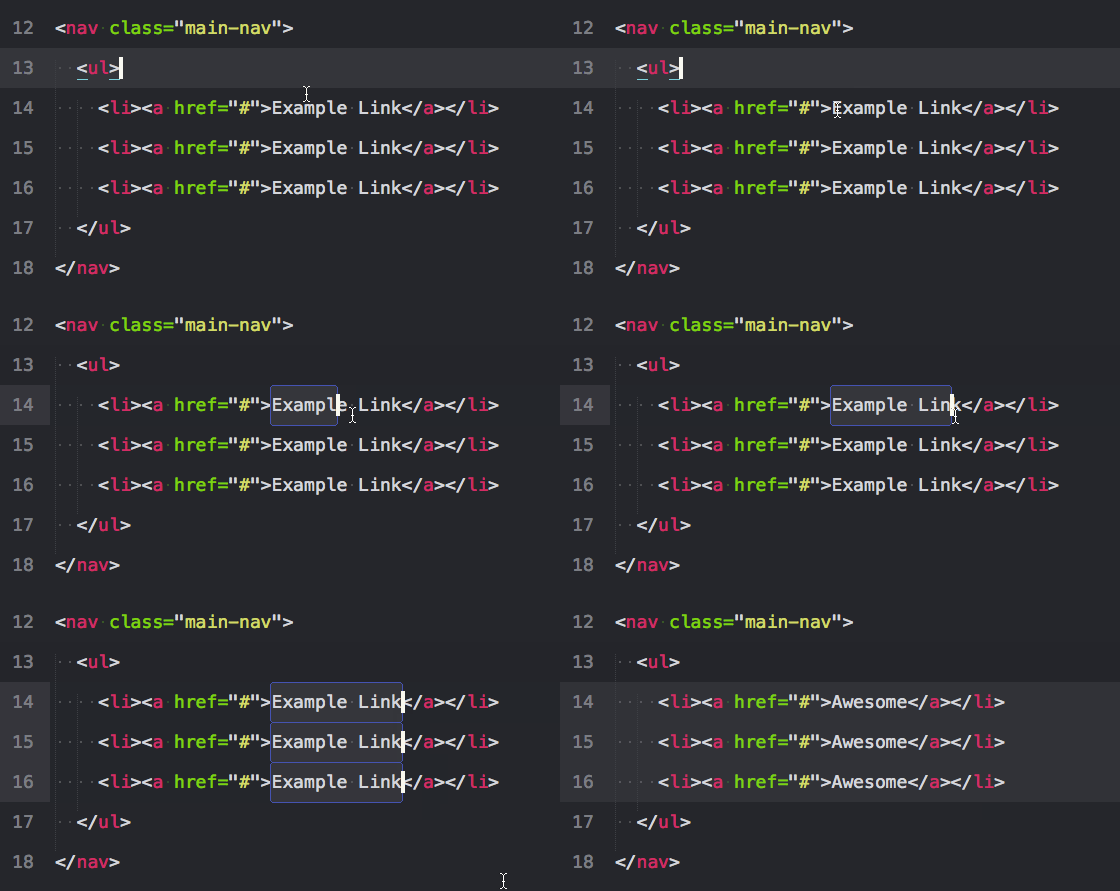
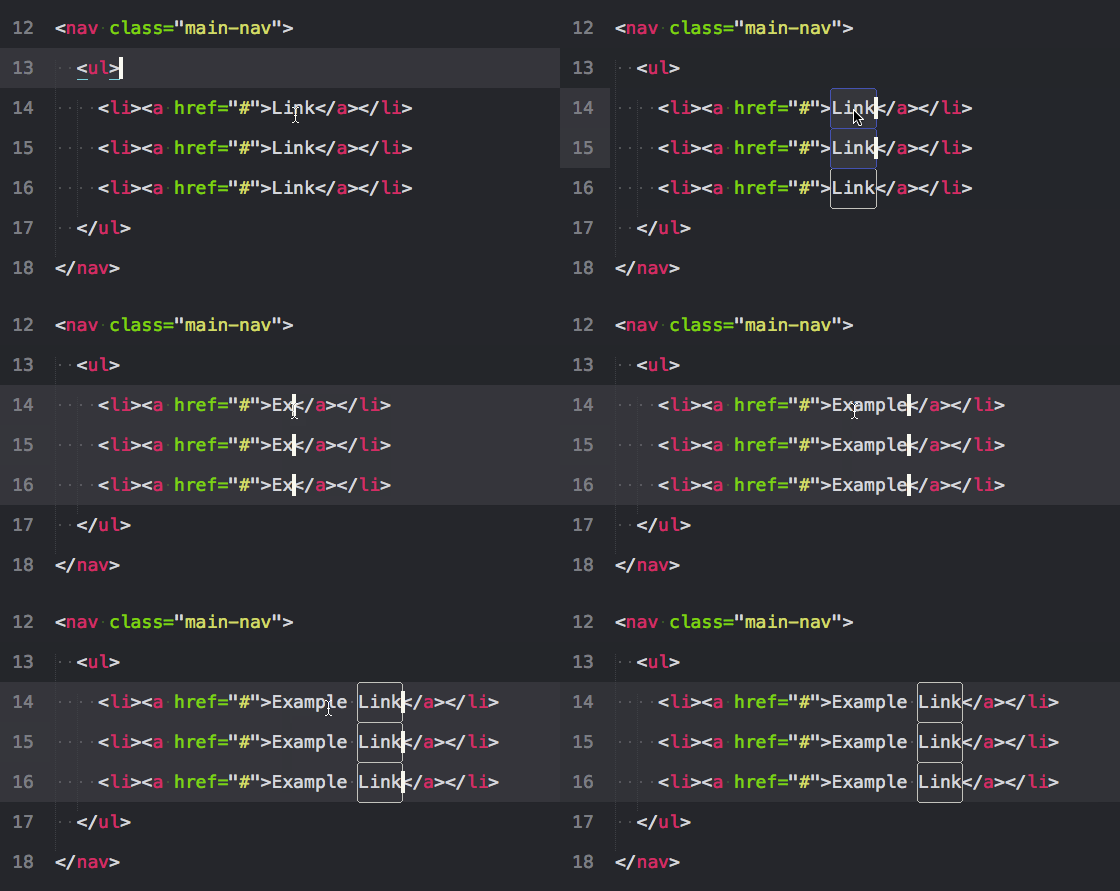
1. 就近选择相同项: ctrl+d

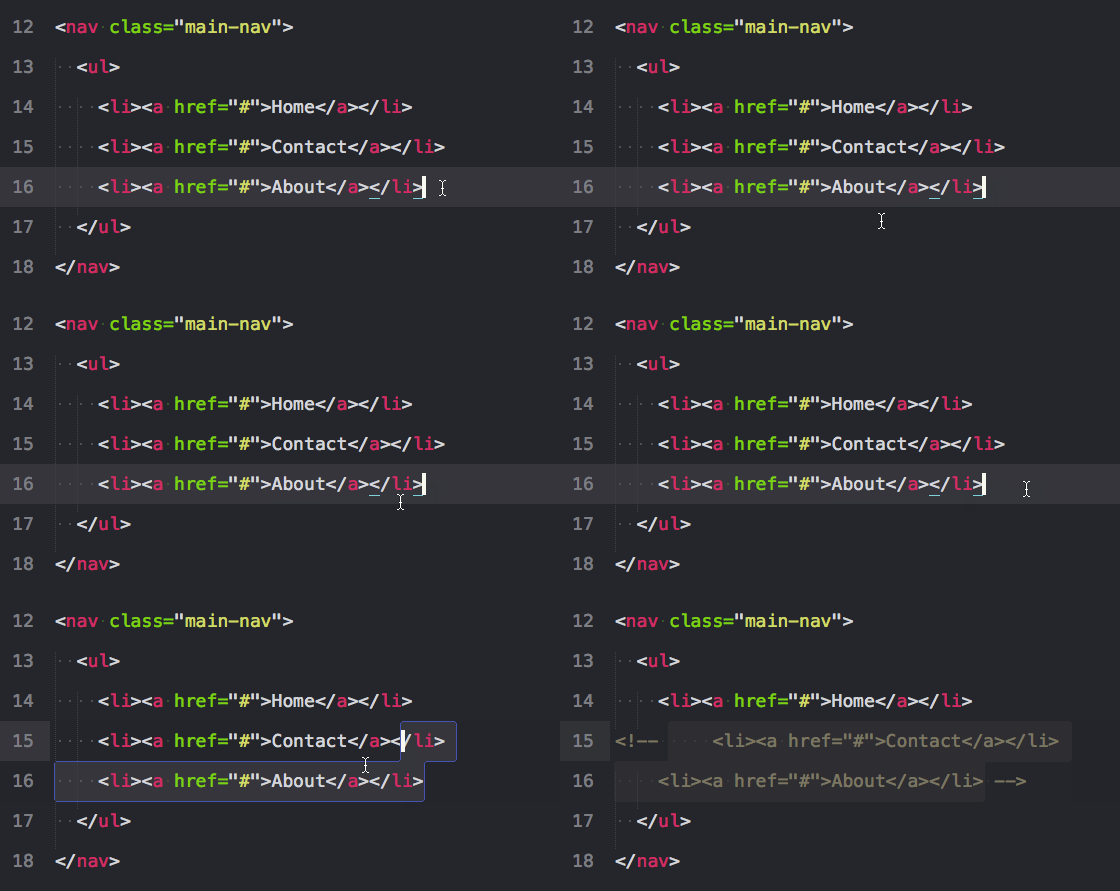
把光标放在一个单词上,按下ctrl+d,将选择这个单词。一直按住ctrl且按D多次,将选择当前选中项的下一个匹配项。通过按住ctrl,再按D三次,将选择三个相同的文本。

2. 选择当前文件所有匹配项: alt+f3

选择文件中的所有匹配项。小心使用这个,因为它能选择一个文件中的所有匹配项. .

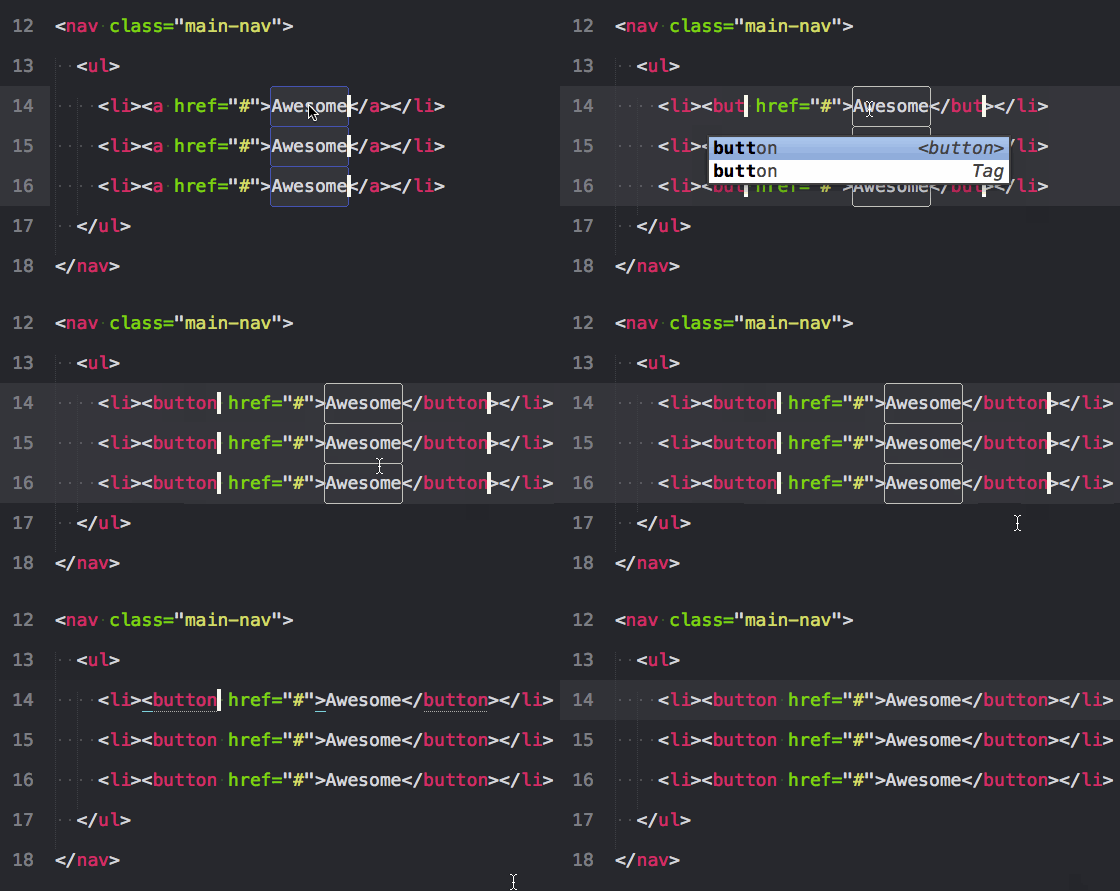
3. 选择文本的包裹标签: ctrl+shift+` (ESC键下面的那个)

这是一个法宝。也许你希望所有属性保持不变,但只是想选择标签。这个快捷键为你这样做,会注意到你可以在一次操作多个标签。ps:需要Emmet插件(可以直接到后面看插件的安装)

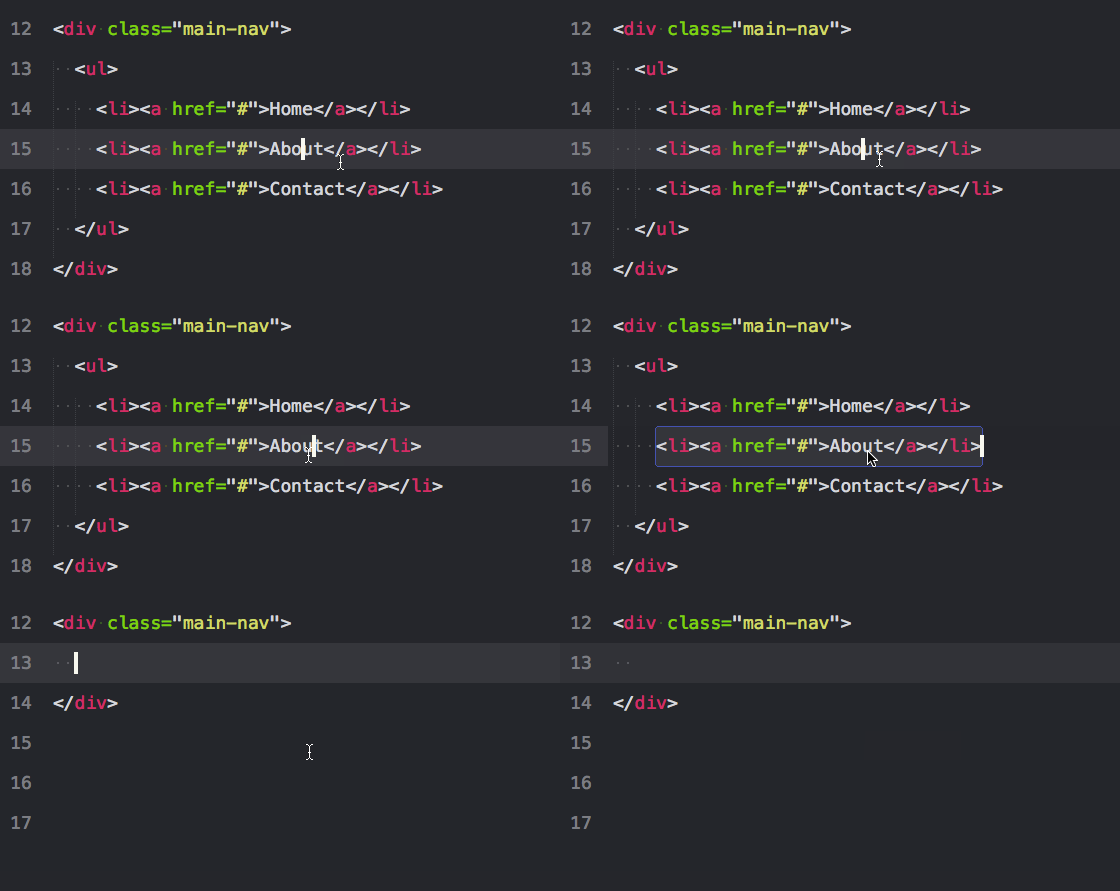
4. 向上扩展一层: ctrl+shift+a

如果你把光标放在文本间再按下上面的键将选择文本,就像ctrl+d。但是再次按下它,将选择父容器,再按,将选择父容器的父容器。ps:需要Emmet插件(可以直接到后面看插件的安装)

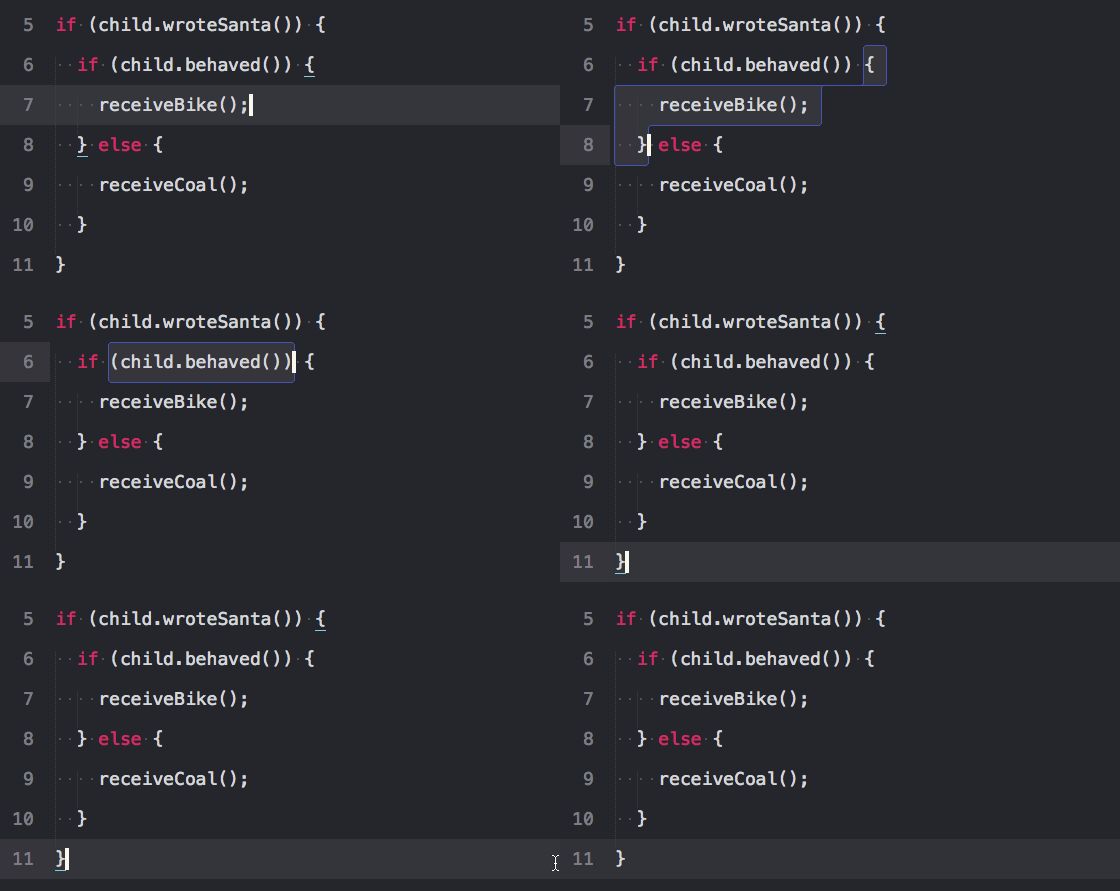
5. 选择括号内的内容: ctrl+shift+m

这有助于选择括号之间的一切。同样适用于CSS。

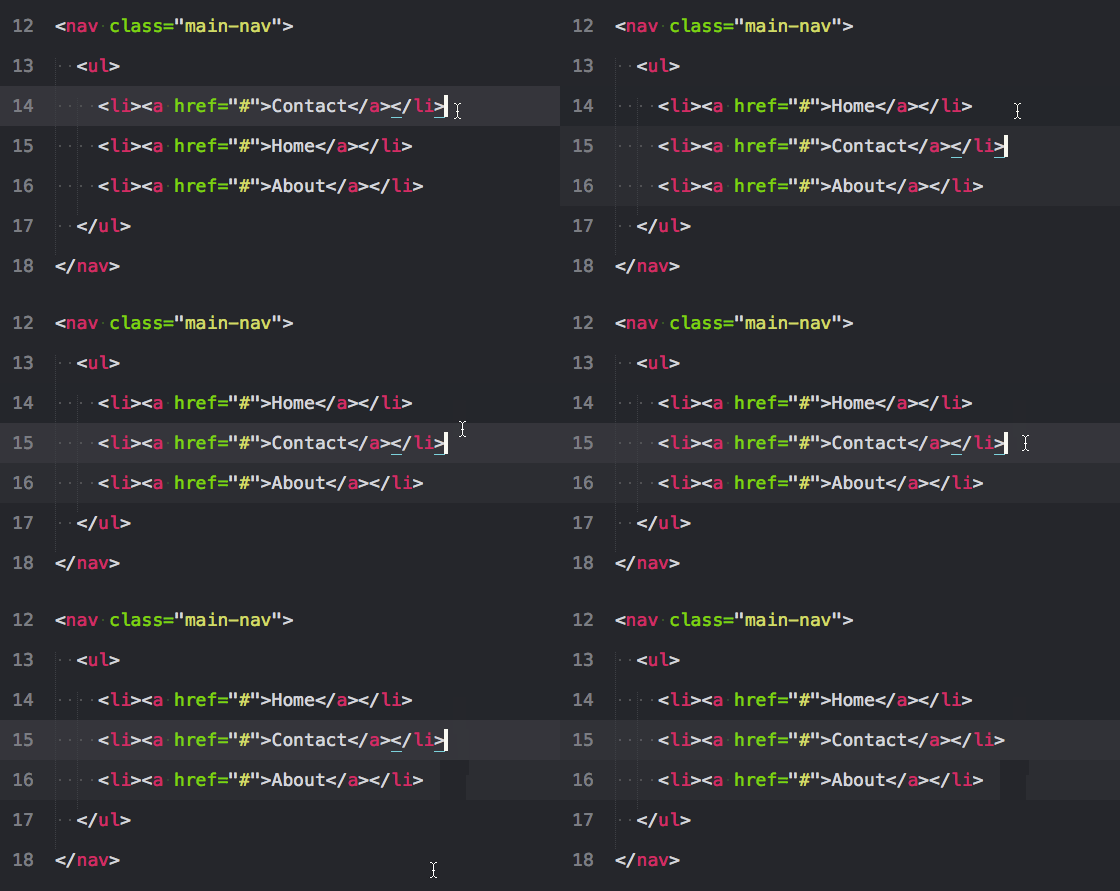
6. 整行的上下移动: ctrl+shift+↑或 ctrl+shift+↓

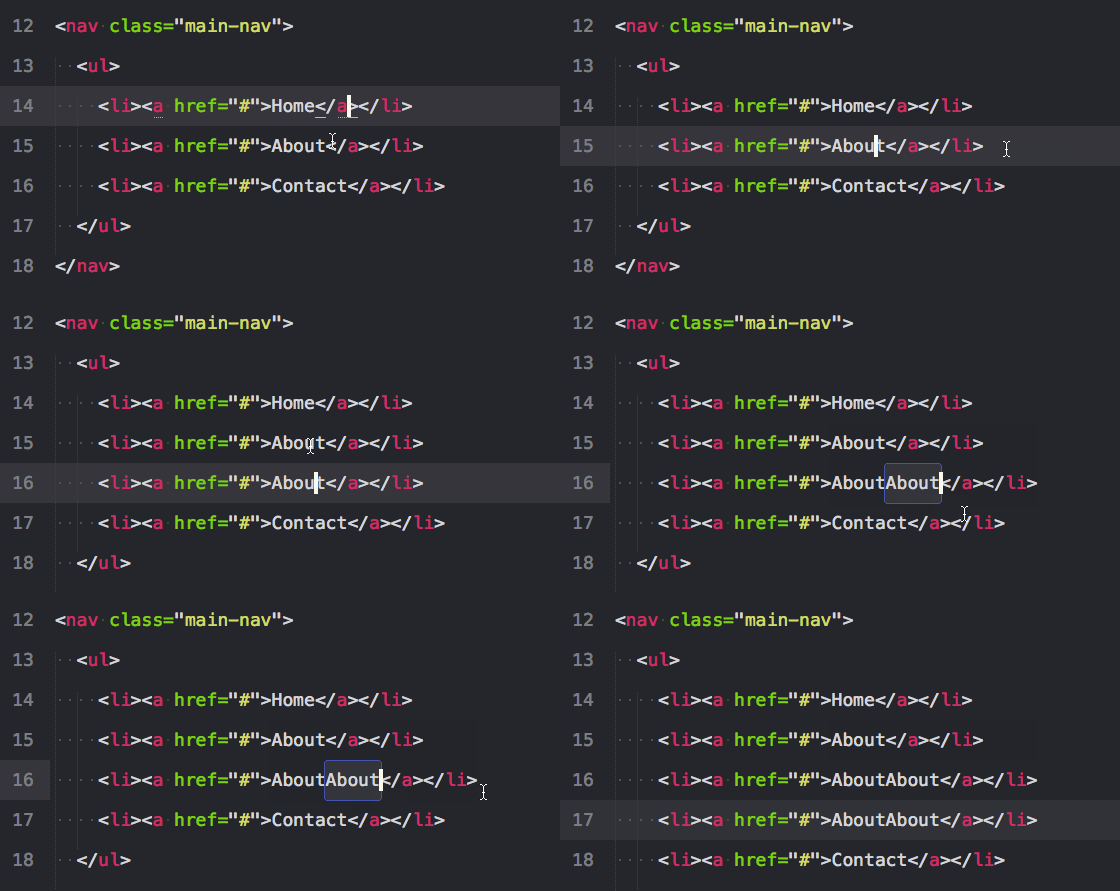
7. 复制行或选中项: ctrl+shift+d

如果你已经选中了文本,它会复制你的选中项。否则,把光标放在行上,会复制整行。

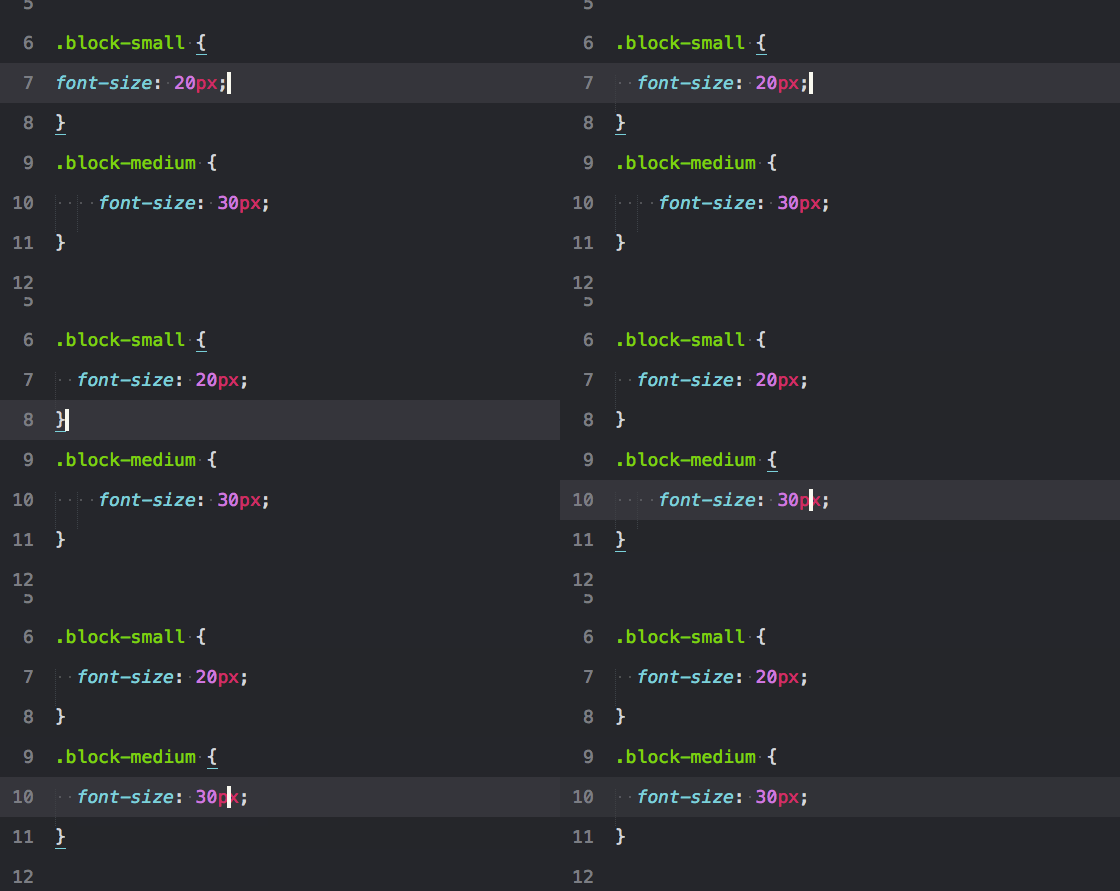
8. 增加和减少缩进: ctrl+[ 或 ]

9. 单行剪辑或选中项: ctrl+x

10. 粘贴并复制格式: ctrl+shift+v

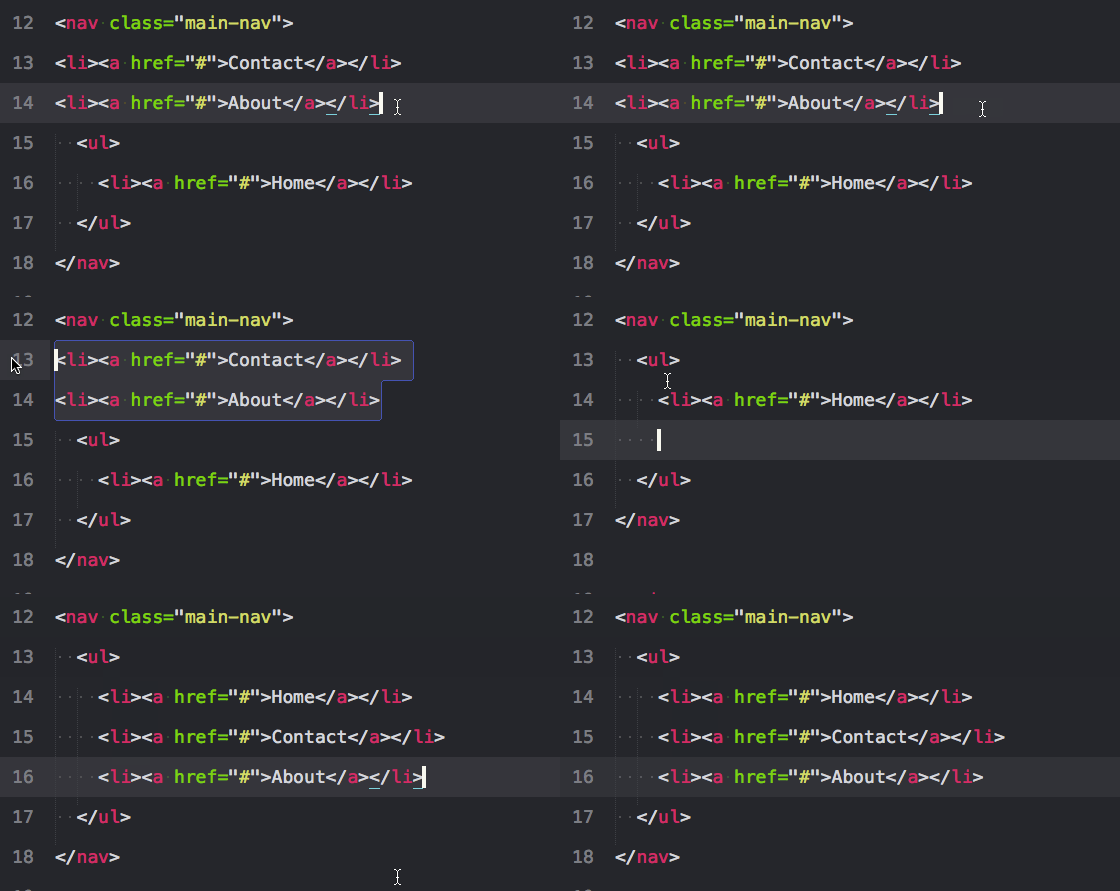
11. 用标签包裹行或选中项: alt+shift+w

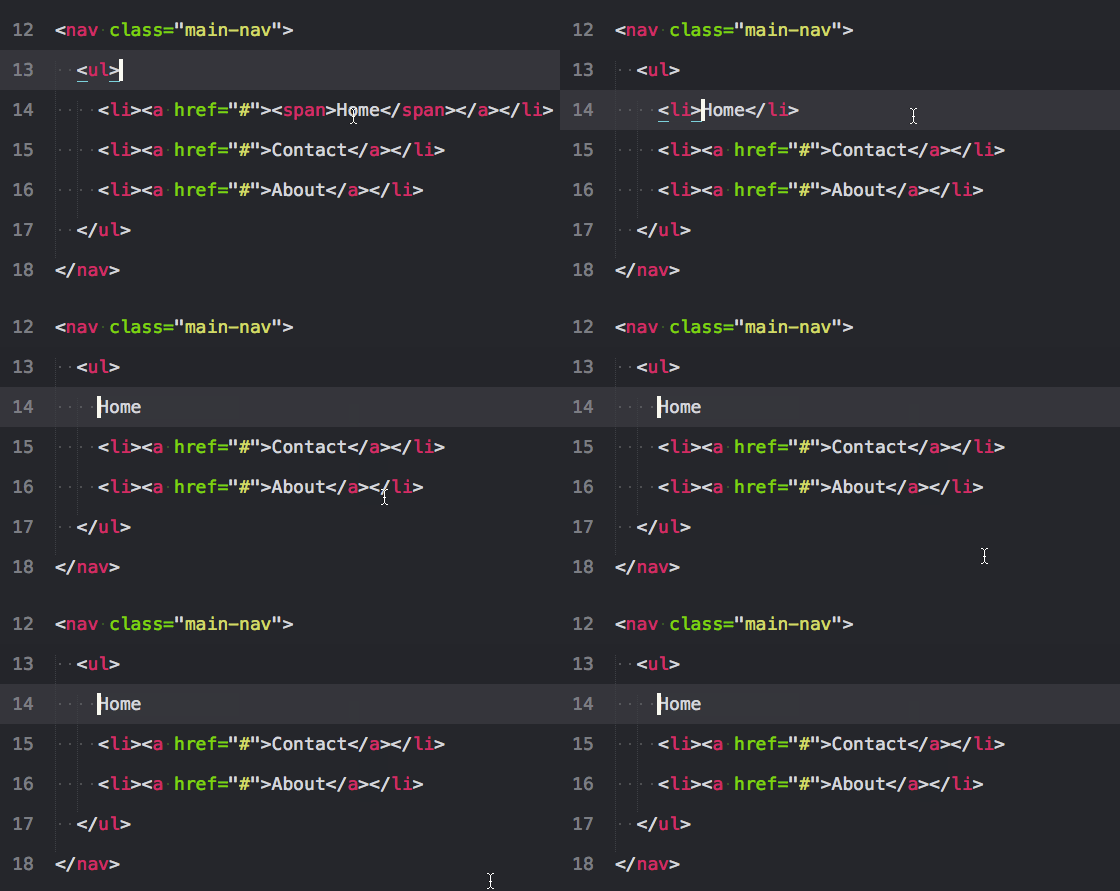
12. 移除未闭合的容器元素: ctrl+shift+;

这会移除与你的光标相关的父标签。对清除标记很有帮助。

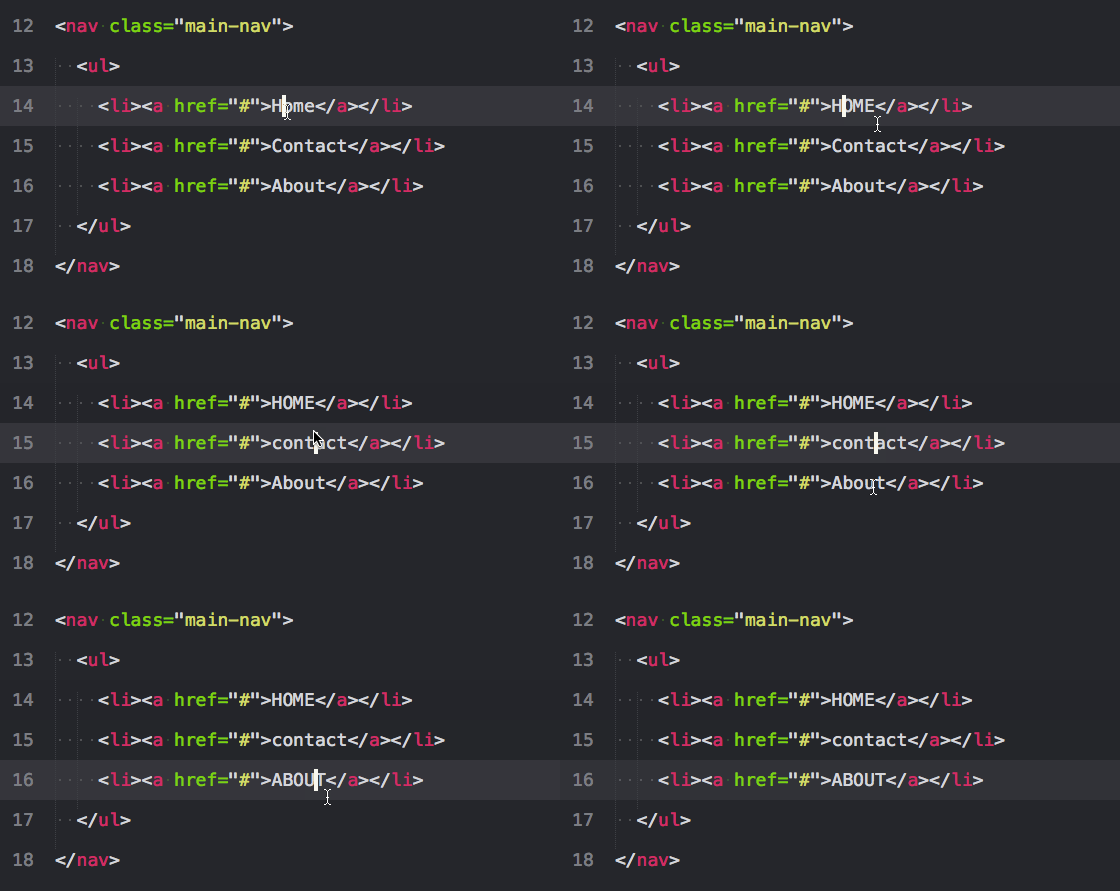
13. 大写和小写: 大写ctrl+k+u、小写ctrl+k+l

14. 注释选中项/行: ctrl+/

这个在所有语言下都可用, 对行和选中项都可用

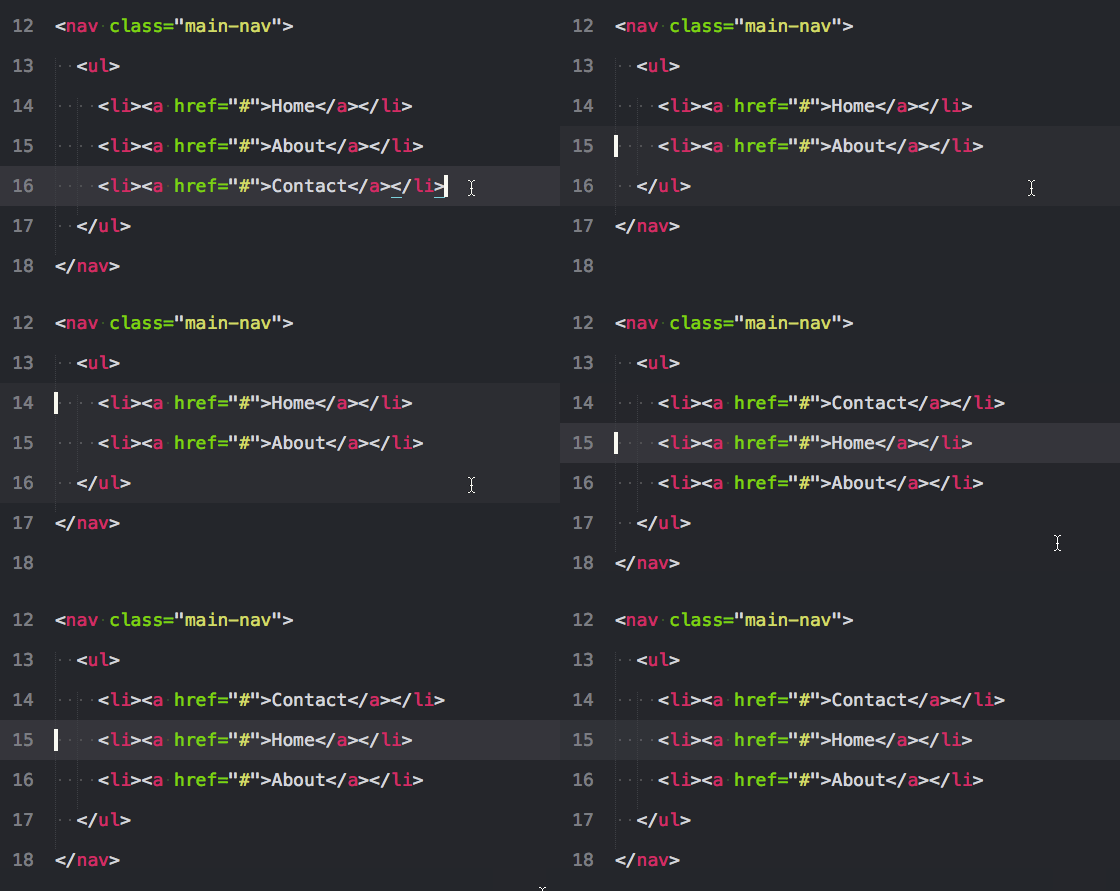
15. 删除一行: ctrl+shift+k

这个就不用图了吧


SublimeText3 插件部分

首先是安装包管理器Package Control,SublimeText3的指令已经更新了,SublimeText2更新上来的童鞋注意下
Ctrl+`打开控制台或者View->Show Console菜单打开命令行

import urllib.request,os; pf = 'Package Control.sublime-package'; ipp = sublime.installed_packages_path(); urllib.request.install_opener( urllib.request.build_opener( urllib.request.ProxyHandler()) ); open(os.path.join(ipp, pf), 'wb').write(urllib.request.urlopen( 'http://sublime.wbond.net/' + pf.replace(' ','%20')).read())

就是上面这串东西了,然后就可以接下来的安装插件了

Tips: 插件名字链接到github,网络不好的童鞋自行下载包扔到Preferences->Browse Packages打开的文件夹下面,然后解压,重启Sublime就行

1. emmet

这个没有什么好说的,类似jQuery的语法,编码蹭蹭往上提。不过要求PyV8环境(安装完后你会看到有一个文件夹),最好还是选择在线装吧。
ctrl+shift+P 输入 install Package 等待读取服务器列表,输入emmet第一个就是了
ps:最好看一下 github里面的简单教程

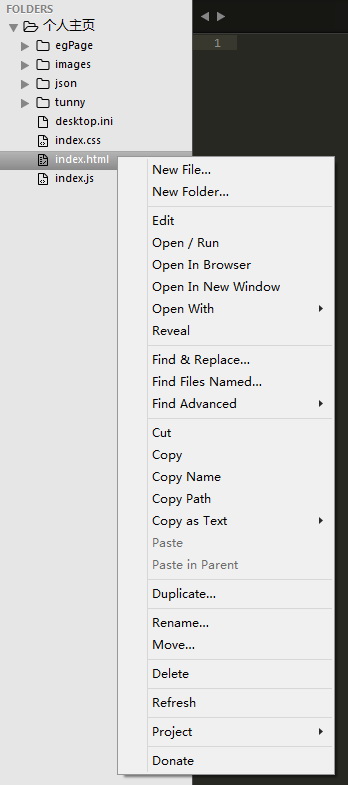
2. 侧边栏增强插件SideBarEnhancements

这个也没有什么好说的,谁用谁知道,大大增强右键列表的功能,装上就能用。

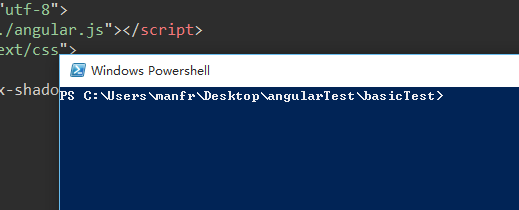
3. 控制台呼出插件Terminal

用node,Grunt等等要调出控制台的娃知道的,简直神奇有木有,装上就能用。

Tips:快捷键 ctrl+shift+T呼出当前文件路径的控制台

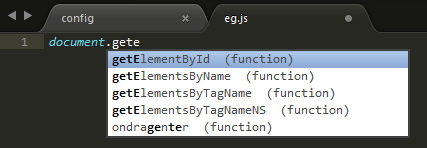
4. 代码提示插件SublimeCodeIntel

这个也没什么废话吧,支持多语言的高速编码的代码提示工具。
装上后还不能直接使用,查了一下原因要配置
你可以点击 Preferences->Browse Packages->SublimeCodeIntel然后添加一个.codeintel文件夹再再在文件夹里面添加一个config文件(Windows创建.codeintel文件夹需要输入.codeintel.

config文件配置:

{
    "PHP": {
        "php": '/usr/bin/php',
        "phpExtraPaths": [],
        "phpConfigFile": 'php.ini'
    },
    "JavaScript": {
        "javascriptExtraPaths": []
    },
    "Perl": {
        "perl": "/usr/bin/perl",
        "perlExtraPaths": []
    },
    "Ruby": {
        "ruby": "/usr/bin/ruby",
        "rubyExtraPaths": []
    },
    "Python": {
        "python": '/usr/bin/python',
        "pythonExtraPaths": []
    },
    "Python3": {
        "python": '/usr/bin/python3',
        "pythonExtraPaths": []
    }
}

其实只要有JS就够了,不过或许某天你要写PHP了呢是吧,留着吧。

然后打开Sublime创建个文件试一下,如果还不行就按下 ctrl+shift+space 开启提示功能

5. 代码排版插件Sublime-HTMLPrettify

以前用的是什么TAG,CssComb和JSFormat,但是某一天发现这款集成prettify的插件后就一直没换过了,不要被插件的HTML迷惑,这是一款可以用于HTML,CSS,Javascript的集成排版插件

Tips:安装完快捷键ctrl+shift+h 一键格式化代码

6. CSS3前缀补充插件Autoprefixer

ctrl+shift+P输入install Package等待读取服务器列表,输入autoprefixer第一个就是了
要装Node.js,没有的话去下载安装吧
插件使用CanIUse资料库,能精准判断哪些属性需要什么前缀

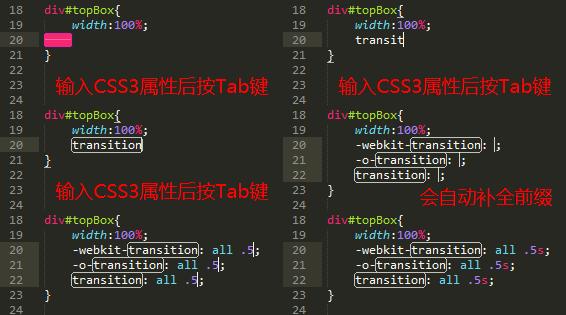
Tips:使用方法:在输入CSS3属性后(冒号前)按Tab键


SublimeText3 添加右键菜单和快捷开启浏览器

添加右键菜单

有时候要开个文件要开个SublimeText3,又要拉文件,麻烦。这里介绍将Sublime添加到右键菜单。

  1. 打开注册表,开始→运行→regedit
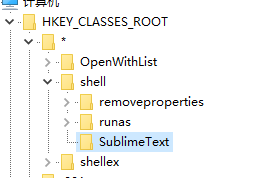
  2. 在 HKEY_CLASSSES_ROOT→ * → Shell 下面新建项命名为SublimeText
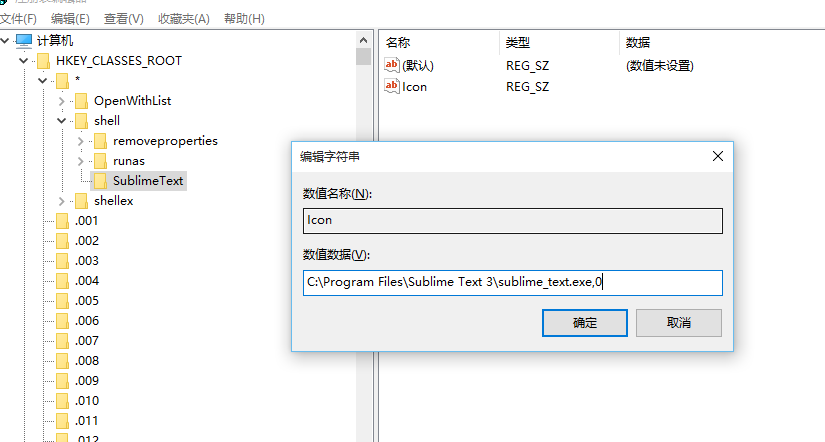
  3. 右键SublimeText项,新建字符串值,命名为Icon,值为 “sublime_text.exe所在路径,0”,例如:C:\Program Files\Sublime Text 3\sublime_text.exe,0
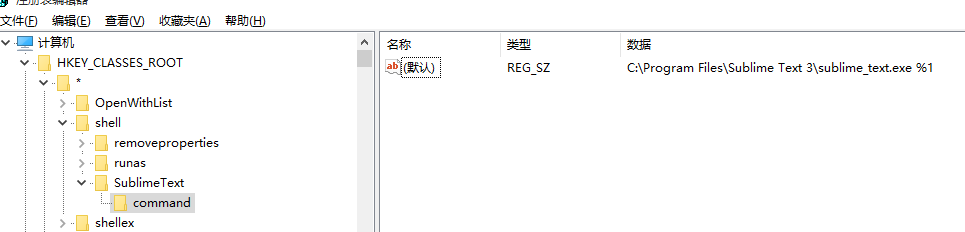
  4. 右键SublimeText项,新建项,命名为command,默认值为 “sublime_text.exe所在路径 %1”,例如:C:\Program Files\Sublime Text 3\sublime_text.exe %1

搞定后随便右击个文本文件试试,是不是看到了Sublime打开的选项了捏?Perfect

一键浏览文件

Preferences->Key Bindings - User打开用户快捷键设置,copy下面的设置

[
    //firefox
    {
        "keys": ["f1"],
        "command": "side_bar_files_open_with",
        "args": {
            "paths": [],
            "application": "C:\\Program Files\\Mozilla Firefox\\firefox.exe",
            "extensions": ".*"
        }
    },
    //chorme
    {
        "keys": ["f2"],
        "command": "side_bar_files_open_with",
        "args": {
            "paths": [],
            "application": "C:\\Users\\manfr\\AppData\\Local\\Google\\Chrome\\Application\\chrome.exe",
            "extensions": ".*"
        }
    },
    //IE
    {
        "keys": ["f3"],
        "command": "side_bar_files_open_with",
        "args": {
            "paths": [],
            "application": "C:\\Program Files\\Internet Explorer\\iexplore.exe",
            "extensions": ".*"
        }
    },
    //safari
    {
        "keys": ["f4"],
        "command": "side_bar_files_open_with",
        "args": {
            "paths": [],
            "application": "C:\\Program Files (x86)\\Safari\\Safari.exe",
            "extensions": ".*"
        }
    }
]

稍微解释下,keys是按键,application是浏览器应用程序路径,注意反斜杠的要转义。extensions是匹配所有的文件后缀格式。

Tips:查了下默认的快捷键,SublimeText3中f1-f12中只有f11被默认为全屏命令,其他的没设置。也就是说,你可以装十个八个浏览器一字排开按过去测试。


SublimeText3 问题部分(自己遇到过的)

1.自动更新

有时候会弹出自动更新的框,解决方法:

  1. 找到Preferences -> Settings-User(设置用户)
  2. 在最后一个花括号结尾(“}”)前添加一句:"update_check":false
  3. 然后请关闭Submine Text并重启,即不会再弹出更新提醒了

2.不能获取插件列表 Package Control:There are no packages available for installation

  1. cmd下输入ping sublime.wbond.net链接一下看下sublime.wbond.net这个域名的ip
  2. 打开C:\Windows\system32\drivers\etc\hosts文件。
    在最后面加上例如 50.116.34.243 sublime.wbond.net这样的对应关系,IP是上面测试的
  3. 然后请关闭Submine Text并重启,即不会再弹出更新提醒了

The 10 Best Online Tools for Testing Code Snippets

Standard
http://designsparkle.com/testing-code-snippets/
code testing snippets

Online tools for testing code snippets make it an indispensable assistant to the developers to check the quality of their code in reducing errors and keep coding practices easier. Here are 10 of the best online tools for testing code snippets in order to help find security flaws and reduce developments costs. 

You May Also Like:

Online Tools for Testing Code Snippets

CodePen

Build, Explore, and Teach the Web, Instantly. CodePen is a web-based HTML, CSS, and JavaScript code editor that lets you experiment with code right in the browser.

code editor

JSBin

JS Bin is a webapp specifically designed to help JavaScript and CSS folk test snippets of code, within some context, and debug the code collaboratively.

code editor

SQLFiddle

SQLFiddle is an online SQL query processing tool. You can run your SQL statements online without having a locally installed database. It can overcome the feature where you can have a database inside a portable disk and plug it for use anywhere. It is also designed to support multiple databases.

code snippet

jsFiddle

jsFiddle is a free code-sharing tool that allows you to edit, share, execute and debug Web code within a browser.

Advertisements


code editors

Liveweave

Liveweave is a HTML5, CSS3 & JavaScript playground for web designers and developers.

liveweave

RegExr

RegExr is a HTML/JS based tool for creating, testing, and learning about Regular Expressions.

testing code

Dabblet

Dabblet is an interactive playground for quickly testing code snippets of CSS and HTML. It uses -prefix-free, so that you won’t have to add any prefixes in your CSS code. You can save your work in Github gists, embed it in other websites and share it with others.

code testing snippets

iDeone

Ideone is an online compiler and debugging tool which allows you to compile source code and execute it online in more than 60 programming languages. Choose a programming language, enter the source code with optional input data and you are ready to go!

code testing snippets

TinkerBin 

Tinkerbin lets you play around with HTML, JavaScript, and CSS without creating files or uploading to servers. It also supports CoffeeScript, Sass(with Compass), Less, HAML, and more.

code testing tools

CSSDesk

CSSDesk is a online HTML/CSS sandbox. Experiment with CSS, see the results live, and share your code with others.

sandbox tools

30 Pro jQuery Tips, Tricks and Strategies

Standard

原文:http://www.problogdesign.com/coding/30-pro-jquery-tips-tricks-and-strategies/

Whether you’re a developer or a designer, a strong jQuery skillset is something you can’t afford to be without. Today, I’m going to show you 30 handy jQuery coding tricks that will help you make your scripts more robust, elegant and professional.

Getting Started

These tips and tricks all have one thing in common- they are all smashingly useful. With this stuff in your back pocket, you’ll be ready to go change the world, and even better, write jQuery like you know what you’re doing. It’s gonna be fun.

We’ll start with some basic tricks, and move to some more advanced stuff like actually extending jQuery’s methods and filters. Of course, you should be familiar with the basics of jQuery first. If you haven’t used jQuery before, I highly recommend browsing the documentation and watching jQuery for Absolute Beginners Video Series. Otherwise, you’re ready to dig in!

#1 – Delay with Animate()

This is a very quick, easy way to cause delayed actions in jQuery without using setTimeout. The way we make it work is to add an animate function into your chain and animate the element to 100% opacity (which it’s already at), so it looks like nothing is happening.

For instance, let’s say that you wanted to open a dialog and then fade it away after 5 seconds. Using animate, you can do it like this:

1
2
3
$(function(){
	$("body").append("<div class='dialog'></div>").<em>animate({ opacity : 1.0 }, 5000)</em>.fadeOut();
});

Don’t you just love jQuery chaining? You’re welcome to read more about this technique from Karl Swedberg.

UPDATE: jQuery 1.4 has eliminated the need for this hack with a method called delay(). It is just what is sounds like – a function specifically made to delay an animation effect. Way to go, jQuery!

#2 – Loop through Elements Backwards

One of my personal favorites is being able to loop backwards through a set of elements. We all know each() lets us easily loop through elements, but what if we need to go backwards? Here’s the trick:

1
2
3
4
5
6
7
8
$(function(){
	var reversedSet = $("li").get().reverse();
	//Use get() to return an array of elements, and then reverse it
 
	$(reversedSet).each(function(){
		//Now we can plug our reversed set right into the each function. Could it be easier?
	});
});

#3 – Is There Anything in the jQuery Object?

Another very elementary but regularly useful trick is checking if there are any elements in the jQuery object. For example, let’s say we need to find out if there are any elements with a class of ‘active’ in the DOM. You can do that with a quick check of the jQuery object’s length property like this:

1
2
3
4
5
$(function(){
	if( $(".active").length ){
		//Now the code here will only be executed if there is at least one active element
	}
});

This works because 0 evaluates false, so the expression only evaluates true if there is at least one element in the jQuery object. You can also use size() to do the same thing.

#4 – Access iFrame Elements

Iframes aren’t the best solution to most problems, but when you do need to use one it’s very handy to know how to access the elements inside it with Javascript. jQuery’s contents() method makes this a breeze, enabling us to load the iframe’s DOM in one line like this:

1
2
3
4
5
6
7
$(function(){
	var iFrameDOM = $("iframe#someID").contents();
	//Now you can use <strong>find()</strong> to access any element in the iframe:
 
	iFrameDOM.find(".message").slideUp();
	//Slides up all elements classed 'message' in the iframe
});

#5 – Equal Height Columns

This was one of CSS Newbie’s most popular posts of 2009, and it is a good, solid trick to have in your toolbox. The function works by accepting a group of columns, measuring each one to see which is largest, and then resizing them all to match the biggest one. Here’s the code (slighly modified):

1
2
3
4
5
6
7
8
9
10
11
12
$(function(){
	jQuery.fn.equalHeight = function () {
		var tallest = 0;
		this.each(function() {
			tallest = ($(this).height() > tallest)? $(this).height() : tallest;
		});
		return this.height(tallest);	
	}
 
	//Now you can call equalHeight
	$(".content-column").equalHeight();
});

An interesting and similar concept is the awesome jQuery masonry plugin, if you’re interested in checking it out.

#6 – Find a Selected Phrase and Manipulate It

Whether you’re looking to perform find and replace, highlight search terms, or something else, jQuery again makes it easy with html():

1
2
3
4
5
6
7
8
9
10
11
12
$(function(){
	//First define your search string, replacement and context:
	var phrase = "your search string";
	var replacement = "new string";
	var context = $(body);
 
	//
	context.html(
		context.html().replace('/'+phrase+'/gi', replacement);
	);
 
});

#7 – Hack Your Titles to Prevent Widows

Nobody likes to see widows – but thankfully with some jQuery and a little help from &nbsp; we can stop that from happening:

1
2
3
4
5
6
7
8
$(function(){
	//Loop through each title
	$("h3").each(function(){
		var content = $(this).text().split(" ");
		var widow = "&amp;nbsp;"+content.pop();
		$(this).html(content.join(" ")+widow);
	});
});

This technique was suggested in a comment by Bill Brown on Css-Tricks.

#8 – Add Pseudo-Selector Support in IE

Whether or not to support IE (especially 6) is a hotly debated issue, but if you are of the “let’s-make-the-best-of-this” camp, it’s nice to know that you can add pseudo-selector support with jQuery. And we aren’t just limited to :hover, although that’s the most common:

1
2
3
4
5
6
7
8
9
10
11
12
13
14
15
16
17
18
19
20
21
$(function(){
	<strong>//ADD HOVER SUPPORT:</strong>
	function hoverOn(){
		var currentClass = $(this).attr('class').split(' ')[0]; //Get first class name
		$(this).addClass(currentClass + '-hover');
	}
	function hoverOff(){
		var currentClass = $(this).attr('class').split(' ')[0]; //Get first class name
		$(this).removeClass(currentClass + '-hover');
	}
	$(".nav-item").hover(hoverOn,hoverOff);
 
	<strong>//ADD FIRST-CHILD SUPPORT:</strong>
	jQuery.fn.firstChild = function(){
		return this.each(function(){
			var currentClass = $(this).attr('class').split(' ')[0]; //Get first class name
			$(this).children(":first").addClass(currentClass + '-first-child');
		});
	}
	$(".searchform").firstChild();
});

The great thing about setting it up that way firstChild(), hoverOn() and hoverOff() are very reusable. Now, in the CSS we can simply add the ‘nav-item-hover’ or ‘searchform-first-child’ classes as additional selectors:

1
2
3
4
5
6
7
8
.nav-item:hover, <strong>.nav-item-hover</strong>{
	background:#FFFFFF;
	border: solid 3px #888;
}
.searchform:first-child, <strong>.searchform-first-child</strong>{
	background:#FFFFFF;
	border: solid 3px #888;
}

It’s not pretty, but it is valid and it works. I’ve got to say, though, that I sure am looking forward to the day we won’t have to bother with this stuff!

#9 – Manage Search Box Values

A popular effect is to fill a site’s search box with a value (like ‘search…’) and then use jQuery to clear the default value when the field receives focus, reverting if the field is empty when blurred. That is easily accomplished with a couple lines of jQuery:

1
2
3
4
5
6
7
8
9
$(function(){
	//set default value:
	$("#searchbox")
	  .val('search?');
	  .focus(function(){this.val('')})
	  .blur(function(){
		(this.val() === '')? this.val('search?') : null;
	  });
});

#10 – Create a Disappearing ‘Back-to-Top’ Link

The disappearing back-to-top link was inspired by Brian Cray. All you have to do is add a back-to-top link at the bottom of your content like normal, and then jQuery performs the magic:

1
2
3
4
5
6
7
8
9
10
11
12
13
14
15
16
17
18
19
20
21
22
23
24
25
$(function(){
/* set variables locally for increased performance */
	var scroll_timer, 
		displayed = false,
		$message = $('#message a'),
		$window = $(window),
		top = $(document.body).children(0).position().top;
 
	/* react to scroll event on window */
	$window.scroll(function () {
		window.clearTimeout(scroll_timer);
		scroll_timer = window.setTimeout(function () { // use a timer for performance
			if($window.scrollTop() <= top) // hide if at the top of the page
			{
				displayed = false;
				$message.fadeOut(500);
			}
			else if(displayed == false) // show if scrolling down
			{
				displayed = true;
				$message.stop(true, true).show().click(function () { $message.fadeOut(500); });
			}
		}, 100);
	});
});

Brian also added some nice-looking CSS, which you could add as a css file or define in an object literal and apply it using jQuery.css(). Feel free to go check out his in-depth explanation if you want to learn more.

#11 – Easily Respond to Event Data

One of my favorite things about jQuery is its convenient remapping of event data, virtually eliminating cross-browser inconsitencies and making events much easier to respond to. jQuery passes an event parameter into all bound/triggered functions, which is commonly called e:

1
2
3
4
5
6
7
8
9
10
11
12
$(function() {
	//We can get X/Y coordinates on click events:
	$("a").click(function(<em>e</em>){
		var clickX = e.pageX;
		var clickY = e.pageX;
	});
 
	//Or detect which key was pressed:
	$("window").keypress(function(<em>e</em>){
		var keyPressed = e.which;
	});
});

You can check out the jQuery docs on this one to see all the possibilites, or view this keycode reference if you’d like to look up a certain key’s character code.

#12 – Encode HTML Entities

The first place I saw this mentioned was over at Debuggable, and I have to say they really came up with something good here. The idea is to produce a jQuery result similar to PHP’s htmlentities(). Check this out:

1
2
3
4
5
6
7
8
9
$(function(){
	var text = $("#someElement").text();
	var text2 = "Some <code> & such to encode";
	//you can define a string or get the text of an element or field
 
	var html = $(text).html();
	var html2 = $(text2).html();
	//Done - html and html2 now hold the encoded values!
});

#13 – Friendly Text Resizing

Originally mentioned at ShopDev, this is an excellent way to include some user-centricity in your code (allowing them to control the font-size):

1
2
3
4
5
6
7
8
9
10
11
12
13
14
15
16
17
18
19
20
21
22
23
$(function(){
  // Reset Font Size
  var originalFontSize = $('html').css('font-size');
    $(".resetFont").click(function(){
    $('html').css('font-size', originalFontSize);
  });
  // Increase Font Size
  $(".increaseFont").click(function(){
    var currentFontSize = $('html').css('font-size');
    var currentFontSizeNum = parseFloat(currentFontSize, 10);
    var newFontSize = currentFontSizeNum*1.2;
    $('html').css('font-size', newFontSize);
    return false;
  });
  // Decrease Font Size
  $(".decreaseFont").click(function(){
    var currentFontSize = $('html').css('font-size');
    var currentFontSizeNum = parseFloat(currentFontSize, 10);
    var newFontSize = currentFontSizeNum*0.8;
    $('html').css('font-size', newFontSize);
    return false;
  });
});

As I said, this is nice trick to know and adds some of that dynamic friendliness that people enjoy so much.

#14 – Open External Links in a New Window

This external links hack has been mentioned before at Cats Who Code, and although imperfect it’s a good way to open external links in new windows without causing validation errors in XHTML 1.0 Strict.

1
2
3
4
5
$(function(){
	$('a[rel$='external']').click(function(){
		this.target = "_blank";
	});
});

This works by grabbing all links with an external rel and adding a blank target. Same result, it’s just not hardcoded into the site.

#15 – Gracefully Degrading AJAX Navigation

AJAX navigation is great – but not for users and bots who can’t use it. The good news is, it’s possible to offer direct links to your content while still presenting AJAX functionality (to users who have that capability) by catching links before they go anywhere, returning false on them and loading the AJAX content instead. It could look like this:

1
2
3
4
5
6
$(function(){
	$("a").bind("click",function(){
		//Put your AJAX request code here
		return false;
	});
});

Of course, this is very basic, but it’s an essential facet to any AJAX navigation. You can also check out SpeckyBoy’s post on Easy-to-Use Free Ajax Navigation Solutions.

#16 – Create an Array of GET variables

Although this is not specifically a jQuery trick, it’s useful enough to be included here. Using GET variables in Javascript code doesn’t happen everyday, but when it does you’ll want to know a quick and efficient way to read them. All we have to do is get document.location.search and do some parsing on it:

1
2
3
4
5
6
7
8
9
10
 
var searchArray = document.location.search.substring(1).split("&");
//Take off the '?' and split into separate queries
 
//Now we'll loop through searchArray and create an associative array (object literal) called GET
var GET = []; 
for (searchTerm in searchArray){
	searchTerm.split("="); //Divide the searchTerm into property and value
	GET[searchTerm[0]] = searchTerm[1]; //Add property and value to the GET array
}

#17 – Partial Page Refresh Using load()

This excellent technique found at the Mediasoft Blog is way cool and very handy for creating a regularly updating dashboard/widget/etc. It works by using jQuery.load() to perform a AJAX request:

1
2
3
4
5
$(document).ready(function() {
	setInterval(function() {
		$("#content").load(location.href+" #content>*","");
	}, 5000);
});

Voila! It works – no iframes, meta refreshes or other such nonsense.

#18 – Skin with jQuery UI

If you’re going to write any jQuery plugins (I hope you have already!), you should know that a great way to add flexibility and elegance is to incorporate jQueryUI theming classes into any widgets/visible elements your plugin produces. The great thing about doing this is that it cuts or eliminates the css you have to provide with the plugin, and it adds a lot of customizability, too (which is one of the key factors in a successful plugin).

And the actual implementation is as simple as learning how the classes work and attaching them to plugin elements. I can see this would be especially great with plugins like form beautifiers and photo sliders, making it easy to keep a consistent look throughout a website or app. You can check out the Theming Reference here.

#19 – Include Other Scripts

Stylesheet switchers are nothing new, but adding other scripts with jQuery is something that is often overlooked. The advantage is twofold:

  1. It makes it easy to have lazy script loading.
  2. It also allows us to add scripts at runtime, which could be useful in a whole host of situations.

It’s as easy as using append() to add a new script to the head of the document:

1
2
3
4
5
6
7
8
$(function(){
	$("head").append("<script type='text/javascript' src='somescript.js'></script>");
 
	//Or, loading only when the slow stuff is ready:
	$("img,form").load(function(){
		$("head").append("<script type='text/javascript' src='somescript.js'></script>");
	});
});

#20 – Use Body Classes for Easy Styling

Do you want to save on code and keep your styling in the css file where it should be? Body classes (another great ideas suggested by Karl Swedberg) allow you to do that. In short, you can use jQuery to add a ‘JS’ class to the body element, which will enable you to set styles in your css that will only be applied if Javascript is enabled. For example:

1
2
3
$(document).ready(function() {
	$("body").addClass("JS");
});

For Javascript users the body now has a JS class, so in our CSS we can add styles like this:

ul.navigation{
	display:block;
}
.JS ul.navigation{
	display:none;
}

This gives us a great way to change styles based on whether or not Javascript is supported/enabled, and we can still keep the styling in the CSS file. Another interesting related use of this technique is to add browser classes to the body, enabling easy browser-specific styling. You can read more about that here.

#21 – Optimize Your Performance

Experienced coders don’t make clients wait – they write code that runs fast! There are several ways you can make your code run faster like:

  • Reference id’s rather than classes (id selection is native and therefore quicker)
  • Use for instead of each()
  • Limit DOM manipulation by adding elements in one big chunk rather than one at a time
  • Take advantage of event delegation
  • Link to Google’s jQuery copy rather than hosting your own – it’s faster and always up to date

Basically, it all boils down to not making jQuery do any more work than it has to (and using native abilites whenever possible). Giulio Bai wrote an excellent post on jQuery perfomance, if you’d like to dig in deeper.

#22 – Adapt Your Scripts to Work Cross-Browser – The Right Way

Thankfully, jQuery’s cross-browser compatibility really cuts down the need for browser hacks. Sometimes, though, it is good to be able to get information about the client, and we can do that cleanly and unobtrusively with jQuery.support:

1
2
3
4
5
//Does this client follow the W3C box model?
var boxModel = $.support.boxModel;
 
//Does this client support 'opacity'?
var opacity = $.support.opacity;

It’s definitely better practice to use feature-detection rather than browser sniffing, and this is a very efficient way to do it. Read more about jQuery.support’s properties here.

#23 – Configure jQuery to be Compatible with Other Libraries

We all find ourselves in situations where multiple libraries are needed, and because jQuery isn’t the only library that uses the $ alias, compatiblity issues sometimes pop up. Thankfully, this is easy to fix using jQuery’s noConflict(). You can even define a custom alias to replace the $:

1
2
3
4
var $j = jQuery.noConflict();
 
//Now you can use '$j' just like '$'
$j("div").hide();

An alternate technique is to wrap jQuery calls in an anonymous function and pass jQuery in as a parameter. Then you can use whatever alias you want, including the ‘$’. This is especially useful for plugin authoring:

1
2
3
4
5
(function($){
	$(document).ready(function(){
		//You can use normal jQuery syntax here
	});
})(jQuery);

#24 – Efficiently Store Element-Specific Information with data()

data() is probably one of the lesser used jQuery methods, although it certainly shouldn’t be. It allows us to attach/retrieve as much data as we want to DOM elements without misusing attributes, and is especially useful for more complex scripts. For example, Stefan Petre’s Colorpicker plugin uses data a lot because it’s tracking lots of fields and colors, converting rgb to hex, etc. Here’s are some examples of how data() works:

1
2
3
4
5
6
7
8
9
10
11
12
13
14
15
16
$(document).ready(function() {
	//Set status to 'unsaved'
    $("button:first").data("status", "unsaved");
 
	//Retrieve status
	var buttonStatus = $("button:first").data("status");
 
	//Change status, this time defining an object literal
	$("button:first").data("status", {saved : true, index : 1});
 
	//Retrieve status of index property
	var buttonStatusIndex = $("button:first").data("status").index;
 
	//Remove status data
	$("button:first").removeData("status");
});

I’m sure you can imagine the huge extent of possibilities this presents. Again, it’s worth reading the documentation if you haven’t used data() before.

#25 – Extend/Modify Existing jQuery Functions

Nobody says you can’t use the existing jQuery platform as a springboard for new ideas – and many have done just that using extend(), another wonderful jQuery method. The popular Easing plugin, for example, adds some animation variety by extending the easing object, an already existing object that is passed to animate() and others:

1
2
3
4
5
6
7
8
9
10
11
12
13
jQuery.extend({
	easing: {
		easein: function(x, t, b, c, d) {
			return c*(t/=d)*t + b; // in
		},
		easeinout: function(x, t, b, c, d) {
			if (t < d/2) return 2*c*t*t/(d*d) + b;
			var ts = t - d/2;
			return -2*c*ts*ts/(d*d) + 2*c*ts/d + c/2 + b;		
		},
		easeout: function(x, t, b, c, d) {
			return -c*t*t/(d*d) + 2*c*t/d + b;
		}...

By extending and improving jQuery’s default functionality, you can open up a whole new world of cool possibilities.

#26 – Reverse Engineer before() and after()

I always appreciated how jQuery provided append()/prepend() and appendTo()/prependTo(), enabling us to easily perform an append in either direction. I’ve wished, though, that a similar ability was provided with before() and after(). To change that, we can easily add two functions called putBefore() and putAfter() that will fulfill that purpose. Here’s how:

1
2
3
4
5
6
7
8
9
10
11
12
$(function(){
	jQuery.fn.putBefore = function(dest){
		return this.each(function(){
			$(dest).before($(this));
		});
	}
	jQuery.fn.putAfter = function(dest){
		return this.each(function(){
			$(dest).after($(this));
		});
	}
});

#27 – Add an isChildOf() Test

I’m sure we all have found ourselves in this situation – needing to know if an element is a descendant of another element. The good news is, with one line of code we can extend jQuery to allow this:

1
2
3
4
5
6
7
8
$(function(){
	jQuery.fn.isChildOf = function(b){return (this.parents(b).length > 0);};
 
	//Now we can evaluate like this:
	if ( $("li").isChildOf("ul") ){
		//Obviously, the li is a child of the ul so this code is executed
	}
});

Thanks to Dan Switzer II for this contribution!

#28 – Add Custom Selectors

This is another one that has been talked about a lot in the development community, so you may have this already figured out. If not, get ready because this will open some whole new windows for jQuery efficiency. The short story is, jQuery allows us to extend its expression object, which means we can add whatever custom selectors we want. For example, say we wanted to add a selector version of the isChildOf() method we wrote earlier:

1
2
3
4
5
6
7
8
9
10
$(function(){
	jQuery.extend(jQuery.expr[':'], {   
		'child-of' : function(a,b,c) {
			return (jQuery(a).parents(c[3]).length > 0);
		}   
	});
 
	//'child-of' is now a valid selector:
	$("li:child-of(ul.test)").css("background","#000");  
});

Debuggable has a great post on this one as well, if you’d like to read more about how the parameters work, etc.

#29 – Smooth Scrolling Without Plugin

Karl Swedberg posted this one a while back on the Learning jQuery site, and it is definitely worth a look. Of course, there are a couple of plugins to accomplish this (and they have more features), but I think the real value in this is the excercise of doing it yourself. Plus, look at how tiny it is:

1
2
3
4
5
6
7
8
9
10
11
12
13
$(document).ready(function() {
  $('a[href*=#]').click(function() {
    if (location.pathname.replace(/^\//,'') == this.pathname.replace(/^\//,'') 
      && location.hostname == this.hostname) {
       var $target = $(this.hash);
       $target = $target.length && $target || $('[name=' + this.hash.slice(1) +']');
       if ($target.length) {
           $target.ScrollTo(400);
           return false;
       }
    };
  });
});

#30 – Add Tabs without a Plugin

jQuery tabs are often covered but also often used, and like the scrolling trick above it’s important to know how to do these without a plugin. The first thing to do is write our markup, which should be perfectly presentable in the absence of Javascript:

1
2
3
4
5
6
7
8
9
10
11
12
13
14
15
16
<div class="widget">
	<h3>Popular</h3>
	<ul>
		<li>Item #1</li>
		<li>Item #2</li>
		<li>Item #3</li>
	</ul>
</div>
<div class="widget">
	<h3>Recent</h3>
	<ul>
		<li>Item #1</li>
		<li>Item #2</li>
		<li>Item #3</li>
	</ul>
</div>

With a bit of styling, this would look just fine, so we know our jQuery is going to degrade gracefully. Now we can write the code:

1
2
3
4
5
6
7
8
9
10
11
$(document).ready(function() {
	$("div.widget").hide().filter(":first").before("<ul class='tabs'></ul><div class='tab-content'></div>").add("div.widget").each(function(){
		$(this).find("ul").appendTo(".tab-content");
		$("ul.tabs").append("<li>" +$(this).find(":header:first").text()+ "</li>");
	});
	$("ul.tabs li").click(function(){
		$(this).addClass("active");
		$(".tab-content ul").slideUp().eq($("ul.tabs li").index(this)).slideDown();
	});
	$("ul.tabs li:first").click();
});

Of course, that’s just one way to do it. If you’d like to see some other approaches, see Extra Tuts’ jQuery Tabs Tutorials collection.

Wrapping Up

Thanks for reading, I hope you’ve enjoyed it! In case you’re all fired up on jQuery now, here are some links to more great tips n’ tricks collections:

As you can see, there are infinite opportunities for amazing innovation with jQuery. So keep experimenting, keep trying things, keep thinking, “What if?” You could be the next jQuery supergeek!

浅谈 PHP 中的多种加密技术及代码示例

Standard

原文:http://www.cnblogs.com/nixi8/p/4926689.html

同样是一道面试答错的问题,面试官问我非对称加密算法中有哪些经典的算法? 当时我愣了一下,因为我把非对称加密与单项散列加密的概念弄混淆了,所以更不用说什么非对称加密算法中有什么经典算法,结果当然也让面试官愣了一下,所以今天就花点时间说说PHP中的信息加密技术

信息加密技术的分类

单项散列加密技术(不可逆的加密)

属于摘要算法,不是一种加密算法,作用是把任意长的输入字符串变化成固定长的输出串的一种函数

MD5

string md5 ( string $str [, bool $raw_output = false ] ); //MD5加密,输入任意长度字符串返回一个唯一的32位字符

md5()为单向加密,没有逆向解密算法,但是还是可以对一些常见的字符串通过收集,枚举,碰撞等方法破解;所以为了让其破解起来更麻烦一些,所以我们一般加一点盐值(salt)并双重MD5;

md5(md5($password).'sdva'); 

sdva就是盐值,该盐值应该是随机的,比如md5常用在密码加密上,所以在注册的时候我会随机生成这个字符串,然后通过上面的方法来双重加密一下;

Crypt

很少看到有人用这个函数,如果要用的话有可能是用在对称或非对称的算法里面,了解一下既可;

string crypt ( string $str [, string $salt ] ) //第一个为需要加密的字符串,第二个为盐值(就是加密干扰值,如果没有提供,则默认由PHP自动生成);返回散列后的字符串或一个少于 13 字符的字符串,后者为了区别盐值。
<?php
$password='testtest.com';
echo crypt($password);
//输出:$1$DZ3.QX2.$CQZ8I.OfeepKYrWp0oG8L1
/*第二个$与第三个$之间的八个字符是由PHP生成的,每刷新一次就变一次
*/
echo "<hr>";

echo crypt($password,"testtest");
//输出:tesGeyALKYm3A
//当我们要加自定义的盐值时,如例子中的testtest作为第二个参数直接加入, 超出两位字符的会截取前两位
echo "<hr>";

echo  crypt($password,'$1$testtest$');
//输出:$1$testtest$DsiRAWGTHiVH3O0HSHGoL1
/*crypt加密函数有多种盐值加密支持,以上例子展示的是MD5散列作为盐值,该方式下
盐值以$1$$的形式加入,如例子中的testtest加在后两个$符之间,
超出八位字符的会截取前八位,总长为12位;crypt默认就是这种形式。
*/
echo "<hr>";
//crypt还有多种盐值加密支持,详见手册

Sha1加密:

string sha1 ( string $str [, bool $raw_output = false ]); //跟md5很像,不同的是sha1()默认情况下返回40个字符的散列值,传入参数性质一样,第一个为加密的字符串,第二个为raw_output的布尔值,默认为false,如果设置为true,sha1()则会返回原始的20 位原始格式报文摘要
<?php
$my_intro="zhouxiaogang";
echo sha1($my_intro); // b6773e8c180c693d9f875bcf77c1202a243e8594
echo "<hr>";
//当然,可以将多种加密算法混合使用
echo md5(sha1($my_intro));
//输出:54818bd624d69ac9a139bf92251e381d
//这种方式的双重加密也可以提高数据的安全性

非对称加密

非对称加密算法需要两个密钥来进行加密和解密,这两个秘钥是公开密钥(public key,简称公钥)和私有密钥(private key,简称私钥);

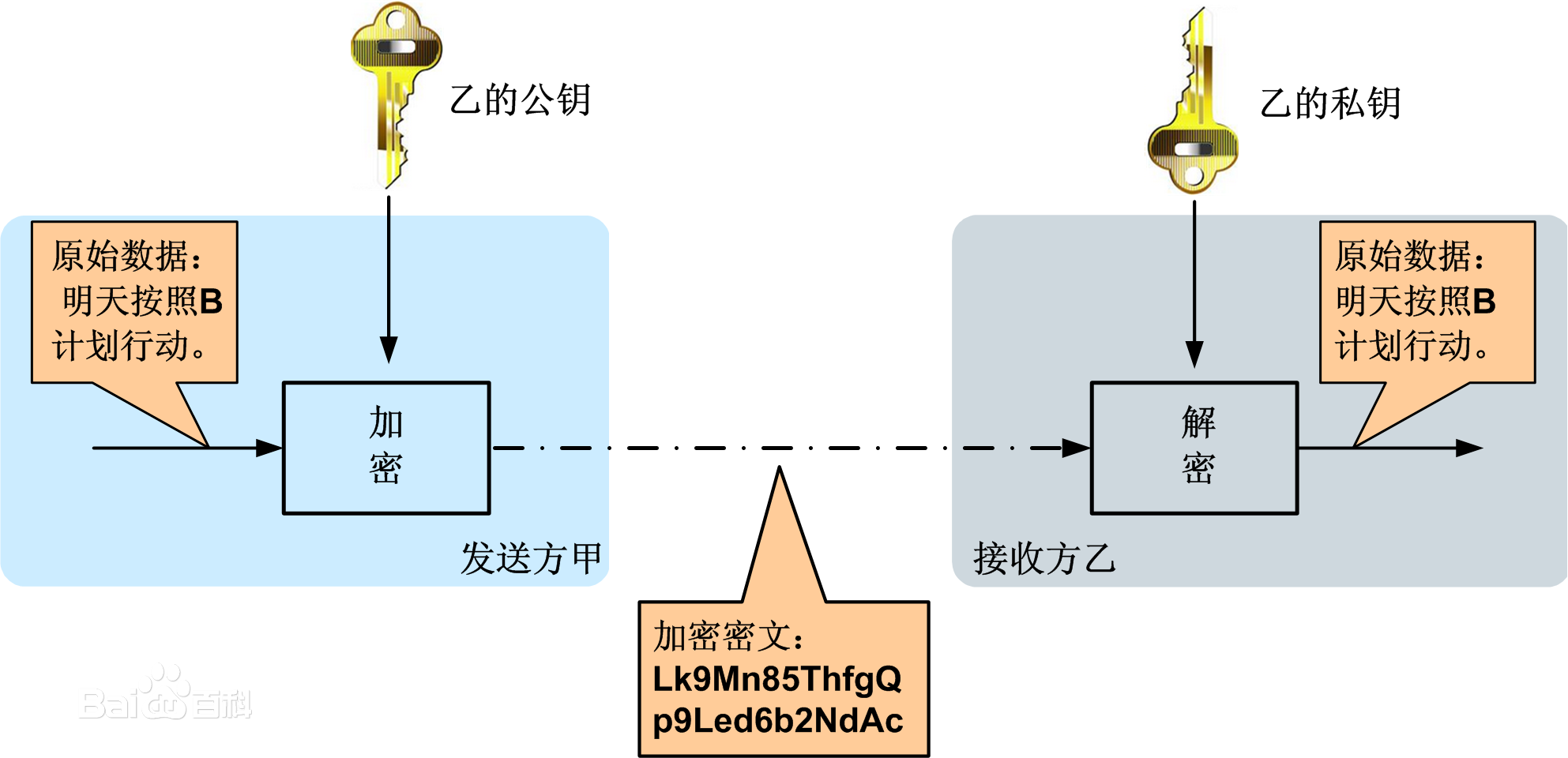
1b4c510fd9f9d72a79ac165bd72a2834359bbbaf.jpg-182.2kB

如图所示,甲乙之间使用非对称加密的方式完成了重要信息的安全传输。

  1. 乙方生成一对密钥(公钥和私钥)并将公钥向其它方公开。
  2. 得到该公钥的甲方使用该密钥对机密信息进行加密后再发送给乙方。
  3. 乙方再用自己保存的另一把专用密钥(私钥)对加密后的信息进行解密。乙方只能用其专用密钥(私钥)解密由对应的公钥加密后的信息。

在传输过程中,即使攻击者截获了传输的密文,并得到了乙的公钥,也无法破解密文,因为只有乙的私钥才能解密密文
同样,如果乙要回复加密信息给甲,那么需要甲先公布甲的公钥给乙用于加密,甲自己保存甲的私钥用于解密。

在非对称加密中使用的主要算法有:RSA、Elgamal、背包算法、Rabin、D-H、ECC(椭圆曲线加密算法)等。其中我们最见的算法是RSA算法

以下是从网上摘抄的一段PHP通过openssl实现非对称加密的算法

<?php
/**
 * 使用openssl实现非对称加密
 * @since 2010-07-08
 */
class Rsa {
    /**
     * private key
     */
    private $_privKey;
    /**
     * public key
     */
    private $_pubKey;
    /**
     * the keys saving path
     */
    private $_keyPath;
    /**
     * the construtor,the param $path is the keys saving path
     */
    public function __construct($path) {
        if (empty($path) || !is_dir($path)) {
            throw new Exception('Must set the keys save path');
        }
        $this->_keyPath = $path;
    }
    /**
     * create the key pair,save the key to $this->_keyPath
     */
    public function createKey() {
        $r = openssl_pkey_new();
        openssl_pkey_export($r, $privKey);
        file_put_contents($this->_keyPath . DIRECTORY_SEPARATOR . 'priv.key', $privKey);
        $this->_privKey = openssl_pkey_get_public($privKey);
        $rp = openssl_pkey_get_details($r);
        $pubKey = $rp['key'];
        file_put_contents($this->_keyPath . DIRECTORY_SEPARATOR . 'pub.key', $pubKey);
        $this->_pubKey = openssl_pkey_get_public($pubKey);
    }
    /**
     * setup the private key
     */
    public function setupPrivKey() {
        if (is_resource($this->_privKey)) {
            return true;
        }
        $file = $this->_keyPath . DIRECTORY_SEPARATOR . 'priv.key';
        $prk = file_get_contents($file);
        $this->_privKey = openssl_pkey_get_private($prk);
        return true;
    }
    /**
     * setup the public key
     */
    public function setupPubKey() {
        if (is_resource($this->_pubKey)) {
            return true;
        }
        $file = $this->_keyPath . DIRECTORY_SEPARATOR . 'pub.key';
        $puk = file_get_contents($file);
        $this->_pubKey = openssl_pkey_get_public($puk);
        return true;
    }
    /**
     * encrypt with the private key
     */
    public function privEncrypt($data) {
        if (!is_string($data)) {
            return null;
        }
        $this->setupPrivKey();
        $r = openssl_private_encrypt($data, $encrypted, $this->_privKey);
        if ($r) {
            return base64_encode($encrypted);
        }
        return null;
    }
    /**
     * decrypt with the private key
     */
    public function privDecrypt($encrypted) {
        if (!is_string($encrypted)) {
            return null;
        }
        $this->setupPrivKey();
        $encrypted = base64_decode($encrypted);
        $r = openssl_private_decrypt($encrypted, $decrypted, $this->_privKey);
        if ($r) {
            return $decrypted;
        }
        return null;
    }
    /**
     * encrypt with public key
     */
    public function pubEncrypt($data) {
        if (!is_string($data)) {
            return null;
        }
        $this->setupPubKey();
        $r = openssl_public_encrypt($data, $encrypted, $this->_pubKey);
        if ($r) {
            return base64_encode($encrypted);
        }
        return null;
    }
    /**
     * decrypt with the public key
     */
    public function pubDecrypt($crypted) {
        if (!is_string($crypted)) {
            return null;
        }
        $this->setupPubKey();
        $crypted = base64_decode($crypted);
        $r = openssl_public_decrypt($crypted, $decrypted, $this->_pubKey);
        if ($r) {
            return $decrypted;
        }
        return null;
    }
    public function __destruct() {
        @fclose($this->_privKey);
        @fclose($this->_pubKey);
    }
}
//以下是一个简单的测试demo,如果不需要请删除
$rsa = new Rsa('ssl-key');
//私钥加密,公钥解密
echo 'source:我是老鳖<br />';
$pre = $rsa->privEncrypt('我是老鳖');
echo 'private encrypted:<br />' . $pre . '<br />';
$pud = $rsa->pubDecrypt($pre);
echo 'public decrypted:' . $pud . '<br />';
//公钥加密,私钥解密
echo 'source:干IT的<br />';
$pue = $rsa->pubEncrypt('干IT的');
echo 'public encrypt:<br />' . $pue . '<br />';
$prd = $rsa->privDecrypt($pue);
echo 'private decrypt:' . $prd;
?>  

对称加密算法

对称加密(也叫私钥加密)指加密和解密使用相同密钥的加密算法。有时又叫传统密码算法,就是加密密钥能够从解密密钥中推算出来,同时解密密钥也可以从加密密钥中推算出来。而在大多数的对称算法中,加密密钥和解密密钥是相同的,所以也称这种加密算法为秘密密钥算法或单密钥算法。它要求发送方和接收方在安全通信之前,商定一个密钥。对称算法的安全性依赖于密钥,泄漏密钥就意味着任何人都可以对他们发送或接收的消息解密,所以密钥的保密性对通信性至关重要。

对称加密的常用算法有: DES算法,3DES算法,TDEA算法,Blowfish算法,RC5算法,IDEA算法

在PHP中也有封装好的对称加密函数

Urlencode/Urldecode

string urlencode ( string $str ) 
/*
1. 一个参数,传入要加密的字符串(通常应用于对URL的加密)
2. urlencode为双向加密,可以用urldecode来加密(严格意义上来说,不算真正的加密,更像是一种编码方式)
3. 返回字符串,此字符串中除了 -_. 之外的所有非字母数字字符都将被替换成百分号(%)后跟两位十六进制数,空格则编码为加号(+)。
*/

通过Urlencode函数解决链接中带有&字符引起的问题:

<?php
$pre_url_encode="zhougang.com?username=zhougang&password=zhou"; //在实际开发中,我们很多时候要构造这种URL,这是没有问题的
$url_decode    ="zhougang.com?username=zhou&gang&password=zhou";//但是这种情况下用$_GET()来接受是会出问题的;
/*
Array
(
  [username] => zhou
  [gang] => 
  [password] => zhou
)
 */


//如下解决问题:
$username="zhou&gang";
$url_decode="zhougang.com?username=".urlencode($username)."&password=zhou";
?>

常见的urlencode()的转换字符

?=> %3F
= => %3D
% => %25
& => %26
\ => %5C

base64

string base64_decode ( string $encoded_data )
  1. base64_encode()接受一个参数,也就是要编码的数据(这里不说字符串,是因为很多时候base64用来编码图片)
  2. base64_encode()为双向加密,可用base64_decode()来解密
$data=file_get_contents($filename);
echo base64_encode($data);
/*然后你查看网页源码就会得到一大串base64的字符串,
再用base64_decode()还原就可以得到图片。这也可以作为移动端上传图片的处理方案之一(但是不建议这样做哈)
*/

严格的来说..这两个函数其实不算是加密,更像是一种格式的序列化

以下是我们PHP程序中常用到的对称加密算法

discuz经典算法

<?php
function authcode($string, $operation = 'DECODE', $key = '', $expiry = 0) {   
    // 动态密匙长度,相同的明文会生成不同密文就是依靠动态密匙   
    $ckey_length = 4;   
       
    // 密匙   
    $key = md5($key ? $key : $GLOBALS['discuz_auth_key']);   
       
    // 密匙a会参与加解密   
    $keya = md5(substr($key, 0, 16));   
    // 密匙b会用来做数据完整性验证   
    $keyb = md5(substr($key, 16, 16));   
    // 密匙c用于变化生成的密文   
    $keyc = $ckey_length ? ($operation == 'DECODE' ? substr($string, 0, $ckey_length): 
substr(md5(microtime()), -$ckey_length)) : '';   
    // 参与运算的密匙   
    $cryptkey = $keya.md5($keya.$keyc);   
    $key_length = strlen($cryptkey);   
    // 明文,前10位用来保存时间戳,解密时验证数据有效性,10到26位用来保存$keyb(密匙b), 
//解密时会通过这个密匙验证数据完整性   
    // 如果是解码的话,会从第$ckey_length位开始,因为密文前$ckey_length位保存 动态密匙,以保证解密正确   
    $string = $operation == 'DECODE' ? base64_decode(substr($string, $ckey_length)) :  
sprintf('%010d', $expiry ? $expiry + time() : 0).substr(md5($string.$keyb), 0, 16).$string;   
    $string_length = strlen($string);   
    $result = '';   
    $box = range(0, 255);   
    $rndkey = array();   
    // 产生密匙簿   
    for($i = 0; $i <= 255; $i++) {   
        $rndkey[$i] = ord($cryptkey[$i % $key_length]);   
    }   
    // 用固定的算法,打乱密匙簿,增加随机性,好像很复杂,实际上对并不会增加密文的强度   
    for($j = $i = 0; $i < 256; $i++) {   
        $j = ($j + $box[$i] + $rndkey[$i]) % 256;   
        $tmp = $box[$i];   
        $box[$i] = $box[$j];   
        $box[$j] = $tmp;   
    }   
    // 核心加解密部分   
    for($a = $j = $i = 0; $i < $string_length; $i++) {   
        $a = ($a + 1) % 256;   
        $j = ($j + $box[$a]) % 256;   
        $tmp = $box[$a];   
        $box[$a] = $box[$j];   
        $box[$j] = $tmp;   
        // 从密匙簿得出密匙进行异或,再转成字符   
        $result .= chr(ord($string[$i]) ^ ($box[($box[$a] + $box[$j]) % 256]));   
    }   
    if($operation == 'DECODE') {  
        // 验证数据有效性,请看未加密明文的格式   
        if((substr($result, 0, 10) == 0 || substr($result, 0, 10) - time() > 0) &&  
substr($result, 10, 16) == substr(md5(substr($result, 26).$keyb), 0, 16)) {   
            return substr($result, 26);   
        } else {   
            return '';   
        }   
    } else {   
        // 把动态密匙保存在密文里,这也是为什么同样的明文,生产不同密文后能解密的原因   
        // 因为加密后的密文可能是一些特殊字符,复制过程可能会丢失,所以用base64编码   
        return $keyc.str_replace('=', '', base64_encode($result));   
    }   
} 

加解密函数encrypt()

<?php
//$string:需要加密解密的字符串;$operation:判断是加密还是解密,E表示加密,D表示解密;$key:密匙
function encrypt($string,$operation,$key=''){ 
    $key=md5($key); 
    $key_length=strlen($key); 
      $string=$operation=='D'?base64_decode($string):substr(md5($string.$key),0,8).$string; 
    $string_length=strlen($string); 
    $rndkey=$box=array(); 
    $result=''; 
    for($i=0;$i<=255;$i++){ 
           $rndkey[$i]=ord($key[$i%$key_length]); 
        $box[$i]=$i; 
    } 
    for($j=$i=0;$i<256;$i++){ 
        $j=($j+$box[$i]+$rndkey[$i])%256; 
        $tmp=$box[$i]; 
        $box[$i]=$box[$j]; 
        $box[$j]=$tmp; 
    } 
    for($a=$j=$i=0;$i<$string_length;$i++){ 
        $a=($a+1)%256; 
        $j=($j+$box[$a])%256; 
        $tmp=$box[$a]; 
        $box[$a]=$box[$j]; 
        $box[$j]=$tmp; 
        $result.=chr(ord($string[$i])^($box[($box[$a]+$box[$j])%256])); 
    } 
    if($operation=='D'){ 
        if(substr($result,0,8)==substr(md5(substr($result,8).$key),0,8)){ 
            return substr($result,8); 
        }else{ 
            return''; 
        } 
    }else{ 
        return str_replace('=','',base64_encode($result)); 
    } 
}
?>
————————-END————————-

掌握VI编辑器

Standard

原文:http://www.daxixiong.com/?/article/10

资料来源:University of Hawaii at Manoa College of Engineering。

引言
VI编辑器是一个被许多Unix用户使用的基于屏幕的编辑器。VI编辑器具备强大的功能来帮助程序员,但是许多初学者因为要面对很多不同的指令而对使用VI敬而远之。写作本教程的目的就是要帮助初学者适应VI编辑器的使用,当然,也有一些小节的内容与VI的惯用者有关。在讲解的同时举出了很多的例子,最佳的学习方法就是试着在Unix下运行这些例子,并试着举一反三。在这个世界上,没有比自己亲自去经历更好的学习方式了。

约定
在本教程中,使用以下的约定:
^X表示一个控制字符。例如,如果你在教程中看到:^d,其意是你按下了ctrl键,然后敲入了相应的字母。对于本例来说,你就按下ctrl键,然后敲d。

开始之前
VI编辑器使用全屏幕,因此了解你使用的是何种类型的终端是有必要的。当你登录的时候,wiliki会问你的终端是什么。提示信息像这个样子:TERM = (vt100)。
如果你知道自己的终端是一个vt100(或者一个能够当作vt100用的模拟器),在你登录的时候,就为终端类型敲击回车键。如果你有一个hp终端,为终端类型输入“hp”并回车。如果你不确定自己的终端类型,问一个实验室的管理员,或者是请别人帮助你设置正确的终端类型。
如果在登录的时候,你犯了一个错误,输入了错误的终端类型,不要紧张,退出就行了。你可以输入以下的命令来修补设置:
首先,告诉你的shell你的终端是何种类型。(如果你不确定你的shell是什么,可以输入这个命令:echo $SHELL)。对于上面已经给出的例子,终端类型是“vt100”。用你拥有的任何终端类型去替换它。对于C shell(/bin/csh),命令是这个:set term=vt100。对于Bourne Shell(/bin/sh)或者是Korn Shell(/bin/ksh),命令如下:export TERM   TERM=vt100。下一步,用这个命令重设你的终端:tset。
现在,终端的类型被正确设置(希望如此吧),你已经准备好来开始使用VI了。

启动VI编辑器
VI编辑器允许用户生成新的文件或编辑已存在的文件。启动VI编辑器的命令是:vi,紧接着是文件名。例如,为了要编辑一个叫做temporary的文件,你要输入“vi temporary”并回车。你也可以不用文件名来启动vi,但是当你想保存自己的工作的时候,你必须要告诉VI将要把这些内容保存到哪个文件中。
当你第一次启动VI的时候,你会看到在屏幕的左边充满了波浪号(像“~”)。在文件结束之后的任何空行都是如此显示。在屏幕的底部,文件名被显示出来。如果专门指定了一个已经存在的文件,文件的大小也会被显示出来,就像这样:”filename” 21 lines, 385 characters。
如果你指定的文件不存在,系统会告诉你这是一个新文件,就像这样:”newfile” [New file]。
如果你不要文件名而启动VI,当VI启动的时候,屏幕的底部会是空白。如果屏幕没有显示这些预期的结果,你的终端类型可能被错误地设置了。输入:q并回车来退出VI,并且修补你的终端类型。如果你不知道怎么做,问一下实验室管理员。

退出VI
你已经知道了如何进入VI,了解一下如何退出它也是很好的。VI编辑器有两种模式,为了退出VI,必须要处于命名(command)模式。敲击“Escape”或“Esc”键(如果你的终端没有这个键,可以试试^[,或control-[)来进入命名模式。如果在你敲击“Escape”的时候,你已经在命令模式之下,不要担心。系统会发出警告,但是你仍然处于命名模式。
离开VI的命令是:q。当处于命名模式之下,输入冒号以及“q”,并回车。如果你的文件被修改过了,编辑器会警告你,同时也不让你退出。为了忽略此消息,不保存就退出VI的命令是:q!。它让你不用保存任何改动而退出VI。
当然,一般说来,在一个编辑器中,你还是想保存你做出的改变。保存编辑器内容的命令是:w。你可以将以上命令和退出命令结合起来,即:wq。你可以指定一个不同的文件名来保存这些内容,这是通过在:w之后指定文件名来实现的。例如,你想将你正在编辑的文件保存为另外一个叫做filename2的文件名,你可以输入: w filename2并回车。
另外一种保存你的改变并退出VI的方法是ZZ命令。在命令模式下,输入ZZ,它会做与:wq相同的事情。如果文件的内容有任何改变,这些改变会被保存下来。这是离开编辑器的最容易的方法,只需要敲击键盘两次。

VI的两种模式
大多数用户了解VI编辑器的第一件事就是它有两种模式:command(命令)和insert(插入)。command模式允许命令条目来操纵文字。这些命令通常是一个或两个字符长,可以敲几下键盘便被输入了。insert模式将任何在键盘上敲击的内容输入现在的文件中。
VI是以command模式启动的。有几个命令来将VI编辑器转入insert模式。最常用的命令是a和i。这两个命令在前面已经描述过了。当你在insert模式下时,敲击退出(Escape)按钮,你就退出此模式了。如果你的终端没有这个键, ^[或control-[也行。你可以快速敲两下退出(Escape)按钮,这时VI肯定会在command模式之下的。当你已经在command模式之下时敲击退出(Escape)按钮并不会让编辑器退出command模式。系统会提醒你已经在此模式下了。

如何在命令模式下输入命令
命令(command)模式下的命令的格式一般是这样(括号中是可选的参数):[count] command [where]。
大多数命令只有一个字符长,包括那些使用控制字符的命令。本节中描述的命令是在VI编辑器中最经常使用的。
count可以是1到9之间的任何一个。例如,x命令删除在光标之下的那个字符。如果你在命令模式下输入23x,会有23个字符被删除。
一些命令使用一个可选的where参数,你可以指定命令影响到多少行或者是文件的多少部分。where参数也能够是任何移动光标的命令。

一些简单的VI命令
以下是一个简单的命令集合,它们足以让初学者起航。也有许多其它的方便的命令,这将在后续章节中讨论。

  • a:进入插入(insert)模式,输入的字符会被插入到当前光标位置之后。如果你指定了数目(count),插入的所有文字会被重复那么多次。
  • h:向左把光标移动一个字符的位置。
  • i:进入插入(insert)模式,输入的字符会被插入到当前光标位置之前。如果你指定了数目(count),插入的所有文字会被重复那么多次。
  • j:将光标向下移动一行。
  • k:将光标向上移动一行。
  • l:向右把光标移动一个字符的位置。
  • r:将光标所在位置的字符替换掉。指定数目(count)来替换许多字符。
  • u:撤销对文件所作的最后一次修改。再一次输入u会恢复最后一次修改。
  • x:删除光标所在位置的字符。count指出了要删除多少字符。光标之后的字符会被删除掉。

VI中的文字缓存
VI编辑器有36个缓存来存储文字片,同时也有一个通用目的缓存(general purpose buffer)。任何时候,在文件中,当一个文字块被删除或整形,它被放入通用目的缓存中。VI的大多数用户很少使用其它缓存,因此在没有其它缓存的情况下也能够活得很快活。如果被指定的话,文字块也能够被存储在其它缓存中。用”命令来指定缓存。在输入”之后,必须要输入指明缓存的字母或数字。例如,命令:”mdd使用了缓存m,最后的两个字符代表删除当前行。类似地,可以使用p或P命令来粘贴文字。”mp在当前光标位置之后粘贴缓存m的内容。对于之后两节所使用的任何命令,这些缓存被指定用于文字或段落的临时存储。

剪切与整形
用于剪切的常用命令是d。此命令从文件中删除文字。在这个命令之前是一个可选的count,之后是一个移动说明。如果你输入dd,会删除当前行。以下是这些命令的一些组合:

  • d^:删除从行首到当前光标所在位置的内容。
  • d$:删除从当前光标所在位置到行末的内容。
  • dw:删除从当前光标所在位置到字末的内容。
  • 3dd:从当前光标所在位置向下删除3行。

与d命令的功能类似,y命令从文件中提取文字而不删除文字。

粘贴
粘贴的命令是p或P。它们的区别仅在于当粘贴的时候相对于光标的位置。p在当前光标之后粘贴专门的或一般的缓存,而P则在当前光标之前粘贴专门的或一般的缓存。在粘贴命令之前指定数目(count)会将文字粘贴数次。

缩进代码与检查
VI编辑器有功能来帮助程序员将它们的代码布局得更加的整洁。有一个变量来为代码中的各级嵌套设定缩进。为了使用这个功能,可以阅读本教程的“customization section”一节。例如,将偏移宽度设为4个字符的命令是:set sw=4。
以下的命令缩进你的代码或移除缩进,同时也能够用count来指定:

  • <<:将当前行向左移动一个偏移宽度。
  • >>:将当前行向右移动一个偏移宽度。

VI编辑器也有一个有用的功能来帮助你在遇到悬挂圆括号或大括号的时候检查你的源代码。%命令会寻找与一个特别的右括号相对应的左括号,或与之相反。将光标放到一个括号上并敲击%来将光标移动到相应的括号。这个功能对于检查未闭合的括号是很有用的。如果有一个不匹配的括号存在,VI会发出嘟嘟声,这是在提示你没有发现配对的符号。

文字与字符搜索
VI编辑器有两类搜索:字符串和字符。对于一个字符串搜索,使用/和?命令。当你开始使用这个命令的时候,在最底部一行会显示你敲入的命令,在命令后面可以输入你想要搜索的特殊字符串。这两个命令仅在搜索发生的方向上有区别。在文件中,/命令向前(向下)搜索,?命令向后(向上)搜索。n和N命令分别在相同或相反的方向上重复之前的搜索命令。一些字符对于VI来说,有特殊的意义,因此在它们前面必须要放置一条斜线(\)来被当作搜索表达式的一部分。
特殊字符:

  • ^:行的开始(一个搜索表达式的开始)。
  • .:匹配一个单字符。
  • *:匹配0个或多个之前的字符。
  • $:行的结束(一个搜索表达式的结束)。
  • [:开始一系列匹配,或者是非匹配的表达式。例如:/f[iae]t匹配三者之一:fit fat fet。在这种形式下,它不会匹配这些:/a[^bcd]不会匹配任何字符串,除了带一个a和另外一个字母:ab ac ad。
  • <:将之放在以反斜线结束的表达式中来寻找一个字的结束或开始。例如,/\<the\>只会发现the,而不是这些字:there和other。
  • >:参考对于“<”的描述。

字符搜索在一行之内搜索来寻找在命令之后输入的一个字符。f和F命令只在当前行上搜索一个字符。f向前搜索,而F向后搜索,同时,光标会移动到所发现字符的位置。
t和T命令只在当前行上搜索一个字符,对于t来说,光标移动到字符之前的位置,而T向后搜索行到字符之后的位置。
这两套命令使用;和,命令来重复,其中;在相同方向上重复上一条字符搜索命令,而,在相反方向上重复上一条字符搜索命令。

VI(以及EX)的设置
你能够在启动的时候个性化(customization)VI的行为。有几个编辑选项使用:set命令,以下是在Wiliki上的VI和EX编辑器选项(你可以在命令模式下通过输入:set all并回车来获得此列表):

有一些选项具有用等号“=”设置的值,而其它选项有的有,有的没有。(这些开关类型叫做Boolean,在它们的前面有“no”来暗示它们不是设置的。)在此展示的选项是没有进行个性化设置的选项。下面用缩写给出了这些选项的描述。例如,命令设置自动缩进,可以输入:set autoindent或set ai。为了去除设定,你可以输入:set noautoindent或set noai。

  • autoindent (ai):此选项对编辑器进行设置以使得在一个缩进行之后的行像前面行那样缩进。如果你想back over此缩进,可以在第一个字符的位置输入^D。^D工作在插入(insert)模式,并不在命令(command)模式。当然,可以用shiftwidth来设置缩进的宽度,下面有解释。
  • exrc:在启动的过程中,会读入当前目录下的.exrc文件。这可以在环境变量EXINIT或你的主目录下的.exrc文件中设置。
  • mesg:如果对选项解除设置,要关闭消息,使用:set nomesg,这样做以使得当你在使用编辑器的时候没有人能够打扰你。
  • number (nu):用在左边的行号来显示行。
  • shiftwidth (sw):此选项带有一个值,用此值来定义一个软件制表位(tabstop)的宽度。(这个软件制表位用于<<和>>命令。)例如,你可以用此命令来设置偏移宽度为4:set sw=4。
  • showmode(smd):此选项用于显示你所用的编辑器的实际模式。如果你在插入(insert)模式下,屏幕的最底下一行会显示INPUT MODE。
  • warn:如果你修改了文件,但是没有保存,该选项会警告你。
  • window(wi):该选项设定VI使用的屏幕上的行数。例如,要设定VI编辑器只使用你的屏幕的12行(因为你的modem很慢),你可以使用这个:set wi=12。
  • wrapscan(ws):此选项会影响到文字搜索的行为。如果wrapscan被设置了,要是没有在文件的底部找到要寻找的文字,它会试着在开始部分寻找它。
  • wrapmargin(wm):如果此选项有大于0的值,编辑器会自动“word wrap”。也就是说,如果你占用左边部分太多的空间,文字会转向下一行而不用敲回车。例如,要设定wrap边界为2个字符,可以输入:set wm=2。

写和将密钥(关键字)映射到其它密钥(关键字)
一个在VI编辑器中有用的EX编辑器命令是abbreviate命令。它让你为特殊的字符串设定缩写。此命令像这样:ab string thing to substitute for。例如,如果要敲入名字“Humuhumunukunukuapua`a”,但是你不想敲入整个名字,那么你可以使用缩写。在此例中,像这样敲入命令:ab 9u Humuhumunukunukuapua`a。
现在,当你单独敲入9u的时候,VI会敲入它所代表的整个字。如果你敲入了9university,它就不会替换这个字。
去除之前定义的缩写的命令是unabbreviate。例如,去除之前例子的命令就是”:una 9u”。如果你要获取缩写列表,只需要简单地输入:ab,而不用任何定义。
另外一个对于个性化很有帮助的EX编辑器命令就是映射(mapping)命令。有两类映射(mapping)命令。一个用于命令模式,另一个用于插入模式。它们分别是:map和:map!。映射和缩写的工作方式类似,你给系统一个关键序列,并给系统另外一个关键序列去替换之前的序列。(被替换掉的关键序列通常是VI命令。)

EXINIT环境变量和.exrc文件
有两种方式来个性化VI编辑器。如果你在主目录下生成了一个叫做.exrc的文件,当VI启动的时候,那里面所有的命令都会被读到。另外一种方法是设置一个叫做EXINIT的环境变量。该选项在你的shell的建立文件里被设置。如果你使用/bin/csh (C-Shell),命令如下(被放置在.cshrc文件里面):setenv EXINIT ‘…’。
如果你使用/bin/sh or /bin/ksh,命令如下(被放置在.profile文件中):export EXINIT EXINIT=’…’。
就像例子中所说的,不要放在…。在这个空间中,放置你想要建立的命令。例如,如果你想自动缩进,行编号,以及wrap边界三个字符,setenv命令(对于C shell来说)像这样:setenv EXINIT ‘set ai nuwm=3’。
如果你想在setenv EXINIT中放置不止一个命令,用竖线(|)将命令隔开。例如,在命令模式中,要将“g”命令映射到“G”字符,命令是:map g G,与上面的命令结合,可以得到:setenv EXINIT ‘set ai nuwm=3|map g G’。
如果你想生成叫做.exrc的文件,你可以在文件中放置与EXINIT之后的引用一样的东西。

当终端出现问题的时候恢复你的工作
VI编辑器编辑你的文件的一个临时副本,当编辑结束之后,或者当你叫它保存的时候,它就将临时文件的内容放到原始文件中。如果在你编辑文件的时候发生了故障,VI编辑器会试图保存你正在做的任何工作,并且为了之后的恢复而存储它。(注意:如果在你编辑文件的时候VI死掉了,它会给你发一封邮件告诉你如何恢复它。-r选项代表恢复。如果你正在编辑文件vitalinfo,而你意外退出了,“vi”编辑器的-r选项可以帮你忙。该命令像这样:vi -r vitalinfo。在使用-r选项一次之后,你必须要将你恢复的内容保存到实际的文件中。-r选项只能在每一个失败的VI会话中使用一次。)

有关在工作台上使用VI的警告
当你使用工作台时,必须要知道两件事情:一次(连续)编辑相同的文件许多次,以及改变屏幕的大小。
因为VI编辑你的原始文件的一个副本,并且将那个副本的内容保存到原始文件中,如果你登录了好几次,并且使用VI编辑相同的文件好几次,如果你一次保存在一个窗口上,然后又保存到另外一个窗口上,第一次保存的对于文件的改变会被覆盖掉。确保对于每个文件,你只是运行一个副本。
如果你使用一个工作台的一个终端程序,你可以通过拖动窗口的边界来改变屏幕的大小。如果你对大小还不尽满意,输入以下命令:eval `resize`。如果这个命令无效,另外一个命令如下:eval `/usr/bin/X11/resize`。
如果大小是错误的,编辑器不会正常运行。如果你对于屏幕尺寸存在任何疑问,可以向计算机实验室的管理员求助,他会帮你设置正确的尺寸。

VI命令的总结
以下是按照功能分类的VI命令的一个总结列表。有可能还会有其它命令,可以查看VI的在线手册。为了方便,你可以以文本文件方式保存该文件,然后删除你认为自己不会用的一些命令,并打印出剩下的较短的文件。

剪切与粘贴/删除文字

  • “:指定一个任何命令使用的缓存。在”之后输入一个字母或数字,它们会对应一个缓存。
  • D:从当前光标所在位置向后删除直到行尾。
  • P:在当前光标位置或行之前粘贴专门的缓存。如果没有指定缓存(使用”命名),“P”就使用通用缓存。
  • X:删除光标之前的字符。
  • Y:将当前行整形到指定的缓存。如果没有指定缓存,就使用通用缓存。
  • d:删除,直到where。“dd”删除当前行。一个数字就表示删除那么多行。被删除的内容放置在由”命令指定的缓存中。如果没有指定缓存,就使用通用缓存。
  • p:在当前光标位置或行之后粘贴专门的缓存。如果没有指定缓存(使用”命名),“p”就使用通用缓存。
  • x:删除光标之下的字符。输入一个数字表示要删除多少字符。被删除的字符位于光标之后。
  • y:整形,将结果放到一个缓存中。“yy”整形当前行。输入一个数字表示要整形的行数。可以用”命令来指定缓存。如果没有指定缓存,就使用通用缓存。

插入新的文字

  • A:在当前行之后追加。
  • I:在一行的开头处插入。
  • O:在当前光标位置的上面一个新行进入插入模式。
  • a:进入插入模式,输入的字符会在当前光标位置之后插入。如果在命令之前输入一个数字,那么会插入内容多次。
  • i:进入插入模式,输入的字符会在当前光标位置之前插入。如果在命令之前输入一个数字,那么会插入内容多次。
  • o:在当前光标位置之下的一个新行进入插入模式。

在文件内移动光标

  • ^B:向后回滚一页。输入数字就会回滚那么多页。
  • ^D:向前滚动半个窗口。输入数字会滚动那么多行。
  • ^F:向前滚动一页。输入数字会滚动那么多页。
  • ^H:将光标向左移动一个空格。输入数字会移动那么多个空格。
  • ^J:在同一列向下移动光标一行。输入数字会向下移动那么多行。
  • ^M:移动到下一行的第一个字符处。
  • ^N:在同一列向下移动光标一行。输入数字会向下移动那么多行。
  • ^P:在同一列向上移动光标一行。输入数字会向上移动那么多行。
  • ^U:向后回滚半个窗口。输入数字会回滚那么多行。
  • $:将光标移动到当前行的末尾。输入数字会移动到下面行的末尾。
  • %:将光标移动到匹配的括号处。
  • ^:将光标移动到第一个非空白的字符处。
  • (:将光标移动到一个句子的开头。
  • ):将光标移动到下一个句子的开头。
  • {:将光标移动到前一个段落。
  • }:将光标移动到下一个段落。
  • |:将光标移动到指定的列(由count指定)。
  • +:将光标移动到下一行的第一个非空白字符处。
  • -:将光标移动到之前一行的第一个非空白字符处。
  • _:将光标移动到当前行的第一个非空白字符处。
  • 0:将光标移动到当前行的第一列。
  • B:将光标回移一个字,跳过punctuation。
  • E:将光标向前移动到一个字的结尾,跳过punctuation。
  • G:跳到由count指定的行处。如果没有指定数目,就跳转到文件的末尾。
  • H:将光标移动到屏幕顶端的第一个非空白字符处。
  • L:将光标移动到屏幕底端的第一个非空白字符处。
  • M:将光标移动到屏幕中间的第一个非空白字符处。
  • W:将光标向前移动到一个字的开头,跳过punctuation。
  • b:将光标回移一个字。如果光标在字的中间,就将光标移动到那个字的第一个字符处。
  • e:将光标前移一个字。如果光标在字的中间,就将光标移动到那个字的最后一个字符处。
  • h:将光标向左移动一个字符的位置。
  • j:将光标向下移动一行。
  • k:将光标向上移动一行。
  • l:将光标向右移动一个字符的位置。
  • w:将光标向前移动一个字。如果光标在字的中间,就将光标移动到下一个字的第一个字符处。

在屏幕上移动光标

  • ^E:向前滚动一行。用count指定滚动的行数。
  • ^Y:向后滚动一行。用count指定滚动的行数。
  • z:用以下选项重画屏幕。“z<回车>”将当前行放到屏幕的顶部;“z.”将当前行放到屏幕的中间;“z-”将当前行放到屏幕的底部。如果你在“z”命令之前指定一个数字,它就将当前行变到指定的行处。例如,“16z.”将第16行放到屏幕的中间。

替换文字

  • C:从当前光标位置处变到行的结尾。
  • R:用输入的一系列字符(以Esc键结尾)替换屏幕上的字符。S:改变一整行。
  • c:改变直到。“cc”改变当前行。用count指定改变的行数。
  • r:替换光标下的一个字符。用count指定替换的字符数。
  • s:替换(Substitute)光标下的一个字符,并进入插入模式。用count指定替换的字符数。在最后一个替换的字符处放一个美元($)符号。

搜索文字或字符

  • ,:在相反方向上重复上一个f,F,t或T命令。
  • /:在文件里向下搜索/之后的字符串。
  • ;:重复上一个f,F,t或T命令。
  • :在文件里向上搜索之后的字符串。
  • F:在当前行向后搜索“F”命令指定的字符。如果找到了,就将光标移动到那个位置。
  • N:重复由“/”或“”给出的搜索,不往相反方向搜索。
  • T:在当前行向后搜索“F”命令指定的字符。如果找到了,就移动到那一列。
  • f:在当前行搜索“f”命令之后指定的字符。如果找到了,就将光标移动到那个位置。
  • n:重复上一个“/”或“”搜索。
  • t:在当前行搜索“t”命令之后指定的字符。如果找到了,就将光标移动到那个字符位置之前的一列。

操纵字符/行格式

  • ~:转换光标之下的字符事例(Switch the case of thecharacter under the cursor)。
  • <:Shift the lines up towhere to the left by one shiftwidth. “<<” shifts the currentline to the left,and can be specified with a count。
  • >:Shift the lines up towhere to the right by one shiftwidth. “>>” shifts the currentline to theright, and can be specified with a count。
  • J:将当前行和下一行合并起来。用count指定合并的行数。

保存与退出

  • ^\:退出“VI”模式,进入“EX”模式。EX编辑器是行编辑器,VI就是建立在其上的。重新进入VI的EX命令是“:vi”。
  • Q:退出“VI”模式,进入“EX”模式。ex编辑器是一个逐行(line-by-line)编辑器。重新进入VI的EX命令是“:vi”。
  • ZZ:退出编辑器,如果有任何改动就保存。

其它一些指令

  • ^G:显示当前的文件名和状态。
  • ^L:清除并重画屏幕。
  • ^R:重画屏幕并移除假的行。
  • ^[:退出键。取消部分形成的命令。
  • ^^:回到上次编辑的文件处。
  • !:执行一个shell。如果指定了a,使用!执行的程序将特定的行作为标准输入,同时也会替换带执行程序的标准输出的那些行。“!!”将当前行作为输入来执行一个程序。例如,“!4jsort”会从当前光标位置拿掉五行并执行sort。在键入命令之后,会有一个你可以输入命令的单独的exclamation点。
  • &:重复之前的“:s”命令。
  • .:重复最后一次修改文件的那个命令。
  • ::开始输入一个EX编辑器命令。当用户输入回车的时候,此命令马上执行。
  • @:输入在特定缓存中存储的命令。
  • U:将当前行恢复到光标进入行之前的状态。
  • m:用“m”命令之后的特定字符来标记当前位置。
  • u:撤销对文件所作的最后一次修改。再次输入“u”会恢复修改。

EX命令
VI编辑器建立在另外一个叫做EX的编辑器之上。EX编辑器只通过行来编辑。在VI编辑器中,用:命令来开始键入一个EX命令。以下的列表并不完全,但是给出的命令是用得比较多的。如果用某些命令(如“:s”和“:w”)来修改不止一行,在命令之前必须指定范围。例如,要替换掉从第3行到第15行的内容,命令是“:3,15s/from/this/g”。
:abstring strings
缩写。如果在VI中输入一个与strings相关的字,编辑器会自动插入相应的字。例如,缩写“:ab usa United States ofAmerica”会在输入“usa”的时候插入字“United States of America”。
:mapkeys new-seq
映射。此命令将一个关键字或一个关键字序列映射到另外一个关键字或一个关键字序列。
:q
退出VI。如果对内容有任何改动,编辑器会发出一个警告信息。
:q!
不保存而退出VI。
:s/pattern/to_pattern/options
替换。此命令用to_pattern中的字符串替换指定的pattern。如果没有参数(选项),此命令只是替换第一个出现的pattern。如果给定了“g”,所有出现的pattern都会被替换掉。例如,命令“:1,$s/Dwayne/Dwight/g”会替换掉将所有出现的“Dwayne”替换为“Dwight”。
:set[all]
给VI和EX设定一些个性化的选项。“:set [all]”命令给出了所有可能的选项。
:unastring
移除之前由“:ab”定义的缩写。
:unmkeys
移除由“:map”定义的移除映射。
:vifilename
开始编辑一个新文件。如果没有保存对内容作出的改动,编辑器会给出一个警告。
:w
写出当前文件。
:wfilename
将缓存写到指定的文件名。
:w>> filename
将缓存的内容追加到文件中。
:wq
写缓存并退出。

近20个绚丽实用的jQuery/CSS3侧边栏菜单

Standard

原文:http://www.codeceo.com/article/20-jquery-css3-side-menu.html

jQuery作为一款主流的JavaScript前端开发框架,深受广告开发者的亲睐,同时jQuery有着不计其数的插件,特别是菜单插件更为丰富,本文将要为大家介绍20个绚丽而实用的jQuery侧边栏菜单,这些侧边栏菜单可以用在不同风格的网页上,如果你觉得不错,也可以进入其下载页面下载菜单源代码。

1、jQuery 3D 垂直多级菜单 可筛选菜单项

这是一款手风琴样式的垂直多级菜单,其特点是利用CSS3特性让菜单外观显得3D立体的效果,同时你也可以在搜索框中输入关键字来筛选菜单项。

jquery-3d-menu-with-search

在线演示        源码下载

2、CSS3手机端侧滑菜单 4种滑动菜单特效

这是一款基于CSS3的手机端侧滑菜单,一共有4种侧滑动画特效。这款CSS3菜单的特点是鼠标划过时即可以各种动画方式展开和隐藏菜单项,该动画方式由CSS3中的transition-delay属性来完成,具体效果大家可以看演示。

css3-mobile-slider-menu

在线演示1        在线演示2        在线演示3        在线演示4        源码下载

3、纯CSS3垂直菜单 菜单项滑动动画

这款CSS3菜单的特点是菜单项有一个非常特别的背景,并且背景可随着鼠标滑过而滑动,挺有创意的滑动动画。这款CSS3菜单是垂直样式的,很适合做网页的侧边栏菜单。

pure-css3-ver-slider-menu

在线演示        源码下载

4、jQuery左侧带小图标的多级下拉菜单

今天我们要来分享一款很不错的jQuery左侧带小图标的多级下拉菜单,菜单是垂直的,每一个菜单项带有一个小图标,看起来非常专业。并且菜单支持无限极下拉,所以对各位Web开发者来说非常实用。菜单时基于jQuery的,所以基本可以支持所有的浏览器。

jquery-side-icon-dropdown-menu

在线演示        源码下载

5、CSS3带小图标垂直下拉菜单

这是一款效果非常不错的CSS3垂直下拉菜单,菜单左侧是每一个菜单项的功能小图标,右侧也可以定义一些数字小图标,并且在菜单项最右侧是tooltip的样式。另外,当鼠标滑过菜单项时将会改变菜单的背景颜色,其中的圆角效果由简单的CSS3属性完成。

css3-dropdown-menu-icon

在线演示        源码下载

6、jQuery多层级垂直手风琴菜单

这款手风琴菜单是多层级的,你可以通过HTML结构生成任意层级的菜单。由于是基于jQuery的,因此这款手风琴菜单的兼容性还不错。

jquery-level-accord-menu

在线演示        源码下载

7、CSS3垂直图标菜单 带Tooltip提示框

今天我们要来分享一款CSS3菜单,菜单外观很漂亮,是垂直排列的小图标,鼠标滑过菜单项时,菜单项的背景会填充渐变的颜色,另外还会弹出该菜单项描述的Tooltip提示框。之前我们也分享过很多CSS3垂直菜单,像这款CSS3二级下拉动画菜单 菜单背景滑动动画纯CSS3垂直动画菜单等都是非常不错的CSS3垂直菜单按钮。

css3-ver-nav-with-icon

在线演示        源码下载

8、CSS3手风琴下拉菜单 支持多菜单展开

这又是款基于CSS3的下拉菜单,这款CSS3菜单是手风琴样式的,今天的这款CSS3手风琴菜单也类似,菜单具有3种模式,一种是同时展开多个菜单,一种是只能同时展开一个菜单,还有一种是可以默认展开一个菜单。应该说,这款CSS3手风琴菜单非常的实用。

css3-accord-menu-mult-flip

在线演示        源码下载

9、HTML5/CSS3仿Google Play垂直菜单

这款CSS3菜单也是垂直菜单,是一款仿Google Play的垂直菜单,另外菜单左侧还有非常漂亮的小图标。

css3-google-play-store-menu

在线演示        源码下载

10、CSS3手风琴菜单 可同时折叠多个菜单

这次分享的CSS3手风琴菜单可以同时折叠展开多个菜单项,菜单整体是黑色的风格,并且在每一个菜单项上都有很漂亮的小图标,小图标像是嵌入在里面一样很有质感。

css3-multiple-accordion-menu

在线演示        源码下载

11、CSS3垂直手风琴折叠菜单

这款CSS3垂直手风琴折叠菜单也非常不错,这款CSS3手风琴菜单的每一个菜单项都有小图标,而且只能有一项展开,更有意思的是,在菜单折叠和展开式右侧的箭头也会有不错的动画效果。

css3-ver-accordion-menu

在线演示        源码下载

12、纯CSS3垂直动画菜单 效果很酷

今天我们来分享一款CSS3垂直菜单,这款垂直菜单不仅有漂亮的小图标,而且鼠标滑过时还有非常酷的CSS3动画,大家可以试试这款CSS3垂直菜单。

pure-css3-vertical-menu

在线演示        源码下载

13、CSS3二级下拉动画菜单 菜单背景滑动动画

这款CSS3菜单的特点是在菜单展开时,菜单的背景会出现滑动的动画效果。

css3-animation-bg-menu

在线演示        源码下载

14、jQuery/CSS3带未读提醒的垂直菜单

这是一款基于jQuery和CSS3的垂直动画菜单,这款jQuery菜单的特点是菜单整体悬浮在一张大气的背景图片上,很有立体的视觉效果。其次这款菜单带有信箱未读提醒,并且不断地闪烁来提示用户打开邮件箱check邮件。

jquery-css3-menu-with-inbox

在线演示        源码下载

15、jQuery/CSS3可折叠侧边栏菜单

这次我们要分享的一款很棒的jQuery菜单插件,这款菜单插件是可折叠的侧边栏菜单,菜单的特点是点击按钮可以展开和折叠菜单,并伴随动画效果。而且每一个菜单项都有一个小图标,非常清新漂亮。当然折叠的效果需要CSS3的支持。

jquery-css3-slide-menu

在线演示        源码下载

16、jQuery仿Google Nexus菜单样式插件

这是一款基于jQuery和CSS3的多功能菜单,菜单样式是仿Google Nexus的,菜单整体看上去是一个封闭的结构,也就是说既有水平菜单,也有垂直菜单,而且每一个菜单项的左侧都有一个漂亮的小图标,是一款外观非常不错的jQuery菜单导航。

jquery-google-nexus

在线演示        源码下载

17、清新小图标的HTML5/CSS3侧边栏菜单

这款CSS3侧边栏菜单和之前这款菜单类似,也带有漂亮可爱的小图标,鼠标滑过菜单项时背景会出现淡入淡出的效果。

html5-css-side-menu-with-icon

在线演示        源码下载

18、CSS3垂直菜单 菜单有立体动画视觉

这款基于CSS3的垂直菜单实现很简单,该CSS3垂直菜单有几个特点:

  1. 菜单外观呈立体视觉效果,非常有质感
  2. 鼠标滑过菜单项时,菜单项会出现伸缩动画。

css3-vertical-menu

在线演示        源码下载

19、CSS3手风琴菜单 下拉展开带弹性动画

这款是CSS3手风琴菜单,菜单项在展开和收缩的时候菜单项会有弹性动画效果。每一层父级菜单有一个小三角,菜单项在展开的时候这个小三角也会出现动画,非常酷。

css3-accordion-menu

在线演示        源码下载

以上这些jQuery侧边栏菜单是不是对你有所帮助,欢迎你的评价。